

After signing up for free trials and running dummy projects across marketing campaigns, client delivery projects, and product roadmaps, I found that:
Basecamp works best for teams that manage projects through active communication. Notion works best for teams that prefer organized databases over conversations.
To validate my understanding, I watched several YouTube walkthroughs, read user reviews on G2 and Capterra, and spent time on Reddit and community threads. I wanted to see how different teams use these platforms and which parts of their workflows depend on each tool. What I found matched my own experience. Basecamp and Notion solve project management through entirely different mental models. They don’t overlap as much as you would expect.
Basecamp is a simple project management tool for small to medium-sized teams who want all their project information in one place. It has a fixed structure that tells you where to put tasks, files, and messages. Everyone can see the project status easily. But you cannot create your own workflows. Every project has to follow the same rules.
Notion, on the other hand, gives you a blank canvas to build projects with wikis, databases, custom workflows, and widgets. This gives you more control and better visibility than Basecamp. However, Notion brings a steep learning curve and needs ongoing setup and maintenance that many teams do not want.
To address these problems, I will also introduce ProofHub in this comparison. It combines Basecamp’s simplicity with the customization options you need to manage different types of projects from one single place.
ProofHub is a powerful project management and team collaboration tool for teams of all sizes. You can plan projects, manage communication, track progress, and keep everything organised in one place. It is easy to set up like Basecamp. At the same time, it gives you the essential features you need to manage daily work and deliver projects on time.
While each tool has several use cases, we have kept the scope of this article limited to project management and collaboration capabilities. To keep the evaluation fair and useful for project-driven teams, I compared all three tools across the following areas:
- Ease of use: Setup time, onboarding, and daily maintenance
- Project management: Task management, project complexity, and methodology/framework support
- Collaboration: Team communication, instant chat, and client access
- File management: Documents, knowledge base, file storage, and sharing
- Reporting: Data insights, custom reports, and progress tracking
- Pricing: Cost models, scaling options, and value for money
- Ratings: Reviews on G2, Capterra, Reddit, and community sites
Basecamp vs Notion vs ProofHub: Comparison Summary
| Basecamp | Notion | ProofHub |
| Ease of use | ||
| ⭐⭐⭐⭐⭐ Intuitive interface with gentle learning curve, productive within hours. Best for: teams valuing simplicity over flexibility. | ⭐⭐⭐ Steep learning curve, scales only with expertise. Requires weeks to months of proficiency. Powerful for sophisticated users who build custom systems, nearly useless for typical users. | ⭐⭐⭐⭐⭐ Gentle learning curve, middle-ground complexity. Productive within a day or two. Best for: teams wanting more structure than Basecamp, less complexity than Notion. |
| Project management capabilities | ||
| ⭐⭐⭐ Basic to-do lists with no subtask nesting, dependencies, or priorities beyond manual ordering. Hill Charts provide subjective progress visualization but rely on human judgment with no validation. Scales poorly beyond 50-100 tasks or 15-20 people. No resource management, time tracking (costs extra), or reporting beyond basic completion rates | ⭐⭐⭐⭐ Build-it-yourself system. Unlimited potential but high investment required. Databases, formulas, rollups, and relations create powerful custom PM systems. Dependencies added but no critical path analysis. Performance ceiling at 5,000-10,000 rows. No native time tracking, resource management, or project health calculation—must build everything. | ⭐⭐⭐⭐⭐ Best for all-in-one project management. Traditional task hierarchy with one subtask level. Custom workflows. Gantt charts with dependencies; critical path, cascade changes. Workload reports and resource reports. Custom roles for granular control. Proofing tool is a standout feature for creative teams. Best for teams of all sizes and projects of any type. |
| Collaboration features | ||
| ⭐⭐⭐⭐ Message boards for structured async discussions. Campfire provides minimal real-time chat (no threading, presence, or channels). Pings for DMs exist separately from projects. Automatic check-ins replace standups. Client collaboration is exceptional—controlled visibility without complexity. 700 integrations vs. Slack’s 2600+. Best for: client-facing teams, agencies, async-first distributed work. | ⭐⭐⭐ Flexible but fragile—powerful for small technical teams, chaotic for others. Real-time editing works for small teams/simple content, degrades with scale and complexity. Commenting contextual but resolved discussions disappear. Notifications inconsistent and overwhelming. Permissions granular but complex, easy to misuse. Best for: small ( <10 people), technically sophisticated teams with reliable connectivity. | ⭐⭐⭐⭐⭐ Discussions for structured topic based conversations, Chat for real-time communication across the organization. Announcements for broadcasts. Notes for creating wikis or meeting minutes. Proofing tool exceptional for creative feedback and approvals. @mentions. Best for both internal and external collaboration, without needing any integration or complex setup. Custom roles to set up granular permission controls. |
| File management | ||
| ⭐⭐⭐⭐⭐ Adequate storage, limited sophistication. 500GB for Basecamp plan, 5TB for Pro Unlimited. Can upload directly or link to Google Drive, Dropbox, Box. Folders for organization, version history tracked. No in-document search—can find files by name only. Docs & Files tool simple but functional. | ⭐⭐⭐ Flexible embedding, performance concerns. Unlimited file attachments (up to 5MB on Free). Can embed from multiple services. Each database item is a page that can contain files, creating nested organization. Performance degrades with many embedded files. | ⭐⭐⭐⭐ Structured storage with plan based limits. 15GB (Essential) or 100GB (Ultimate Control). Upload directly with drag-and-drop. Files tool with folder organization. Attach files directly to task, or share through chat and discussion board to add context. Proofing tool handles JPEG, PNG, PDF, and more with markup and version management. Options to buy additional storage |
| Reporting | ||
| ⭐⭐ Almost none—deliberate philosophical choice. Hill Charts show subjective progress assessment. Basic task completion percentages treat all tasks equally. Activity feed shows what happened, not whether it was good. No time reports (unless you pay for add-on), no resource utilization, no velocity, no financial reporting, no portfolio views. No custom reports possible. | ⭐⭐⭐ Build-it-yourself analytics—powerful if you can, absent if you can’t. Database views, formulas, and rollups create custom reports. Can build dashboards, progress tracking, resource summaries—all manually constructed. No native charts/visualizations (must embed external). Performance degrades with reporting complexity. | ⭐⭐⭐⭐⭐ Pre-built reports for project status, resource allocation, time tracking, task completion reports included. Workload reports show assignments per user. Custom reports for tracking specific data. Export to CSV/PDF. Best for: teams needing straightforward operational visibility, time-based billing, and resource monitoring |
| Pricing & value for money | ||
| ⭐⭐⭐⭐ Expensive for small, economical for large teams. Basecamp: $15/user/month. Pro Unlimited: $299/month for unlimited users (annual) or $349/month (monthly). Free plan limited (3 projects, 1GB, 10 users). Break-even at ~20 users; extraordinary value beyond 50+. Poor value for small teams ( <5). Flat pricing stability appreciated. | ⭐⭐ Linear per-user scaling with pricing instability. Free (unlimited for individuals), Plus ($10/user/month), Business ($20/user/month includes AI as of May 2025), Enterprise (custom). Pricing changes (2024-2025) undermined predictability confidence. Performance limits “unlimited potential” promise. Hidden costs in learning and system-building time. Good value for individuals (free) and sophisticated small teams. Poor value for typical teams paying for potential they can’t realize. | ⭐⭐⭐⭐⭐ Flat pricing—great for growing and large teams Essential: Flat $45/month (40 projects, 15GB, unlimited users). Ultimate Control: Flat $89/month promotional/$135 annual/$150 monthly (unlimited projects, 100GB). Extraordinary per-user value at scale ($0.45-2.25/user for 20-100 people). Transparent, predictable pricing. Best value for teams of all sizes. |
| User reviews and ratings | ||
| ⭐⭐⭐⭐ G2: 4.2/5 stars Capterra: 4.2/5 stars (14,000+ reviews) Pros: Simplicity, client collaboration, flat pricing, consolidation of communication tools, automatic check-ins Cons: Outdated interface, lack of advanced features (Gantt, dependencies, time tracking), limited customization, primitive Campfire chat, search not powerful, file sharing clunky | ⭐⭐⭐⭐⭐ G2: 4.7/5 stars Capterra: 4.7/5 stars Pros: Flexibility and customization, all-in-one workspace consolidation, powerful databases and multiple views, generous free plan, clean aesthetic UI Cons: Steep learning curve, performance issues with large databases, limited pre build functionality, fewer collaboration features, and that too clunky, pricing instability and frequent changes | ⭐⭐⭐⭐⭐ G2: 4.4/5 Capterra: 4.6/5 stars Pros:All in one platform, Flat-rate pricing for unlimited users, excellent collaboration tools, proofing tool for creative work, easy to set up and use, great customer support, reduces need for multiple tools Cons: Limited integrations, moderate learning curve for gantt chart, no free plan. |
| Sign up | Sign up | Sign up |
What is Basecamp?

Basecamp is a simple project management tool for teams that like to organize their work through steady communication. It began as an internal communication system at 37signals and later turned into a tool that anyone can use without formal training. The idea behind Basecamp has always been “less is more.” The team that built it wanted a clean, direct way to manage work without the heavy concepts that many traditional project management tools follow.
I find Basecamp a good choice for small teams that want a central place to keep track of tasks, updates, and project-related information. It helps everyone stay in sync through ongoing communication. But it is not the best fit for teams that manage complex projects with changing priorities, shifting timelines, or unique workflows. It also does not suit teams that follow structured methods or need a system that adapts to many different project styles.
During my testing, Basecamp felt like a tool designed to reduce noise rather than maximize control. It works when teams follow similar habits and do not need system-driven guidance. The moment projects become multi-layered or unpredictable, you start working around the tool rather than working through it.
What is Notion?

Notion, at its core, is a digital workspace that brings note-taking, knowledge management, and project planning together in one place. But this description only scratches the surface. Notion can be shaped into almost anything you want it to be. It started as a tool for students, researchers, and teams who needed a better way to organize large amounts of information. Fundamentally, it works like a knowledge database that you can shape in many different ways.
Over time, this flexibility has turned Notion into a full system for planning projects, tracking progress, and managing all kinds of work. Users can model their projects, create their own workflows, and build simple or complex structures based on their needs. It fits well for teams that want a tool they can shape to their exact needs, and who are ready to invest time in building and improving their workspace.
However, Notion is not simple for everyone. It requires users to build their own structure. A good way to understand this is to think of it like IKEA furniture. You get the raw pieces and the freedom to design your own setup. You do not need coding skills, but you do need patience and the willingness to assemble and maintain your system. Many people enjoy this process because it gives them a sense of control and ownership over how their workspace is organized.
I found Notion empowering and overwhelming at the same time. The more I expanded the workspace, the more time I had to spend maintaining it. The flexibility is valuable, but it never switches off. You keep fine-tuning views, updating properties, cleaning pages, and optimizing structure.
What is ProofHub?

ProofHub is an all-in-one project management and team collaboration tool built for teams of any size. It brings all project work into one place so teams can plan and track their projects without dealing with scattered information. Unlike Basecamp, it gives you more freedom in how you organize your work. Unlike Notion, it does not require you to build your workspace before you start using it.
ProofHub began in 2013 as a proofing tool created by Sandeep Kashyap to simplify feedback on creative assets. Over time, it grew into a complete system that helps teams stay organized, share updates, and understand the status of their projects without needing long meetings or multiple apps.
The idea behind ProofHub is straightforward. Teams need clear organization, simple communication, and a workspace that supports different working styles. They also need a place where each person can focus on their own work while still seeing how the project is moving as a whole. ProofHub tries to balance both sides by staying simple to use while allowing teams to adapt it to the type of projects they run.
Because of this balance, ProofHub works well for teams with changing priorities or mixed types of work. It supports contributors who need a focused view of their tasks, managers who need an overview of current progress, and leaders who want clarity across projects without extra meetings.
In short, ProofHub offers the simplicity people like in Basecamp and the flexibility people want from Notion, but without the setup effort or maintenance load. It gives teams a stable system that stays useful as their work changes.
Basecamp vs Notion vs ProofHub: Ease of use
Most teams judge a project management tool by how quickly they can start using it. A tool may look simple, but if it forces you to configure dozens of small decisions before doing real work, adoption slows down. Ease of use is about setup effort, onboarding clarity, and the experience of returning to the tool every day without friction.
For this section, I looked at how each tool handles first-time setup, onboarding, navigation, and ongoing maintenance. I also tested how each platform holds up during daily use when projects expand, and teams add more data.
| Basecamp | Notion | ProofHub |
|---|---|---|
Basecamp
Basecamp greets you with a clean, structured home screen. You see three clear spaces: top navigation panel, your brand logo, your project stacks, and recently-visited projects, along with any project that you have pinned. This layout gives you immediate orientation. You understand where company-wide communication goes, where departments share updates, and where active project work lives.

The top navigation stays consistent. “Home,” “Pings,” “Hey!,” “Activity,” and “Find” appear at all times, so you always know how to reset your view, catch up on updates, or search across the account. This makes the interface predictable, even if you are new. If you ever feel lost, the Home button resets your view. If you need to catch up, Hey! Shows your notifications in one place. Activity gives you a running timeline of everything happening inside the account.

Setting up your first project takes only a few minutes. You add the project name, invite your team, and begin adding lists and messages. Basecamp does not complicate this process with unnecessary configuration. You start working right away.
I particularly liked how most actions inside Basecamp happen directly on the page you are already in. You can check off a task, reorder items, add notes, or upload a file without moving to another screen. This keeps the experience lightweight and prevents the fatigue that a patchwork of tools creates.
However, the simplicity cuts both ways. Basecamp does not update anything automatically. If someone forgets to check off tasks or add progress updates, the system does not catch the gap. Everything relies on consistent user habits. Teams that communicate frequently and update tasks on time keep the workspace clean. Teams that work on complex projects with many moving parts, if they forget to update changes, will quickly struggle with incomplete information.
Maintenance in Basecamp stays low technically, but high behaviorally. Basecamp does not require configuration changes, custom workflows, or structural upkeep. The system remains stable regardless of how you use it. You do not maintain the tool; you only need to maintain the discipline of using it.
I found Basecamp easy to use because it removes choices. You work inside its fixed structure, and that structure keeps things simple. But this also means the tool cannot guide you when complexity increases. You get ease of use upfront, but you trade away flexibility that could support long-term growth.
Notion
Notion approaches the interface very differently from Basecamp. Instead of giving you a fixed structure on day one, it opens with a blank workspace that you must define. For many new users, this first impression feels open but directionless. The onboarding checklist introduces the basics, but the tool still expects you to decide how information should be arranged before you can work comfortably.
The core idea behind Notion’s interface is that everything is built from small pieces called “blocks.” These blocks can be anything from text, images, tables, databases, pages, or any of the 500+ types of embedded services. You can use the slash command to insert a new block anywhere on your page.

Pages can be created anywhere, and they can be nested again and again. This creates a workspace that can grow in many directions, but it also means you must choose how each part fits together. The left sidebar becomes your main guide. It holds your pages, your notifications, and your workspace settings, but its usefulness depends on how clearly you name and organize the pages you create.

I enjoy building systems, so I found the blank canvas on Notion quite liberating. However, from a practicality perspective, if you want a clear starting point, the lack of structure becomes a barrier.
Navigation in Notion can feel smooth once you understand how your workspace is arranged, but during the first few weeks, it is common to lose track of where things live. You can get the idea with the breadcrumbs at the top of the page to understand where you are within the platform. However, without a predefined home base or fixed sections, the experience relies heavily on the structure you create.
The setup effort becomes the cost of customization. You create templates, adjust naming conventions, refine database views, and revisit decisions until the system feels stable. Many teams spend days or even weeks shaping their workspace.
Note: Though Notion community offers tons of pre-built templates that can save you the setup time, it is important to consider that understanding the core mechanics of those templates can be equally challenging to setting up your own workspace. Hence I recommend careful thought about choosing a particular template.
Notion gives you freedom, but freedom comes with the overwhelming responsibilities of careful maintenance. Even someone like me, who enjoys designing systems, got frustrated when I couldn’t set up relational databases the way I wanted.
The blank canvas approach of Notion has enormous potential, but you pay for that potential through ongoing maintenance and the need for naming rules, database conventions, and guidelines for creating new pages. Additionally, as databases grow, performance slows. As pages multiply, navigation requires more structure. As teams expand, consistency becomes harder to enforce.
ProofHub
ProofHub offers a structured workspace that stays intuitive for individuals while also being robust enough to handle the complex project requirements of your team. It does not open with a blank slate like Notion, but it also does not lock you into a rigid structure like Basecamp. Every time you log in, ProofHub starts with a “Me View,” which shows personal tasks, events, agendas, and widgets. You see only what matters to you. This reduces noise and helps you start your day without searching through multiple pages.

The “projects” in ProofHub are the top-most containers where everything from tasks, discussions, and files related to that project live. However, that doesn’t mean you have to go through multiple clicks to reach a particular project. Both sidebars guide you with easy navigation. The left sidebar gives you quick access to tasks, templates, projects, events, and new items. The right sidebar gives you notifications, bookmarks, stickies, and the timer. The system keeps navigation shallow and consistent.

Apart from being intuitive, ProofHub’s UI is particularly practical in terms of productivity, transparency, and clarity. If you are a team member, you don’t have to go through how work is arranged in the background unless you want to. If you are a manager, you don’t need to go through everything once you have planned your entire project, and if you want to make a few changes to that plan. Unless you want to view how things are progressing collectively on a project level, you don’t have to sift through your project information. This level of clarity, while also keeping a robust infrastructure to meticulously organize your project, is what makes ProofHub one of the best project management tools.

Creating a project in ProofHub feels as quick as Basecamp but is more flexible. You add a project name, choose your team members, toggle the features you want, and start organizing your tasks. You do not design systems. You simply choose what you want to use. The structure is already there. You step into it and begin working.
From a maintenance perspective, ProofHub keeps the routine workload low. Teams need to update their tasks and share progress, but they do not need to create systems, enforce naming conventions, or manage complex structures. The system remains predictable. You can adapt ProofHub to many project types—campaigns, sprints, client projects—without building complex configurations. You add tasks, create workflows, use Gantt timelines, or open board views. ProofHub handles the structure. You handle the work.
Basecamp vs Notion vs ProofHub: Project management capabilities
The tools may feel simple or flexible, but what matters is how well it helps you organize work, maintain visibility, plan ahead, and execute consistently. For this section, I focused on how each platform handles task structure, workflows, dependencies, planning tools, and the experience of managing growing projects.
| Basecamp | Notion | ProofHub |
|---|---|---|
Basecamp
Basecamp approaches project management from a fundamentally different premise than most tools in this category. It assumes that most project management complexity is invented rather than necessary, and that teams waste more time managing their project management tools than they do managing actual projects. This philosophy produces a tool that deliberately limits its own capabilities in the service of simplicity. The effectiveness of these capabilities depends entirely on whether your projects match Basecamp’s assumptions about what project management should look like. The core project management structure is straightforward. Projects are containers where work happens. Inside each project, you get the following features:
- To-dos: Let teams create, assign, and track task lists to keep project work organized.
- Messages: Central place for structured discussions so teams can align without scattered email threads.
- Docs & Files: Stores project documents and uploads in one spot for easy access and version clarity.
- Schedule: Shows all project deadlines, events, and milestones to keep timelines visible.
- Campfire: Real-time group chat for quick conversations and instant coordination.
- Automatic Check-ins: Prompts team members with recurring questions to gather updates without manual follow-ups.

This structure keeps everything under one roof, but it also sets the limit of how deeply you can plan.
You create to-dos inside lists and assign tasks to teammates. Each item has a due date, comments, and file attachments. The simplicity works well when projects follow a linear flow with only a few moving parts. You can get through a campaign, a client project, or a small team initiative without overthinking.
For teams managing product development projects, Basecamp offers a kanban-style board for visualizing workflow and moving work through stages. However, it can only be used to list the triage and view the backlog in two stages: “Figuring it out” and “In progress. The view is not customizable and is not suitable for the implementation of Kanban methodology.

Limited depth for complex planning
Basecamp does not support subtasks, task dependencies, custom fields, or layered hierarchies. You cannot break work into smaller components inside a task. You also cannot create relationships between tasks, link them to other lists, or track progress beyond a simple percentage based on completed items.
This makes Basecamp reliable for simple workflows but restrictive for teams that manage:
- multi-stage work
- technical projects
- product cycles
- sprint-based work
- cross-functional initiatives
You plan only at the list level. Anything more detailed depends on comments, documents, or offline planning tools.
No system-driven workflow progression
Basecamp does not offer workflow stages or board views. You do not move tasks through statuses like To Do, In Progress, or Done. Instead, lists act as loose containers. If you want a workflow, you recreate it by naming lists accordingly, which still does not give you a clean visual pipeline. This limits your ability to track progress, understand bottlenecks, or see the health of a project at a glance. Everything relies on manual updates and team discipline.
Reporting is minimal, so visibility stays low
Basecamp shows completed task percentages, upcoming deadlines, and assigned items through individual views. But it does not give you project-level visibility or workload insights. You cannot generate reports, view timelines, or analyze progress across multiple projects. As projects grow, this lack of visibility makes planning harder.
I find Basecamp project management capabilities good enough for small, structured projects that do not demand advanced planning. It keeps things light and predictable. However, the tool cannot scale with increasing complexity. If your team needs visibility, workflow structures, layered planning, or data-driven insights, Basecamp’s limits show very quickly.
Notion
Notion approaches project management from a position of a flexible system that you build from scratch. It provides building blocks—pages, databases, properties, views—and assumes you will construct whatever project management system your work requires. This approach creates capabilities that are theoretically unlimited but practically constrained by what you know how to build and how much complexity your workspace can handle before performance degrades. The effectiveness of Notion’s project management features depends entirely on your ability to design and maintain systems that match your needs without exceeding the platform’s technical limits.

The foundation of project management in Notion is the database. These databases are empty containers you populate with whatever properties make sense for your work. You can create properties for task status, priority, assignee, due date, tags, dependencies, custom metrics, or anything else you need to track. Each database entry is simultaneously a task and a full page where you can add notes, attach files, embed documents, create checklists, or build nested structures.

This dual nature means a single task can contain an entire project’s worth of documentation and context, which is powerful when you need everything connected but overwhelming when you just want to check off simple tasks.
These databases can be viewed differently based on how you see the same underlying data. A single task database can appear as a table showing all fields in spreadsheet format, a Kanban board organizing tasks by status, a calendar displaying items by due date, a timeline showing work across weeks or months, a gallery presenting tasks as visual cards, or a list providing simple hierarchical organization.

You switch between these views depending on what you need to understand at any given moment. This flexibility means you can work however suits each context without duplicating information, but it also means you must build and maintain multiple views for the same database, deciding which properties to show, how to filter and sort, and what visualization serves each purpose.
The project management capabilities that emerge from this foundation depend on how sophisticated your database design becomes. At the simplest level, you create a task database with basic properties and use board or table views to track progress. This works adequately for straightforward projects but offers nothing you could not get from simpler tools with far less setup effort. The real capabilities appear when you start connecting databases together through relations and using formulas and rollups to calculate information automatically. You can design an advanced project system in Notion that supports:
- Tasks with custom fields: Let teams add structured attributes (status, priority, effort, owner) to tasks for precise tracking.
- Nested subtasks: Breaks work into smaller, tiered steps so teams can manage complex workflows with clarity.
- Dependencies through formulas: Uses relational formulas to show which tasks rely on others, helping teams avoid blockers.
- Sprint boards: Provide kanban-style boards tailored for agile sprints to plan, execute, and review cycles.
- Documentation linked to tasks: Connects project docs directly to related tasks to keep context and instructions in one place.
- Project dashboards: Combines databases, charts, and views into a single page for real-time project visibility.
- Custom rollout frameworks: Let teams design structured, repeatable launch or delivery processes using templates and linked databases.
Everything is possible because you start with building blocks. The challenge is maintaining consistency. The more powerful your system becomes, the more rules you need to preserve its structure. There is no end to the possibilities of how you can arrange a project in Notion. I have discussed more about this in my article about Notion’s project management capabilities.
For planning, Notion’s timeline view works as a lightweight Gantt chart. You can drag tasks across dates, visualize progress, and group by owners or statuses. You can build sprint boards using the Kanban view. You can create workload dashboards using rollups and formulas.

These tools give you planning capabilities, but they depend entirely on your initial system design. The tool does not enforce structure. It only reflects the structure you created.
As teams grow and tasks multiply, databases get heavy. Performance slows down. Filters and views take longer to load. People create pages instead of tasks. Tasks lose structure. Duplicate entries appear. You spend more time maintaining the system than managing work.
Notion is powerful for teams that treat system design as an ongoing responsibility. It becomes a burden for teams that simply want a project management tool to guide daily work.
ProofHub
ProofHub positions itself in the middle ground between Basecamp’s deliberate simplicity and Notion’s overwhelming flexibility. It provides a structured project management framework with enough configuration options to adapt to different workflows without requiring you to build the system from scratch. The effectiveness of these capabilities depends on whether your projects need more structure than Basecamp offers but less customization complexity than Notion demands, and whether ProofHub’s specific feature implementations match how your team actually works.
The foundation of project management in ProofHub is the traditional hierarchy: projects contain task lists, task lists contain tasks, and tasks can contain subtasks. This structure is fixed and familiar, matching how most teams naturally think about organizing work. Here’s the list of a few features:
- Projects: The main workspace that organizes all tasks, discussions, files, and timelines for a specific initiative.
- Project overview: A centralized summary showing key project details, progress, and important updates at a glance.
- Project categories: Let teams group and filter projects by type or department for easier organization and navigation.
- Task lists: Group related tasks into structured buckets so teams can plan work in clear stages.
- Tasks (with subtasks): Assign, schedule, and break work into smaller steps to manage execution with clarity.
- Custom fields: Add structured attributes to tasks so teams can track specific details that the default fields don’t cover.
- Multiple views: Table view to create the database of different tasklists, board view to manage workflows, and calendar to view milestones and manage/schedule events.
- Gantt charts: A timeline view that maps dependencies and schedules to plan projects end-to-end.

ProofHub does not require constant restructuring. You update tasks, adjust workflows, and attach files as you work. The system keeps everything organized without drifting. This reduces administrative effort and keeps project planning stable over time.
Basecamp vs Notion vs ProofHub: Collaboration features
Good collaboration tools reduce noise, keep discussions organized, and help teams communicate without losing important details. For this section, I focused on how Basecamp, Notion, and ProofHub support team conversations, feedback loops, client access, real-time communication, and cross-functional visibility.
| Basecamp | Notion | ProofHub |
|---|---|---|
Basecamp
Basecamp treats communication as the center of teamwork. Every project gives you a dedicated Message Board, which acts like a structured discussion thread. You post updates, announcements, decisions, and long-form explanations here. Each message supports comments, attachments, and @mentions, so everyone stays in context.

This format works well when teams prefer deliberate communication instead of constant chat. You create clear documentation of each discussion, and nothing gets lost in long chat logs.
Campfire enables casual conversation without overwhelming you
Inside each project, Basecamp includes a built-in group chat called Campfire. You can share quick updates, ask small questions, or exchange ideas without sending a formal message. The chat stays tied to the project, so conversations remain relevant.
However, Campfire does not offer advanced chat capabilities. You cannot create channels, threads, or custom categories. Small teams may not feel the need for this, but larger teams may outgrow the format.
Automatic Check-ins reduce meeting load
Basecamp’s Check-ins feature encourages teams to share updates without scheduling standups or status meetings. You ask a recurring question—“What did you work on today?” or “Anything blocking you?”—and team members answer at their own pace.
This reduces interruptions, but it depends heavily on participation. If people skip updates, the system loses its value quickly.
Client access is simple but limited
Basecamp includes client access features, but you cannot fine-tune permissions deeply. Clients can see messages, to-dos, files, and schedules when you grant access. The simplicity helps agencies that want to share updates without confusing clients. But teams that need granular controls may find this insufficient.
Basecamp handles structured communication extremely well. The message board creates clarity and slows down the frantic nature of chat. But Basecamp struggles when teams need multi-channel communication, threaded discussions, or advanced client permissions. Collaboration feels calm, but it also feels limited as teams grow.
Notion
Notion allows teams to collaborate directly inside pages and databases. You comment on blocks, tag teammates, create discussions in context, and embed files, videos, or documents inside any page. This keeps conversations tied to the exact piece of information you’re discussing.
The flexibility helps teams that collaborate around documentation, research, planning, and content creation.
Every Notion block supports comments. You can highlight text, mention teammates, ask questions, or resolve threads. This works well when you collaborate on:
- documentation
- specs
- project plans
- content drafts
- meeting notes
The feedback loop stays close to the content, which improves clarity. But the quality of collaboration depends on how well the workspace is structured. If pages are scattered or inconsistent, comments get buried.
No unified communication hub
Notion does not offer a central place for discussion. You rely on comments, page discussions, or database entries. If the workspace grows and people create pages in different locations, you lose visibility.
Teams often compensate by using Slack, Teams, or email for general conversations. This splits communication across multiple tools.
Sharing and permissions require careful control
Notion’s sharing model is powerful but easy to misuse. You can grant access at the page or database level, share publicly, or invite clients. But without clear rules, you may expose too much information or accidentally restrict access to critical pages.
Teams need strong guidelines to prevent permission clutter.
Collaboration breaks when structure drifts
As the workspace grows, pages multiply, and databases expand. If team members don’t follow naming conventions or page hierarchy, collaboration becomes messy. People struggle to find information, and comments lose context.
This problem worsens with new employees who join the workspace without understanding its structure.
Notion works brilliantly when teams collaborate around documents or knowledge bases. You place conversations directly where the work happens. But Notion lacks a shared communication hub, so teams must rely on external tools for general discussions. The experience is strong when organized well, but it degrades quickly when structure drifts.
ProofHub
ProofHub brings discussions, announcements, chat, and task-level feedback into one place. You open a project and see everything organized under Discussions, Tasks, Notes, and Files. This reduces the fragmentation you see in Notion and the limitations you face in Basecamp.
The platform encourages structured, actionable communication without creating too much noise.
Discussions keep conversations organized
ProofHub’s Discussions feature lets you create threads around specific topics. You tag teammates, attach files, and keep the conversation tied to the project. The layout stays clean and easy to follow, even when discussions get long.
This keeps your teamwork grounded in context.
Task-level collaboration improves clarity
Every task includes:
- comments
- mentions
- file attachments
- proofing tools
- version control
- activity logs

You can discuss work exactly where it happens instead of switching between chat apps and task lists. This reduces confusion and helps teams track decisions more clearly.
Built-in chat keeps quick conversations connected to work
ProofHub includes built-in group Chat and private Chat. You can discuss ideas instantly without relying on external chat platforms. The chat connects directly to projects and tasks, so you never lose context.

This gives you the casual speed of chat without sacrificing organization.
Announcements close communication gaps
Announcements help you share company-wide updates without mixing them with project-level discussions. This feature works well for:
- policy updates
- team wins
- important news
- event reminders
It behaves like an internal bulletin board.

Client access with controlled permissions
Unlike Basecamp’s broad controls, ProofHub lets you manage what clients can see at the project level and task level with custom roles. You control access to tasks, discussions, files, and notes. Clients only see what you want them to see.

This helps agencies or teams working with external stakeholders.
Proofing tools support detailed feedback
ProofHub’s proofing system stands out. You can upload designs or documents and use markup tools to highlight issues, add comments, and request changes. You review and approve files directly in the tool. This reduces back-and-forth and eliminates long email threads.
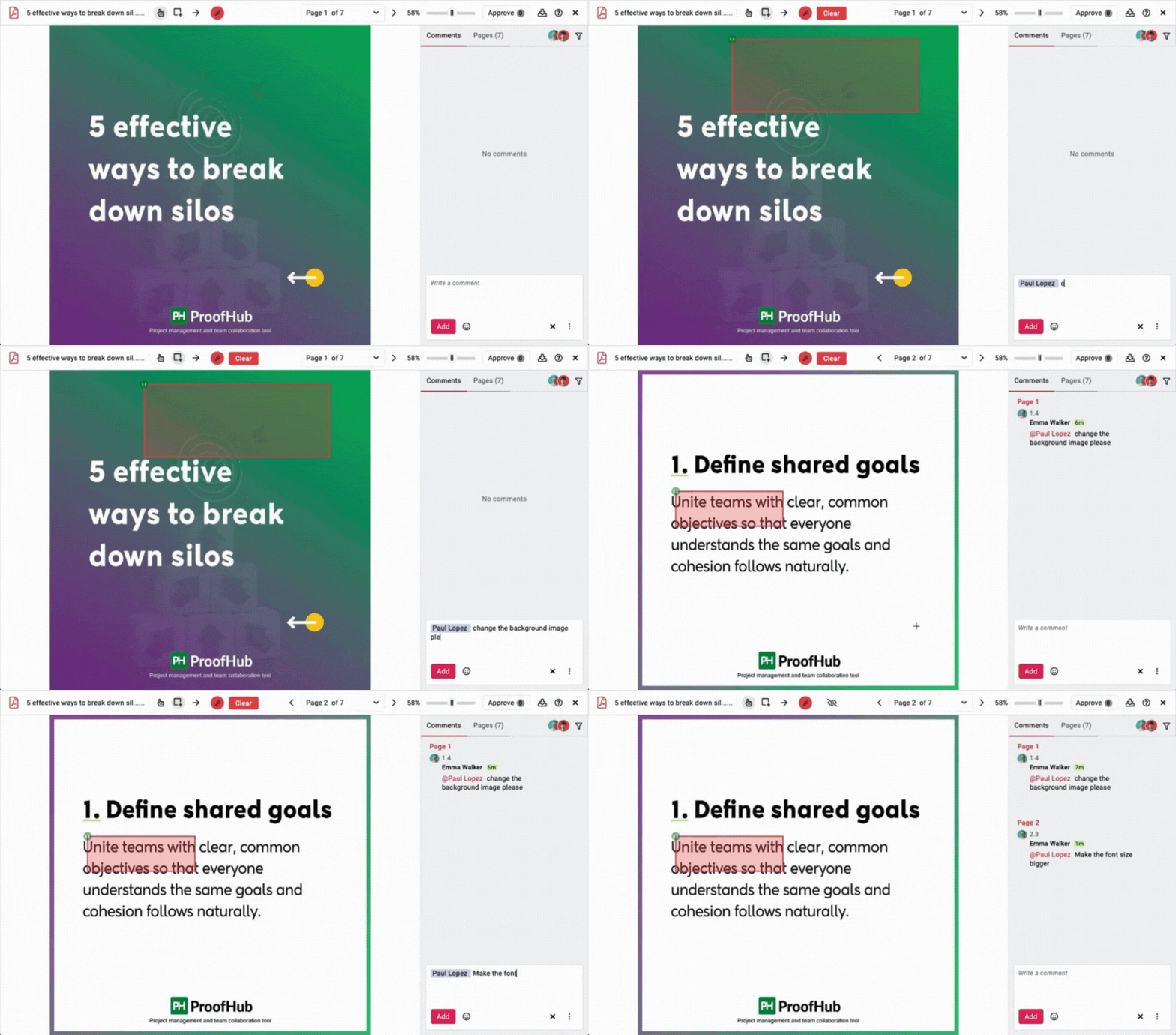
Teams that handle creative or design-heavy projects get measurable value here.
ProofHub gives teams a complete communication environment. You get structured discussions, meaningful task-level conversations, real-time chat, and controlled client access. The tool keeps collaboration organized even as your team grows. It avoids the limits of Basecamp and the structural fragility of Notion, which makes the experience feel stable and scalable.
Basecamp vs Notion vs ProofHub: File management
A good file management system helps teams organize documents, maintain version clarity, centralize assets, and reduce the time spent searching for the latest file. For this section, I focused on how each platform handles uploads, organization, retrieval, permissions, version control, and how well they support real project needs like documentation, assets, client deliverables, and internal knowledge sharing.
| Basecamp | Notion | ProofHub |
|---|---|---|
Basecamp
Basecamp keeps file management inside the Docs & Files section of each project. You can upload documents, images, PDFs, spreadsheets, and other assets. You can also create simple folders to group related files. This feels familiar because the layout resembles a standard file drive.
The system works well if you only need a basic place to store documents. You upload, create a folder, add files, and share them inside project discussions. Everything stays inside the project, which keeps context clear.
No version control or file version
Basecamp treats every file upload as an individual asset. If you upload a revised version of a document, Basecamp does not recognize it as a new version of an existing file. It simply uploads the new file. This forces you to track versions manually by renaming files or writing comments.
For teams that revise documents often, this becomes tedious. You spend more time managing files than focusing on the work.
Limited structure for documentation or knowledge bases
Basecamp does not support interconnected pages or structured documentation. You can write long-form content inside Docs, but you cannot link documents, build hierarchies, or maintain a proper knowledge base. Everything stays flat. This makes the system insufficient for teams that need rich documentation like wikis, SOPs, technical notes, or onboarding guides.
Navigation becomes harder as files grow
Basecamp lacks advanced search filtering or metadata-driven organization. When projects grow and accumulate hundreds of files, you rely on naming conventions and folder structures to keep things manageable. The tool does not help you tag, categorize, or connect files meaningfully.
Basecamp works for simple file sharing, but it does not scale. You get a straightforward place to upload and organize documents, but the system does not support versioning, structured documentation, or deep organization. Teams that rely heavily on files will quickly feel the limitations.
Notion
Notion treats every document as a page, and pages can live inside databases or nested hierarchies. This gives you full control over how you create and organize files, notes, knowledge bases, internal wikis, and documentation libraries.
You can embed almost anything—images, PDFs, videos, audio, Figma frames, Loom videos, spreadsheets, code blocks, and more. This flexibility turns Notion into a living workspace where information connects fluidly.
Documentation becomes powerful when structured well
Notion shines when you need a place to maintain:
- SOPs
- project documentation
- meeting notes
- internal wikis
- research repositories
- content libraries
You can interlink pages, reference databases, create nested structures, and build rich knowledge networks. Everything stays searchable because Notion indexes all content, including text inside embeds.
File organization depends on your system design
Notion does not organize anything for you. You create the hierarchy. You define naming conventions. You decide how many layers of pages you want and how the databases connect.
This level of control is valuable but risky. If your workspace’s structure grows without discipline, information becomes scattered and messy. Files end up buried inside pages or nested too deeply, forcing everyone to rely on search.
When structured well, Notion becomes one of the best documentation tools. When structured poorly, the workspace becomes confusing.
Database attachments help, but require maintenance
You can store files inside databases and use custom properties to tag and categorize them. This works well for structured asset libraries, content calendars, design repositories, or client deliverables.
However, you must maintain these databases. You clean up duplicates, rename files, update categories, and ensure that everything stays consistent. Without this, the system falls apart.
Version control is manual
Like Basecamp, Notion does not offer proper version control for uploaded files. You can embed new versions or upload replacements, but the system does not track changes automatically. However, Notion does track edits inside pages, which helps when working with text-heavy documentation.
Notion gives you flexibility that Basecamp cannot match. You build your knowledge base and organize it however you want. But the same flexibility demands constant upkeep. When the workspace grows, you feel the weight of manual structure. Notion is excellent for documentation-heavy teams that maintain strong organizational habits. It falls short when teams want an easy, predictable file system with minimal maintenance.
ProofHub
ProofHub keeps file storage simple and accessible. Every project includes a Files section where you upload, organize, and manage documents. You can group assets inside folders, attach them to tasks, share them inside discussions, or keep them inside notes.
The structure stays consistent across projects, so you never lose files inside nested pages or scattered hierarchies.
Version control that eliminates confusion
ProofHub tracks file versions automatically. When you upload a new version, the system stacks it under the same file entry. You see who uploaded the revision, when they did it, and what changed.
This saves a significant amount of time for teams that update documents frequently. You avoid the clutter Notion and Basecamp create by leaving duplicate versions everywhere.
Proofing tools make reviewing assets efficient
ProofHub includes built-in proofing tools for design files, PDFs, and documents. You can mark areas, add comments, request changes, and approve files directly in the tool.
This removes the need to send long feedback emails or switch between chat apps and design tools. Collaboration stays organized around the file itself, which improves clarity and reduces revision cycles.
Organization stays clean without manual structure
You do not build the file system. The structure already exists. ProofHub groups files naturally into:
- project-level folders
- task attachments
- discussion attachments
- note-related files
The system keeps everything accessible without requiring you to design a hierarchy or maintain it constantly.
Global file visibility improves team awareness
You can switch to the global Files view to see documents from all projects. This helps teams track shared assets, reference past work, and find documents without opening each project individually. The search works reliably and filters by file type.
ProofHub offers the most balanced file management system among the three tools. You get clean organization, version control, proofing tools, and a structure that doesn’t drift over time. It manages both simple and complex file needs without forcing you to maintain the workspace manually. This makes it ideal for teams that handle frequent revisions, creative assets, documentation, and client deliverables.
Basecamp vs Notion vs ProofHub: Reporting
Reporting is where a tool shows its real value. Teams rely on reports to answer basic questions:
Are we on track? Who is overloaded? What deadlines need attention? Which projects demand intervention?
A strong reporting system reduces decision-making time, improves predictability, and helps managers catch risks before they escalate. For this section, I evaluated how each tool handles visibility, progress tracking, dashboards, workload insights, and data-driven decision support.
| Basecamp | Notion | ProofHub |
|---|---|---|
Basecamp
Basecamp does not include traditional project reports. You rely on lists, due dates, and activity feeds to understand what is happening. The system tracks completed to-dos, active assignments, and upcoming deadlines, but it does not convert this data into deeper insights.
The approach works when project complexity stays low. You open a project, scan the to-dos, check progress percentages, and read recent activity. You understand the state of the project, but you do not get a full picture across multiple projects.
No workload visibility
Basecamp does not show how much work each team member has. You cannot view task load by person or understand who is overbooked or underutilized. You rely on manual checks within each project or direct communication with the team.
This becomes harder when the number of projects increases or when tasks are spread across multiple lists.
No centralized dashboards or timeline-based insights
Basecamp does not offer dashboards, charts, burndown views, or timeline reports. The system keeps everything simple, but you lose the ability to:
- track task trends
- monitor slippage
- compare planned vs. actual work
- identify bottlenecks
- analyze cross-project progress
This creates blind spots that only grow as work increases.
Activity view helps but lacks depth
Basecamp’s Activity view lists recent updates, new tasks, completed items, comments, and file uploads. It helps you catch up quickly, but the information scrolls chronologically. You cannot filter by status, project health, or workload indicators.
Basecamp keeps reporting minimal by design. You understand what happened recently, but you cannot easily understand what may happen next or how the entire team’s workload looks. This works for small, simple teams. It breaks down the moment you manage complex, cross-functional work or multiple parallel projects.
Notion
Notion does not include built-in reporting tools. You build your own using formulas, rollups, filters, relations, and database views. This gives you enormous control. You can create dashboards that track exactly what you want:
- project health
- task load
- due date distribution
- priority breakdowns
- sprint velocity
- progress indicators
If you enjoy building systems, this becomes a powerful extension of your workflow.
Powerful if designed well, fragile if not
Dashboards remain accurate only when your workspace stays consistent. Any change in database properties, relations, or naming breaks your dashboards. You spend time maintaining formulas, updating filters, or recreating views when the structure changes.
This constant upkeep makes reporting harder to rely on. You must treat the workspace as a living system.
Cross-project visibility requires more setup
To understand everything across projects, you create additional databases or build master dashboards. These centralize data through relations or synced blocks. When done well, you get a high-level overview of work across the team. But building this takes time and planning.
Teams that lack the bandwidth for system design often ignore these capabilities, which leaves them without meaningful visibility.
Workload insights are possible but not natural
You can show workload distribution using rollups and formulas. You can color-code tasks by priority or owner. You can build calendars to display assignments. But Notion does not generate workload reports automatically. You design the system to produce insights.
When teams grow, maintaining workload views becomes one of the hardest aspects of Notion.
Notion can produce excellent reporting if you invest time in the setup. But the effort is ongoing. You maintain formulas, adjust dashboards, and monitor consistency. Reporting becomes a project of its own. For teams with strong Notion builders, this flexibility is an advantage. For others, the burden outweighs the benefits.
ProofHub
ProofHub includes ready-to-use reports inside every project. You do not configure databases, create dashboards, or build views manually. You open the Reports tab and see clear visuals that display:
- completed vs. pending tasks
- tasks by stage
- tasks by person
- upcoming deadlines
- overdue work
- timesheets
- project progress
The reporting stays meaningful even if your workspace grows or team members change habits.
Workload view that highlights bottlenecks
ProofHub’s Workload view shows how much work each team member has across projects. You can see who is overloaded, who has free capacity, and how deadlines collide. This helps you reassign tasks, balance responsibilities, and prevent burnout.
This level of visibility is missing in Basecamp and requires custom building in Notion.
Gantt-based insights for planning stability
The Gantt view serves not only as a planning tool but also as a reporting layer. You see dependencies, slippage, and progress percentages visually. You understand how delays affect downstream tasks and the project timeline.
This makes it easy to forecast risks and adjust plans before problems escalate.
Time tracking and logs make accountability clear
ProofHub includes built-in time tracking and timesheets. You can log time manually or use the timer. You can review logs by project, person, or task. The system groups everything automatically, so reporting stays consistent.
Agencies and teams that bill for time or track effort gain significant value here.
Centralized reporting across all projects
You can open global reports to understand the health of multiple projects. You see:
- progress trends
- overdue work across teams
- workload distribution
- time logged by team or project
- upcoming deadlines
- project-level summaries
You get a full picture without building anything manually.
ProofHub delivers comprehensive reporting without requiring setup or manual maintenance. You get visibility across tasks, teams, deadlines, workloads, and timelines. It highlights issues early and gives managers reliable data to make decisions. The system stays clean even as projects multiply, which makes it a strong reporting tool for growing teams.
Basecamp vs Notion vs ProofHub: Pricing & value for money
Pricing determines long-term sustainability for teams choosing a project management tool. It’s not just about the upfront cost; it’s about how well the pricing aligns with your growth, the features you receive at each tier, and the financial predictability your team can rely on. For this section, I focused on transparency, scalability, limits, hidden costs, and the actual value each platform delivers for the price.
| Basecamp | Notion | ProofHub |
|---|---|---|
Basecamp
Basecamp uses a flat pricing structure. You either choose the free plan for personal use or upgrade to a single paid plan that covers your entire team. You do not pay per user, and you do not calculate seat costs. This simplicity feels refreshing, especially for small teams that want predictable expenses.
The paid plan gives you all features with no complicated tiers. Everyone in the company gets the same access. This works well when your team is small, stable, and operates within Basecamp’s constraints.
Value depends on team size and workflow simplicity
If you have a team of 10 or more, Basecamp’s flat pricing becomes affordable because you spread the cost across multiple users. But if your team is small—three or four people—the plan becomes expensive compared to other tools that charge per user.
The bigger limitation comes from the tool’s capabilities. You pay a fixed amount, but you still get basic project management features. You do not get advanced workflows, reporting, workload management, or planning tools. If you need these features, the value drops.
Not ideal for scaling businesses
Basecamp’s value decreases as your project complexity increases. You do not pay more as you grow, but you also do not get additional capabilities. You outgrow the tool long before you outgrow the price.
Teams that scale quickly often switch tools because Basecamp’s simple structure cannot support multi-layered work.
Basecamp offers predictable pricing, but the value depends heavily on how simple your projects are. If you want a lightweight tool for communication and basic tasks, Basecamp feels affordable. If you need structured project management, the flat fee starts to feel expensive because the tool gives you very little beyond the basics.
Notion
Notion charges per user across all paid plans. You unlock more collaboration features, admin controls, and database capabilities as you move up the tiers. The pricing feels flexible, especially for smaller teams.
Notion’s value increases when users fully adopt its capabilities—databases, relations, templates, documentation, and custom systems. You are not paying for a standard project management tool. You are paying for a flexible workspace you build yourself.
Add-ons increase costs quickly
Notion offers collaboration and project tools, but many growing teams also pay for:
- additional integrations
- external automations
- third-party backups
- large storage needs
- external document storage
- advanced templates
This increases the real cost of using Notion. If you operate a database-heavy workspace, performance limitations may push you toward the Enterprise tier sooner than expected.
Value depends on time investment, not cost
The financial cost looks reasonable, but the operational cost becomes heavy. You spend time building templates, setting up structures, refining naming conventions, and cleaning up pages. This time adds up.
If your team enjoys system design, the cost feels justified. If not, the time investment often outweighs the monetary value.
Scales well, but only with strong workspace discipline
Notion becomes expensive when the team grows without structure. You need a workspace owner or administrator who maintains everything. Without this role, the workspace becomes messy, and the cost stops making sense because the value decreases over time.
Notion’s pricing feels fair, but the value relies entirely on your ability to maintain the workspace. The tool can be cost-effective for documentation-heavy teams or teams that enjoy customization. It becomes a poor investment for teams that want a structured, ready-to-use project management system without maintenance.
ProofHub
ProofHub uses a flat pricing structure similar to Basecamp Pro unlimited plan, but with far more functionality included by default. You do not pay per user, and you do not move through restrictive tiers. You pay one price and get everything:
- unlimited users
- unlimited projects
- all features
- full admin controls
- reporting
- workflows
- Gantt charts
- proofing tools
- forms
- time tracking
This makes the pricing predictable and easy to budget long-term.
High value for growing teams
The more your team grows, the more affordable ProofHub becomes compared to per-user tools. A team of 5 pays the same as a team of 50, which eliminates future budgeting challenges and prevents financial surprises.
Teams that scale quickly benefit the most because user-based pricing becomes expensive at higher headcounts.
No add-on costs or hidden upgrades
ProofHub does not push features behind higher tiers. You do not pay extra for:
- reporting
- workflows
- time tracking
- custom roles
- project templates
- unlimited collaborators
- client access
This matters for teams that manage multiple clients or departments. Your cost stays the same regardless of how many people join your workspace.
Better value because of built-in capabilities
ProofHub reduces external tool costs because it replaces or consolidates several categories:
- reporting dashboard
- time tracker
- proofing tool
- messaging tool
- task and workflow system
- file sharing
- project planner
- notes/wiki
- client collaboration software
Teams that previously used Notion + Trello + Slack + proofing tools often save money with ProofHub because one subscription covers everything.
ProofHub delivers strong value because the pricing stays predictable, and the feature set supports both simple and complex workflows. You do not pay for extra functionality, and you do not need add-ons to extend capability. This makes ProofHub one of the most cost-effective options for teams that expect to grow or handle multiple workstreams.
Basecamp vs Notion vs ProofHub: User reviews & ratings
User reviews reveal how real teams experience these tools outside controlled testing environments. They highlight long-term strengths, daily frustrations, and blind spots that you only notice after months of continuous use. For this section, I analyzed feedback from G2, Capterra, Reddit, YouTube creators, and community discussions to understand how teams feel about Basecamp, Notion, and ProofHub.
| Basecamp | Notion | ProofHub |
|---|---|---|
Basecamp
Many Basecamp users appreciate its straightforward approach. They highlight how the tool reduces noise, keeps teams aligned, and encourages structured communication. The Message Board and Check-ins receive consistent praise because they help teams avoid constant messaging overload.
Small businesses, agencies, and creative teams often mention that Basecamp helps them stay organized without a complex setup. Users like the clarity of the interface and the predictable structure.
Concerns focus on limited features
A recurring theme across review platforms is Basecamp’s lack of depth. Users say that Basecamp works well for simple tasks, but struggles when teams need:
- subtasks
- dependencies
- detailed planning
- reporting
- workload visibility
- automation
- proper project workflows
Many reviewers mention switching to a more advanced tool once their team size or project complexity increases. Some users also express frustration that Basecamp has not evolved much over the years.
User sentiment overall
Most reviewers enjoy Basecamp for what it is—a simple space for communication and light project work. The dissatisfaction begins when teams try to stretch the tool beyond its intended scope. Users who stay within Basecamp’s limits rate it highly. Users who expect proper project management rate it lower
Notion
Notion’s user base praises its flexibility more than anything else. Reviewers highlight how they can build wikis, knowledge bases, databases, project trackers, and dashboards inside one tool. Many users say Notion replaced three or four apps for them.
Teams that enjoy customization give Notion exceptionally high ratings. They like that they can shape the system exactly how they want and integrate documentation with tasks. Solopreneurs, content creators, startups, product teams, and engineering teams often mention that Notion helps them centralize everything.
Frustration comes from maintenance and performance
Notion receives criticism for three recurring issues:
- Slow performance on large databases: Many users report lag and long load times once their workspace grows.
- Workspace chaos without structure: Reviewers on Reddit often mention that Notion falls apart if the team does not maintain strict conventions.
- Steep initial learning curve: Teams without a dedicated Notion “owner” struggle to keep the system consistent.
These issues lower user ratings for teams that expected Notion to behave like a plug-and-play project management tool.
User sentiment overall
Users who like building systems rate Notion extremely high. Users who want an out-of-the-box project tool often feel overwhelmed. The satisfaction depends entirely on the team’s willingness to maintain the workspace.
ProofHub
ProofHub receives strong reviews for its balanced feature set. Users highlight how the tool stays simple while supporting deeper planning, structured collaboration, and multi-project visibility. They appreciate the built-in workflows, Gantt charts, Kanban boards, proofing tools, and reports.
Many reviewers mention that ProofHub reduces the need for multiple tools. Agencies praise the client access controls. Managers praise the reporting and workload visibility. Team members praise the clean navigation and predictable structure.
Positive feedback focuses on reliability and ease of adoption
Users consistently mention:
- easy onboarding
- minimal learning curve
- predictable structure
- helpful support team
- clarity in tasks and projects
- useful built-in communication tools
- effective for cross-functional teams
Teams that previously juggled multiple apps often say ProofHub simplifies their workflow.
Constructive criticism focuses on customization limits
Some users want more visual customization or deeper integrations with external apps. Others mention that ProofHub’s interface could feel more modern compared to newer tools. However, these points rarely impact usability or performance.
Users generally appreciate that ProofHub chooses clarity over endless customization.
User sentiment overall
Users see ProofHub as a practical tool that balances power and simplicity. It avoids the complexity of Notion and the limitations of Basecamp. Most reviewers describe it as reliable, organized, and suitable for teams that want structured project management without heavy setup.
Basecamp vs Notion vs ProofHub: Pros and cons
Every tool comes with certain ups and downs. Here are the pros and cons of choosing Basecamp, Notion, or ProofHub for your teams.
Basecamp
| Pros | Cons |
|---|---|
| Simple and predictable structure that’s easy to understand | Very limited project management depth with no subtasks, dependencies, or custom fields |
| Strong communication features with Message Board, Campfire, and Check-ins | Poor visibility and reporting capabilities |
| Fast onboarding with consistent interface requiring no setup | Does not scale with complexity as projects grow |
| Flat pricing model with predictable costs | Not suitable for cross-functional teams needing structured planning |
| No maintenance overhead due to lack of customization | Client access lacks fine-grained permission control |
Notion
| Pros | Cons |
|---|---|
| Extreme flexibility to control pages, databases, and workflows | High maintenance workload requiring discipline to avoid chaos |
| Excellent documentation capabilities for wikis, SOPs, and knowledge bases | Steep learning curve for beginners without a Notion owner |
| Custom dashboards with formulas, rollups, and relations | Performance issues at scale with large databases |
| All-in-one workspace for notes, tasks, and databases | No built-in project reporting, timelines requiring manual configurations |
| Strong community with thousands of ready-to-use templates | Lacks unified communication hub needing external tools like Slack |
ProofHub
| Pros | Cons |
|---|---|
| Structured and simple without limiting functionality as projects grow | Fewer deep customizations compared to Notion for building from scratch |
| All essential PM tools included (Gantt, Kanban, calendars, workflows, reporting) | Not suitable for individual users or solopreneurs |
| Unlimited users with predictable flat pricing | No custom automation or AI integeration |
| Powerful collaboration tools with discussions, chat, proofing, and client access | |
| Strong reporting and workload visibility with ready dashboards | |
| Low maintenance with stable structure |
Final verdict
After testing these tools across different types of projects, I have reached a conclusion that Basecamp, Notion, and ProofHub solve project management in completely different ways. Each tool fits a specific kind of team and workflow. Your choice depends on how much structure you want, how much customization you can maintain, and how fast your projects evolve.
Use Basecamp if:
- You want a simple tool that keeps communication clear and calm.
- Your projects stay small, steady, and predictable.
- You want a fixed structure instead of endless customization.
- You prefer message-based collaboration over real-time chat noise.
- You don’t need subtasks, dependencies, workflows, or advanced planning.
- You want a tool your team can learn in minutes without onboarding challenges.
Use Notion if:
- You want complete control over how your workspace looks and behaves.
- Documentation, wikis, SOPs, and knowledge sharing sit at the core of your workflow.
- You enjoy building templates, dashboards, and custom databases.
- You have the time and discipline to maintain structure as your workspace grows.
- You want a flexible all-in-one system rather than a traditional project management tool.
- You are comfortable with higher maintenance in exchange for freedom.
Use ProofHub if:
- You want a structured project management system ready on day one.
- Your team works on multiple projects and needs clear visibility.
- You want built-in workflows, Gantt charts, proofing, reporting, and time tracking.
- You prefer a predictable flat pricing model that supports growth.
- You need reliable collaboration tools without relying on external apps.
- You want a balance between simplicity and depth without building the system yourself.
Frequently asked questions
What is the main difference between Basecamp and Notion?
The core difference lies in how each tool approaches work structure. Basecamp centers work around isolated projects with an async-first philosophy. Notion is a flexible workspace that can be shaped into many systems but requires setup and discipline.
Which tool is better for project management: Basecamp or Notion,
Basecamp works well for lightweight coordination but lacks advanced task control. Notion can support project management, but only after significant customization. If your priority is clearly defined tasks, ownership, timelines, and progress tracking out of the box, ProofHub fits best.
Is Notion a good replacement for Basecamp?
Not directly. Notion is a flexible workspace, not a dedicated project management system. It can replace Basecamp only if your team is willing to design and maintain its own workflows. For teams that want ready-made project structures and predictable execution, Notion complements rather than replaces dedicated PM tools.
Which tool is best for team collaboration and communication?
Basecamp excels at async collaboration through message boards and check-ins. Notion supports collaboration through shared documents and comments. ProofHub combines both structured project discussions, task-level communication, and shared files—making collaboration easier to follow without relying on constant real-time interaction.
Can Notion handle complex project workflows?
Notion can model complex workflows, but it relies heavily on manual setup, templates, and conventions. ProofHub handles complex workflows more reliably because task hierarchies, dependencies, approvals, and roles are built in. Basecamp intentionally avoids complexity and is better suited for simpler, low-overhead projects.
Which tool is better for client-facing projects and external collaboration?
ProofHub is better suited for client-facing work because it supports granular access control, shared projects, and clear boundaries between internal and external collaboration. Basecamp also supports clients, but with limited control. Notion is less ideal for client projects unless carefully permissioned and maintained.
Is Basecamp suitable for large teams compared to Notion?
Basecamp works best for small to mid-sized teams that value simplicity. As teams grow, their lack of advanced structure, reporting, and role control becomes limiting. Notion scales in information volume but can become hard to govern operationally.
Which tool requires the least setup and learning curve?
Basecamp has the lowest setup and learning curve due to its opinionated design. ProofHub requires slightly more setup but remains intuitive for teams familiar with project management. Notion has the steepest learning curve because teams must design their own systems before real work can begin.
