A project management plan turns scattered goals into a documented roadmap that guides a project from initiation to closure. It consolidates scope, schedule, cost, quality, resources, risk, and communication into one baseline that project managers use to make decisions, align stakeholders, and track performance.
Without this plan, projects run on assumptions instead of structure, making delays, budget overruns, and miscommunication far more likely.
This blog covers what a project management plan includes, its core components, how to create one step by step, common challenges teams face, and the tools that support the process. A downloadable template is included to help you get started right away.
- 1.A project management plan is a formal, baseline document, not just a to-do list. It consolidates scope, schedule, cost, quality, resources, risk, and communication into one reference used to guide execution, monitoring, and closure.
- 2.It goes beyond project planning. Project planning is an ongoing process of figuring out how to achieve objectives, while the project management plan is the approved, documented output that becomes the official baseline for the project.
- 3.It covers 13 core components, including scope, schedule, cost, quality, resource, communication, risk, stakeholder, and change management plans, along with governance structure and performance baselines.
- 4.The project manager owns the plan, but builds it with input from subject matter experts, functional leads, and sponsors, who review and approve it before it becomes the official baseline.
- 5.It’s a living document. Once approved, it can only be changed through formal change control, and should be updated at defined intervals, or whenever significant scope, schedule, or cost deviations occur.
What is a project management plan?
The project management plan is a formal document that defines how a project will be executed, monitored, controlled, and closed. It consolidates all subsidiary plans, covering scope, schedule, cost, quality, resources, communication, risk, and procurement, into one baseline.
Project managers use it to guide decision-making, align stakeholders, and track performance against approved objectives throughout the project lifecycle.
What is the importance of a project management plan?
The importance of a project management plan lies in better project clarity, improved time management, improved decision-making, better cost control, better stakeholder alignment, and risk reduction.
A well-structured plan turns scattered goals into a documented roadmap that keeps the project on track from initiation to closure.
Here’s how each benefit plays out:
- Better project clarity: The plan defines scope, deliverables, and objectives upfront. This clarity prevents scope creep and ensures every team member understands what success looks like, resulting in fewer misunderstandings during execution.
- Improves time management: A documented schedule with milestones and dependencies keeps tasks sequenced correctly. This structure helps the project manager spot delays early and adjust timelines before they cascade into bigger issues.
- Improved decision-making: With baselines for scope, cost, and schedule in place, project managers can evaluate changes against defined criteria. This helps eliminate guesswork, leading to faster, more consistent decisions.
- Better cost control: A cost management plan sets budget thresholds and tracking methods. This allows real-time comparison of actual spend against the baseline, reducing the risk of budget overruns.
- Better stakeholder alignment: The plan documents roles, communication protocols, and expectations. This keeps stakeholders informed and reduces conflicting priorities.
- Risk reduction: A risk management component identifies threats early and outlines mitigation steps. This helps managers to minimize disruptions before they escalate into project-ending problems.
What are the components of a project management plan?
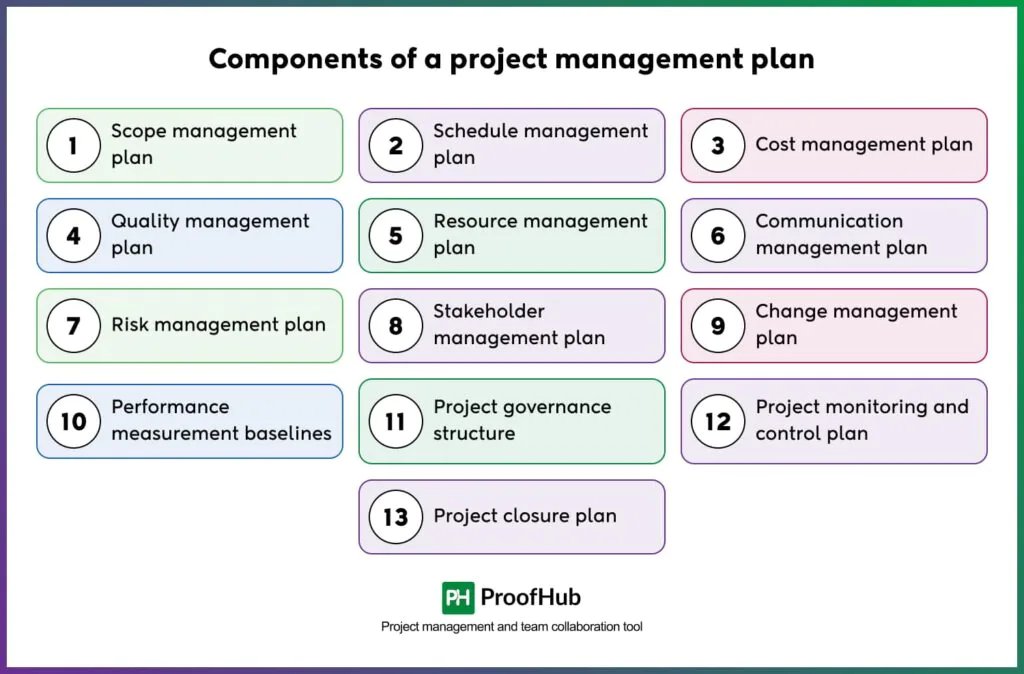
The components of a project management plan are: scope management plan, schedule management plan, cost management plan, quality management plan, resource management plan, communication management plan, risk management plan, stakeholder management plan, change management plan, performance measurement baselines, project governance structure, project monitoring and control plan, project closure plan.
Together, these subsidiary plans form the complete framework a project manager uses to execute, track, and close a project. Each component addresses a specific management area, and combined, they ensure no aspect of the project runs without a defined process.
Here is a brief description of each component mentioned above:
1. Scope management plan
Defines how project scope will be defined, validated, and controlled. It includes a scope statement, work breakdown structure, and change procedures. This prevents scope creep and keeps deliverables aligned with objectives.
Example: a WBS (work breakdown structure) breaking a software launch into design, development, and testing phases.
2. Schedule management plan
Outlines how the project timeline will be developed, monitored, and controlled, including task sequencing and milestone tracking. This benefits teams by making delays visible early, allowing proactive rescheduling.
Example: a schedule breaking a product launch into design, development, and testing phases with defined milestone dates for each.
3. Cost management plan
Establishes budgeting methodology, cost estimation techniques, and spending controls. Cost baselines and variance thresholds help avoid budget overruns through early financial tracking.
Example: setting a 10% variance threshold that triggers a budget review when spending on development exceeds the approved estimate.
4. Quality management plan
Defines quality standards, assurance activities, and control measures for deliverables. Acceptance criteria and audit processes ensure consistent output that meets stakeholder expectations.
Example: requiring code review sign-off and QA testing before a software feature moves to production.
5. Resource management plan
Details how human and physical resources will be acquired, allocated, and managed. Staffing plans and resource calendars prevent bottlenecks from resource shortages.
Example: a resource calendar showing developer availability across two concurrent projects to avoid double-booking.
6. Communication management plan
Specifies what information gets shared, with whom, how often, and through which channels. Clear reporting expectations across stakeholders reduce misunderstandings.
Example: weekly status reports to the project sponsor and daily stand-ups for the core team.
7. Risk management plan
Outlines risk identification, assessment, mitigation, and monitoring processes. A risk register with ownership assigned reduces the impact of unforeseen issues.
Example: flagging vendor delivery delays as a high-priority risk with a backup vendor identified in advance.
8. Stakeholder management plan
Defines strategies for engaging stakeholders based on their influence and interest. Engagement levels and communication needs keep stakeholders aligned throughout.
Example: mapping executive sponsors as high-influence stakeholders requiring monthly briefings versus end users needing only launch updates.
9. Change management plan
Establishes the process for requesting, evaluating, and approving changes. A change control board and documentation requirements protect the project baseline.
Example: a formal change request form requiring sponsor approval before adding a new feature mid-development.
10. Performance measurement baselines
Sets the approved scope, schedule, and cost baselines used to measure performance. Variance analysis becomes possible against these baselines, using methods like earned value management.
Example: comparing actual cost of work performed against planned cost to calculate cost and schedule variance.
11. Project governance structure
Defines decision-making authority, escalation paths, and reporting hierarchy. Ambiguity in accountability disappears once approval authority is clarified.
Example: designating the project sponsor as the final approver for budget changes above a set threshold.
12. Project monitoring and control plan
Describes how progress will be tracked against baselines and how corrective actions will be triggered. Status reporting cadence and performance thresholds guide this tracking.
Example: triggering a corrective action review when a task falls more than five days behind schedule.
13. Project closure plan
Outlines steps for formal project completion, including deliverable handover, documentation, and lessons learned. A structured close-out replaces an abrupt end.
Example: conducting a post-project review meeting to document lessons learned before formally releasing project resources.
How to create a project management plan?
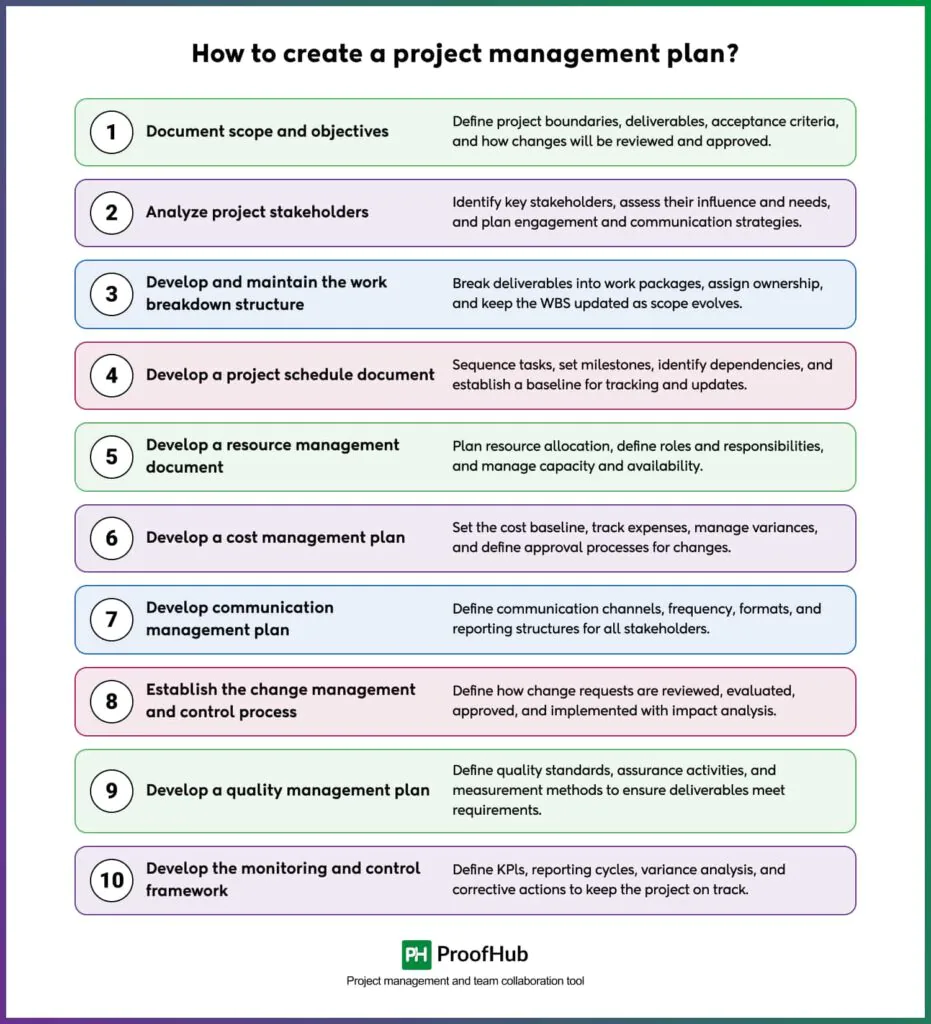
To create a project management plan, you need to document the project scope and objectives, analyze project stakeholders, develop and maintain the work breakdown structure, develop a project schedule document, develop a resource management document, develop a cost management plan, develop a communication management plan, establish the change management and control process, develop a quality management plan, develop the project monitoring and control framework.
Each step builds on the previous one, ensuring the plan covers every management area needed to guide the project from start to finish.
1. Document the project scope and objectives
Scope and objectives in a project plan focus on deliverables and tasks. In a project management plan, this step documents how scope will be controlled, measured, and approved throughout execution.
It establishes the scope statement, defines acceptance criteria, and sets the process for reviewing and approving any proposed changes.
This gives the project a clear boundary, preventing unauthorized additions from expanding the workload without formal evaluation and sign-off from relevant stakeholders.
2. Analyze project stakeholders
A project plan typically identifies execution-level involvement. This step in a project management plan goes further, analyzing stakeholder influence, communication needs, engagement strategies, and decision authority.
It involves mapping stakeholders based on their power and interest levels, then defining tailored engagement approaches for each group.
Understanding who needs frequent updates versus occasional briefings helps the project manager allocate communication effort efficiently and secure buy-in from the people who matter most.
3. Develop and maintain the work breakdown structure
Task organization is the WBS’s role in a project plan. A project management plan also defines how the WBS will be managed, updated, and controlled during execution.
This step breaks deliverables into manageable work packages, assigns ownership, and establishes a process for updating the WBS as scope evolves.
A well-maintained WBS becomes the foundation for scheduling, budgeting, and resource allocation across the entire project lifecycle.
4. Develop a project schedule document
Timelines and milestones come from a project plan. Scheduling standards, tracking methods, baseline control, reporting, and change procedures come from a project management plan.
This step sequences tasks, identifies dependencies, and sets a schedule baseline against which progress gets measured.
It also establishes how often the schedule gets reviewed and what triggers a formal revision, keeping delays visible before they threaten the overall timeline.
5. Develop a resource management document
Assigning people to tasks is where a project plan stops. A project management plan defines resource allocation processes, utilization strategies, responsibilities, escalation procedures, and capacity management.
This step maps out who is responsible for what, tracks resource availability, and sets a process for resolving conflicts when demand exceeds capacity.
It ensures resources are used efficiently without overloading team members or leaving gaps in coverage.
6. Develop a cost management plan
Cost estimates are the extent of a project plan’s coverage here. A project management plan explains how costs will be monitored, approved, tracked, reported, and controlled throughout the project lifecycle.
This step sets the cost baseline, defines variance thresholds, and establishes approval workflows for budget changes.
Regular cost tracking against this baseline helps catch overruns early, before they become difficult to recover from.
7. Develop communication management plan
Who receives updates is defined at the project plan level. Communication channels, reporting structures, meeting governance, escalation paths, and stakeholder strategies get defined at the project management plan level.
This step sets the frequency, format, and audience for every type of project communication, from daily stand-ups to executive briefings.
Clear communication protocols reduce confusion and keep everyone working from the same information.
8. Establish the change management and control process
Recording changes to tasks or scope is where a project plan’s role often ends. A project management plan defines formal approval workflows, impact analysis procedures, governance reviews, and change control authority.
This step creates a structured pathway for evaluating proposed changes, assessing their impact on scope, schedule, and cost, and securing formal approval before implementation.
It protects the project baseline from undocumented modifications.
9. Develop a quality management plan
Deliverable quality requirements are the focus at the project plan level. Quality standards, assurance processes, audits, compliance checks, and performance measurements are the focus at the project management plan level.
This step establishes the criteria deliverables must meet, along with the inspection and testing procedures used to verify compliance.
Consistent quality checks throughout execution reduce the risk of costly rework at project close.
10. Develop the project monitoring and control framework
Progress tracking against tasks and deadlines is standard in a project plan. KPIs, governance reviews, reporting cycles, variance analysis, and corrective actions are standard in a project management plan.
This step sets up the mechanisms for measuring actual performance against baselines and triggering corrective action when deviations occur.
It keeps the project manager informed in real time, rather than discovering problems after they’ve already caused damage.
What are the common challenges in creating a project management plan?
The common challenges in creating a project management plan are: Scope creep, unclear requirements, inadequate risk management, poor communication, stakeholder misalignment, inaccurate time or cost estimates, inadequate project monitoring.
These challenges surface at different stages of planning and execution, but each one can derail a project if left unaddressed.
Here’s how they show up and how to manage them:
1. Scope creep: Uncontrolled changes or additions to project scope happen when requests aren’t formally evaluated. This inflates timelines and budgets beyond the original baseline. A documented change control process with approval gates keeps scope additions in check.
2. Unclear requirements: Vague or incomplete requirements at the planning stage lead to rework and misaligned deliverables later. This wastes time and resources on output that doesn’t meet actual needs. Structured requirement-gathering sessions with stakeholder sign-off reduce ambiguity upfront.
3. Inadequate risk management: Skipping thorough risk identification leaves the project exposed to disruptions that could have been anticipated. Unaddressed risks often escalate into costly delays or failures. Building a risk register with assigned owners and mitigation plans catches issues early.
4. Poor communication: Inconsistent or unclear communication causes misunderstandings about priorities, deadlines, and responsibilities. This creates duplicated work or missed deadlines. A defined communication plan with set channels and frequency keeps information flowing consistently.
5. Stakeholder misalignment: Differing expectations among stakeholders about scope, priorities, or outcomes create conflicting directions for the project team. This slows decision-making and creates rework. Early stakeholder mapping and regular alignment check-ins prevent conflicting priorities from surfacing late.
6. Inaccurate time or cost estimates: Overly optimistic or poorly researched estimates set unrealistic baselines from the start. This leads to budget overruns and missed deadlines that erode stakeholder confidence. Using historical data and expert judgment for estimation improves accuracy.
7. Inadequate project monitoring: Weak tracking mechanisms mean deviations from the plan go unnoticed until they become major problems. This delays corrective action when it’s most needed. Regular status reviews against performance baselines catch variances while they’re still manageable.
Which tools are used to create a project management plan?
Tools to create a project management plan are ProofHub, Wrike, Asana, and Smartsheet. Each tool supports different aspects of planning, from scheduling to resource tracking, helping project managers turn a documented plan into an actionable, trackable system.
Let’s learn more about these tools:
1. ProofHub: Combines task management, Gantt charts, time tracking, and built-in communication in one platform. It helps project managers build the schedule, assign roles, and monitor progress without switching between multiple tools.
2. Wrike: Offers customizable workflows, Gantt charts, and real-time reporting dashboards. It supports scope and schedule tracking with visibility into task dependencies across teams.
3. Asana: Focuses on task assignment, timelines, and workload management. It works well for teams that need clear accountability and progress visibility without heavy scheduling complexity.
4. Smartsheet: Combines spreadsheet familiarity with project tracking features like Gantt charts and automated workflows. It suits teams transitioning from manual tracking to structured project management.
Project management plan template
Here’s a simple project management plan template you can download and start using right away. It covers scope, schedule, budget, RACI, risks, quality checks, and change control in one editable spreadsheet, so you don’t have to build a plan from scratch.
Free Project Management Plan Template
Stop starting every project from scratch. Download the Project Management Plan Template to define scope, set clear milestones, assign ownership, and keep your whole team aligned from day one.
Download the free template nowHow to use this template
1. Start with the Overview tab and fill in the project name, sponsor, manager, dates, and objectives.
2. Move to Scope & Deliverables and list what’s in scope by phase, plus anything explicitly out of scope.
3. Build out Milestone Schedule with target dates, owners, and status — update the Status dropdown as work progresses.
4. Fill in the Budget tab with estimated and actual costs; variance and variance % are calculated automatically.
5. Use the RACI tab to assign Responsible, Accountable, Consulted, and Informed roles for each key task.
6. Log top risks in the Risk Log with likelihood, impact, and a mitigation plan for each.
7. Track deliverable quality in the Quality Checklist tab and update status as items are reviewed.
8. Use the Change Log to document and track any change requests once the plan is approved.
9. Set your update cadence in the Communication Plan, and revisit the whole workbook at each milestone or review cycle.
Who is responsible for creating a project management plan?
The project manager is responsible for creating a project management plan, though it’s rarely done in isolation. They lead the process, but rely on input from subject matter experts, functional leads, and core team members to develop realistic estimates for schedule, cost, and resources.
Sponsors and key stakeholders also review and approve the plan before it becomes the official baseline, ensuring it reflects organizational priorities and has the authority needed for execution.
What is the difference between project planning and a project management plan?
Project planning is the ongoing process of determining how project objectives will be achieved, involving activities like defining tasks, estimating timelines, and allocating resources. It’s a continuous process that happens throughout the project lifecycle as details get refined.
A project management plan is the formal, approved document that consolidates the outputs of project planning into a single baseline. It defines how the project will be executed, monitored, controlled, and closed, and serves as the official reference for managing the project.
What is the difference between a project charter and a project management plan?
A project charter is the document that formally authorizes a project’s existence, granting the project manager authority to use organizational resources. It’s issued early, typically by a sponsor or senior management, and outlines the project’s purpose, high-level objectives, and key stakeholders at a summary level.
The project management plan is the detailed document developed after the charter, defining how the project will be executed, monitored, controlled, and closed. It expands on the charter’s high-level direction with specific baselines for scope, schedule, cost, and other management areas.
Can a project management plan be changed after approval?
Yes, a project management plan can be changed after approval, but only through the formal change control process. Any modification requires evaluation, documented approval, and baseline updates to keep scope, schedule, and cost aligned with the revised direction.
How often should you update a project management plan?
A project management plan should be updated whenever significant scope, schedule, or cost deviations occur, or at defined review intervals, typically weekly or biweekly. Updates should also follow major milestones or phase-gate reviews, ensuring the plan reflects actual progress against baselines and incorporates all approved changes.
Conclusion
A project management plan is what separates a well-run project from one that drifts off track. It gives project managers a single, approved reference for scope, schedule, cost, and risk, and gives stakeholders a clear picture of how the project will be executed and controlled from start to finish.
Building one takes more effort than a basic project plan, but it pays off through fewer surprises, better cost control, and stronger stakeholder alignment. Use the components and steps covered here as a starting point, and download the free template to build your own plan without starting from scratch. Tools like ProofHub can then help turn that plan into a trackable, actionable system your whole team can follow.