

Giving feedback remotely has become a normal part of managing teams. While remote work offers a lot of flexibility, it also makes giving feedback more challenging due to the lack of face-to-face interaction. If feedback is not provided correctly, it can be discouraging to employees.
As Frank A. Clark once said, “Criticism, like rain, should be gentle enough to nourish a man’s growth without destroying his roots.”
This means that feedback should be given in a way that helps people grow, rather than making them feel bad or disconnected from their team.
In this article, you’ll learn how to give feedback when working remotely. You’ll also find the best tool that can help managers communicate clearly and build trust with their remote teams.
What is remote feedback?
Remote feedback means evaluating, guiding, and improving employee performance using virtual communication methods, such as video calls, chat, email, or collaboration tools, rather than in-person meetings.
It helps people understand what they are doing well and what they can improve, even when working from home or different locations. Clear and timely remote feedback keeps teams connected, confident, and productive.
Why is giving feedback remotely important?
Timely, constructive feedback helps remote employees understand whether they are meeting expectations and how to improve. When feedback is missing or delayed, employees may feel uncertain, disengaged, or disconnected from their work.
Giving feedback to remote employees is important because it:
- Improve employee performance and motivation
- Increase engagement and accountability
- Reduce misunderstandings and rework
- Build trust between managers and remote teams
- Lower employee turnover
Best tips for giving feedback remotely

Here is a list of some tried and tested methods to give constructive feedback remotely to your employees and your organization.
1. Use the best video conferencing tool
Use a reliable video conferencing tool for communication with your remote employees rather than only using an audio call, where non-verbal cues are missing (body language, facial expressions).
Seeing your remote employees live on camera (and vice-versa) makes all participants feel comfortable and connected to each other, especially when you haven’t seen each other for a while due to remote work. On the other hand, it’s important to use a tool with high-definition audio and visuals so that both audio and video communication is crystal-clear and flows without any annoying interruptions (your internet connection also matters).
2. Start on a friendly, warm note
As a leader, you should begin a remote feedback session with a warm and friendly note. Tearing straightaway into your subordinate’s work will only make the team stressed and anxious. Showing a little compassion can go a long way toward making your team members feel confident and building trust between both sides.
A few words of appreciation for a job well done can make a big difference. The key is to make your reportees feel that you are on their side and want them to progress by addressing any issues that may be present.
3. Set clear goals and priorities
Whether it’s team feedback or one-on-one feedback, team leaders should take little time to get straight to the point. You can ask all your reportees on what tasks they’re working on currently, and if they are facing any issues with work. If you are not satisfied with the progress or quality of the work, then explain the problem without beating around the bush.
Any changes to deadlines or goals should be shared immediately with the team. Encourage them to give their suggestions and opinions, and listen attentively to what they have to say. Consider documenting positive feedback to share with the entire team, while supporting your team members in developing action plans to address errors and drive improvements.
4. Focus on problems, not individuals
As a responsible leader, you should focus on unbiased observations, not on individual qualities or their absence. Evaluate the performance of your team members or individuals based on their actual contributions to organizational and project goals.
One of the most important things you can do to provide remote feedback accurately and straightforwardly is to collect and use reliable data for fair, unbiased performance evaluation.
5. Keep your body language positive
As a leader, it’s important to maintain positive body language when giving feedback remotely. When you’re on camera, it’s not easy for other people to pick up on your emotions. So, try to set your cam in a way that shows your entire body posture (keep it open and receptive) rather than only showing a face so your team can pick up your gestures.
Make sure you appear calm and relaxed rather than putting up an angry, frustrated face in front of others. Your dressing should be formal, as it would be during a real-world feedback session. Look directly (not at yourself or side walls) at the camera to maintain eye contact with others while talking to them. Practicing all these things can help you build rapport and trust with your attendees.
6. Follow up, and track progress
Once you’ve given feedback remotely, it’s important to follow through on it. Accountability can be a bit of a challenge in days of remote work, so you want to make sure that your team members execute the corrective actions and plans discussed during the feedback.
You can fix the responsibility of a chosen individual for taking charge of accountability, or ask all team members to email you weekly or fortnightly to give updates on the execution of feedback. Remind them in a firm tone that you do not want feedback to be ignored at any cost.
7. Regularly check in with your team
One of the most effective ways to give feedback remotely is to regularly check in with your widely dispersed team through chat, phone call, video conferencing, or email, to maintain the same level of communication. Small, frequent performance reviews help team managers build rapport and trust with team members, which is especially important when delivering honest feedback.
There’s no denying that remote work cannot compensate for the loss of in-person human connection, as in the regular office environment. Even casual, non-work-related discussions and water cooler conversations can go a long way in encouraging open communication and transparent feedback.
8. Highlight positive points
Highlighting the positives can be an effective way to begin giving feedback remotely. This is not like a feedback sandwich where you place the critical feedback between two slices of positive feedback. This approach may work occasionally, but it loses its impact when applied repeatedly to the same employee.
When building on the positive aspects of an employee’s work performance, remote feedback should be accompanied by critical feedback. The purpose should be to help employees recognize that addressing weak performance areas can also strengthen their strengths.
9. Encourage two-way feedback
Giving feedback remotely is not just about managers and team leads assessing an individual’s performance and telling them what they did right and what they did wrong. Feedback sessions should never be a one-way street. Rather, there should be two-way communication where information flows to and fro. While providing feedback remotely helps employees to bring improvements in work, it is also an opportunity to have their input.
Often, employees are reluctant to voice their opinions, concerns, and suggestions unless the senior management asks. You should encourage employees to share their challenges, concerns, and suggestions. Give them adequate time to talk about it; you can schedule the employee feedback session after the meeting.
10. Give actionable advice
Giving feedback remotely is not just limited to making your employees aware that certain areas need improvement from their side. It is also about how the organization chalks out a solid plan to help them improve their performance and skills at work. They need to know what they need to do and how they are going to do it.
The manager’s role is to identify the weak points and provide employees with specific, actionable steps to help them meet the organization’s predefined performance standards. Since both parties are clear about the problem, employees should know what they’re supposed to do to achieve the set goals.
Common challenges you can face while giving feedback remotely

1. Missing non-verbal/visual cues
One of the main challenges of giving feedback remotely is the lack of non-verbal/visual cues. Unlike remote feedback sessions, in-person feedback sessions give team leaders vital clues about what their reportees are trying to say through their body language (facial expressions, movement of hands and feet, posture, tone of voice, eye contact, etc.).
2. Lack of empathy
Virtual communication can never match the intimacy and emotional touch of the real world. Remote workers can and do struggle with isolation and loneliness. There is a strong possibility that some leaders appear cold or apathetic to their employees when communicating virtually.
And not all leaders can be blamed for this behavior because they are unable to experience the emotions of their reportees due to physical separation. Leaders can get caught up in their personal situations and sometimes forget that employees also have their lives, families, and problems.
Lack of empathy may impact team productivity and cause intra-team conflict.
3. Background noises
Remote work means leaders spend most of their time on conference calls and in-person meetings. While giving something as crucial as remote feedback, disturbing background noises can affect the quality of conversations. Some common examples of background noises are dogs barking, a conversation between people, phone bells ringing, kids fighting and crying, etc.
These noises make it increasingly difficult for both sides to focus on the discussed topics, give suggestions, express opinions, or answer questions. It is not possible to control all such noises, but they can degrade the quality of remote feedback to a large extent.
4. Different time zones
If you’re giving remote feedback to your reportee living in a different countries then scheduling an audio/video call at the same time can be difficult due to different time zones. Many times it happens that both sides fail to figure out a common time for a feedback call because while one side is active, the other side is sleeping because it’s midnight in that timezone.
Both sides need to participate in feedback with an active state of mind so that no crucial point is missed and a healthy discussion takes place.
5. Lack of trust
Many remote team leaders are having trust issues simply because of physical barriers in two-way communication; no face-to-face communication, and daily interactions with remote employees.
This can lead to reduced trust and cohesion between leaders and their teams, and even amongst the team members themselves. This mistrust can reflect in remote feedback too, and your reportee may feel hard done by.
Best tool for leaders for giving feedback remotely
A manager needs a comprehensive tool to provide effective feedback to their teams, and ProofHub is a great fit with its all-in-one features. It offers powerful features under one roof that can be used by team leaders to provide accurate and unbiased feedback to remote teams.
Let’s find out how ProofHub makes giving remote feedback easier and more efficient for leaders across various industries.
- Online Proofing helps leaders collaborate on designs and documents.
- Smart task management enables leaders to keep track of project progress.
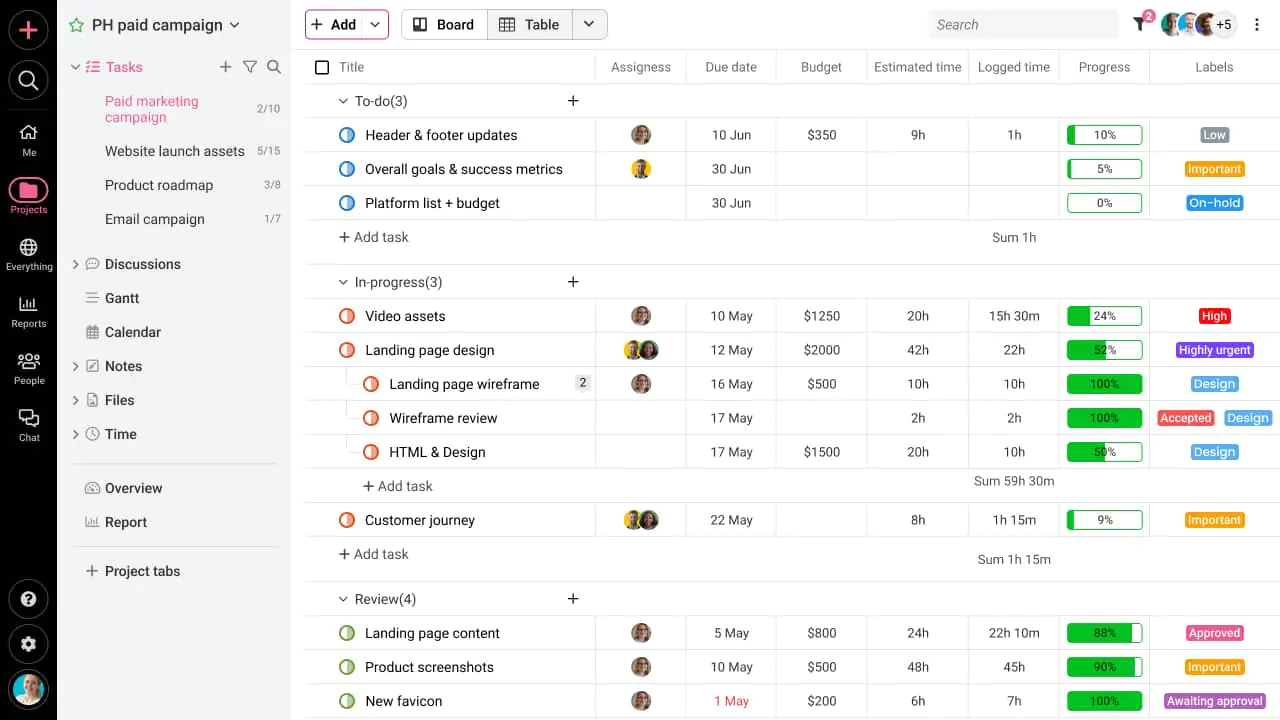
- Time-tracking lets leaders know who’s utilizing time (and who’s not).
- Custom help leaders analyze individual and overall project progress.
- Online discussions bring leaders and their reportees on a single, shared platform.

- Group chat connects leaders and their teams quickly.

- Leaders can access files with a single click during feedback.
- Leaders can adjust plans with gantt charts.
- Leaders can manage schedules at one place with project scheduling calendar.
- Multilingual interface helps leaders to set language of their choice.
Conclusion
Giving feedback remotely requires clarity, empathy, and consistency. When feedback is given correctly, it helps remote employees grow, stay engaged, and perform better in their roles.
As remote work continues to grow, mastering the skill of giving feedback remotely will remain essential for every leader.
Following best practices and using a feature-rich and powerful collaboration tool like ProofHub can help both leaders and their reportees to exchange crucial feedback and clearly understand each other’s perspectives.
