

A work breakdown structure (WBS) divides a project’s total scope into smaller deliverables and work packages. It creates a structured, hierarchical decomposition of the work required to achieve the project’s objectives.
It starts with the overall project or major deliverable at the top, progressively breaking down into smaller deliverables and work packages. Each component represents a distinct part of the project scope, contributing to achieving the project objectives, which may be a product, service, or other project outcome.
A well-managed WBS helps project teams organize complex work into manageable components. It supports project planning, team alignment, better estimation, resource allocation, progress tracking, and accountability. By clarifying the work required and establishing a clear scope baseline, it helps teams reduce the risk of scope creep and cost overruns.
This guide covers the WBS definition, benefits, types, key components, steps, examples, and a template. It also explains how to create and manage a WBS using ProofHub.
- 1.A work breakdown structure divides the total project scope into smaller, manageable components.
- 2.A well-defined WBS improves planning, scope control, resource allocation, cost estimation, and progress tracking.
- 3.The 100% rule ensures the WBS covers all project work without omissions or unnecessary overlap.
- 4.Work packages provide a basis for assigning ownership, estimating costs, and monitoring progress.
- 5.A WBS dictionary documents every specific detail of individual work packages.
- 6.ProofHub structures a WBS through task lists, tasks, subtasks, assignees, due dates, and Gantt views.
What is a work breakdown structure?
A work breakdown structure (WBS) is a hierarchical decomposition of the scope of a project into smaller, manageable deliverables, tasks, and subtasks. Project teams work on these components to accomplish the objectives and ensure that all required work is accounted for.
In simple terms, a WBS defines the total work required to complete a project. It provides a structured breakdown of project deliverables and their components, helping teams understand the scope of work, assign responsibilities, and coordinate activities.
WBS project components are organized into four levels, with each descending level adding more detail. It typically starts with Level 0, representing the overall project goal, followed by major project deliverables, sub-deliverables, and finally work packages at Level 1,2, and 3, respectively. Each work package component represents a clearly defined unit of work that can be estimated, assigned, scheduled, and monitored.
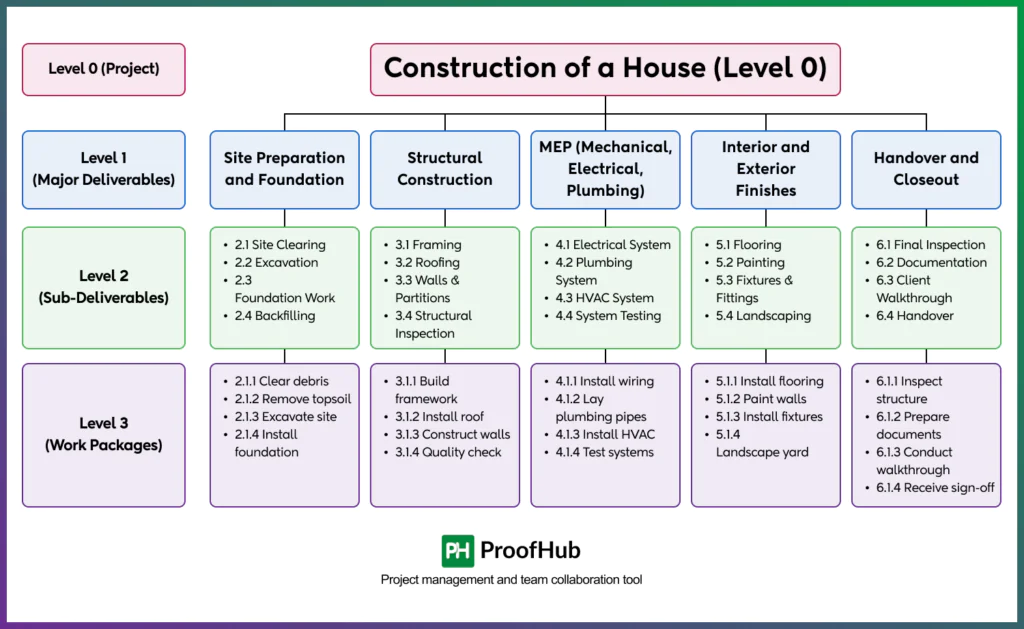
There are three units by which the work is grouped and planned inside the four-level hierarchy: control accounts, planning packages, and work packages. Each unit groups similar work together, which gives better classification and cleaner tracking.
- Control account: groups related work packages and planning packages under one management checkpoint
- Planning package: holds scope that is known but not yet detailed.
- Work package: manageable unit of work. It has a defined duration, cost, effort, and resource requirement.
What are the benefits of using a work breakdown structure in project management?
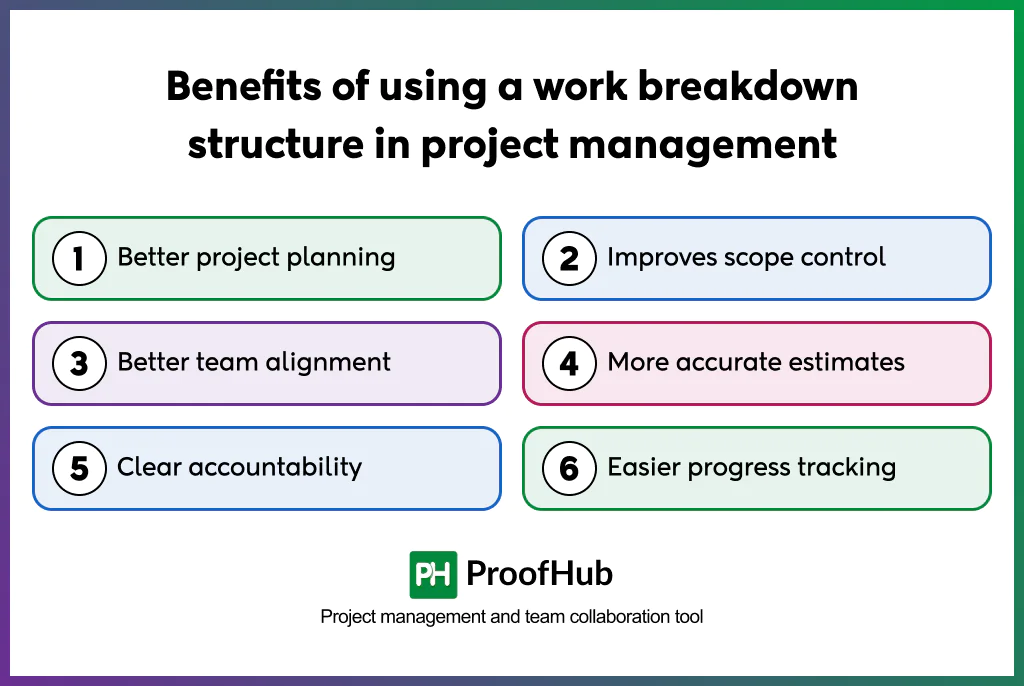
The key benefits of WBS are better project planning, improved scope control, better team alignment, accurate estimations, clear accountabilities, and easier project tracking.
The ultimate goal of WBS is to make a large project manageable.
- Better project planning: Decomposing a project into deliverables and work packages gives teams a structured view of the work before execution begins. This gives teams an organized structure to plan resources, estimate costs, set timelines, and identify dependencies more effectively.
- Improves scope control: The WBS organizes the approved project scope, clarifying what is included in the project and what falls outside it. This decomposition provides a baseline for monitoring scope and evaluating proposed changes through the change control process.
- Better team alignment: A shared hierarchy acts as a common reference for everyone involved in the project. They get better clarity around deliverables, work boundaries, and how individual components contribute to the overall project, which improves coordination across teams.
- More accurate estimates: Project estimates turn out to be more precise and accurate when calculations are based on smaller, well-defined work packages. Package-level estimates provide a more detailed basis for developing the overall project budget and schedule.
- Clear accountability: Assigning an accountable owner to each work package clarifies responsibility for its completion. Teams understand each other’s role in achieving the project objectives, while managers have a clear point of contact.
- Easier progress tracking: Work packages provide measurable indicators of project progress. Tracking completion at this granular level and consolidating the results gives project managers a clearer picture of overall progress.
What are the types of work breakdown structure?
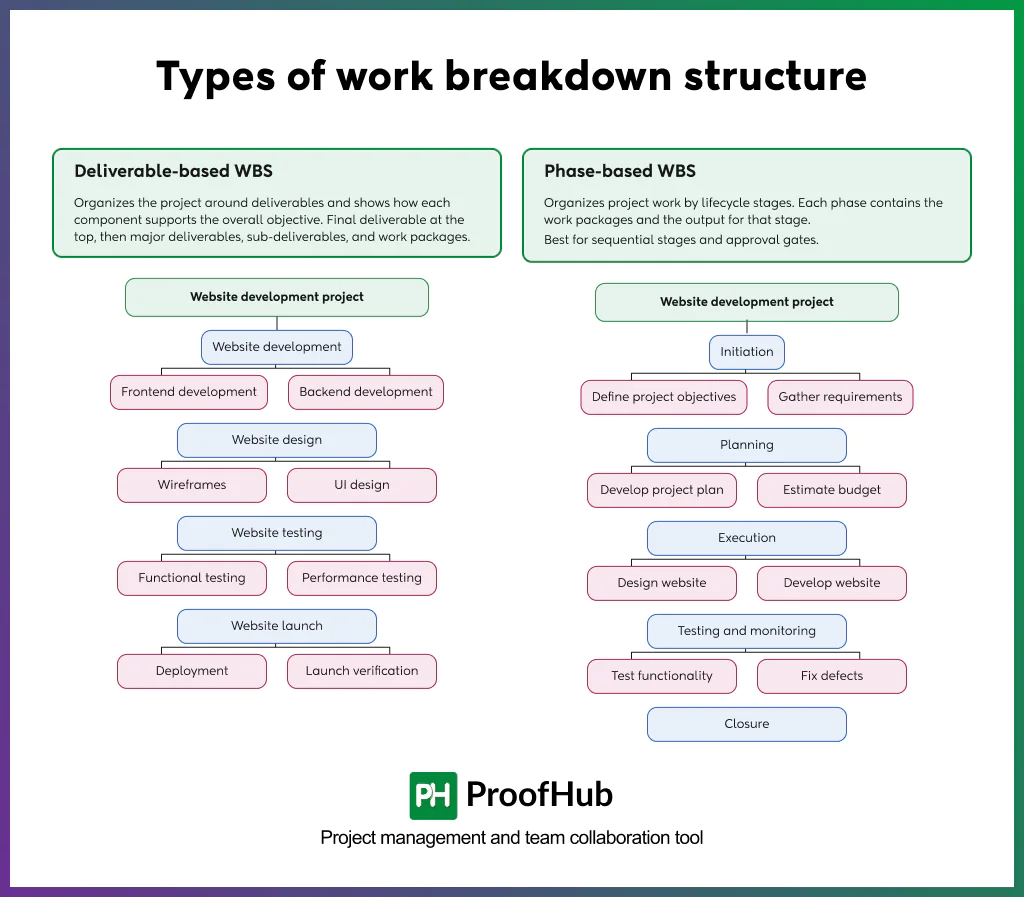
A WBS is categorized into two types: deliverable-based WBS and phase-based WBS.
1. Deliverable-based WBS
It organizes a project around deliverables and shows how individual components contribute to the overall project objective. The final deliverable appears at the top of the WBS, proceeding down to major deliverables, sub-deliverables, and work packages.
Example: Website development project
- Website design
- Wireframes
- UI design
- Website development
- Frontend development
- Backend development
- Website testing
- Functional testing
- Performance testing
- Website launch
- Deployment
- Launch verification
2. Phase-based WBS
It organizes project work by lifecycle stages. Each phase contains the work packages and the output associated with that work. It is best for projects that have sequential stages and approval gates.
Example: Website development project
- Initiation
- Define project objectives
- Gather requirements
- Planning
- Develop project plan
- Estimate budget and resources
- Execution
- Design website
- Develop website
- Testing and monitoring
- Test functionality
- Fix defects
- Closure
Other types of WBS that support project planning are:
3. Cost-based WBS
Organizes project components according to cost categories to support budgeting and cost tracking.
4. Resource-based WBS
Groups work according to the resources, teams, or functional capabilities required to complete it.
5. Risk-based WBS
Organizes risk-related work around identified threats, uncertainties, and mitigation requirements.
6. Responsibility-based WBS
Groups work according to the teams, departments, or individuals responsible for completing it.
7. Process-oriented WBS
Generates a comprehensive project scope by defining the project’s work phases, functions, and steps to be followed to accomplish the project.
What are the key components of a work breakdown structure?
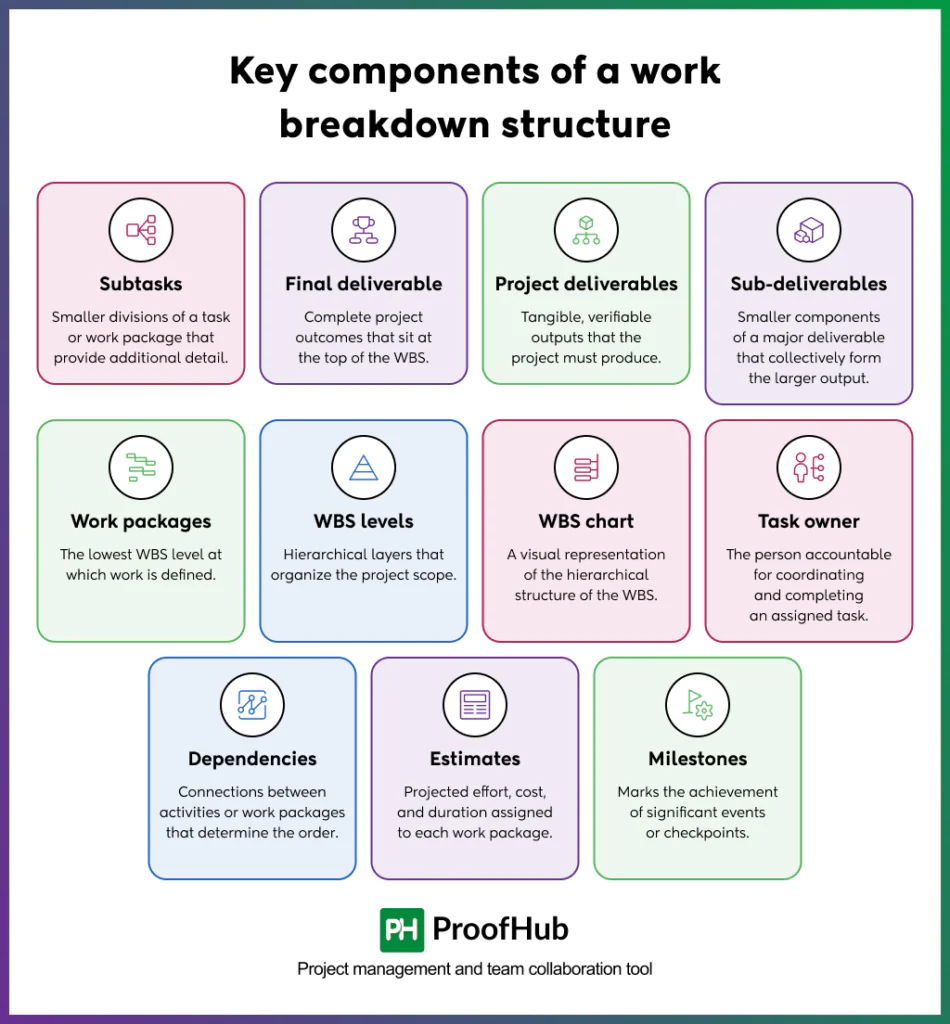
The key components of a WBS are: project, tasks, subtasks, deliverables, sub-deliverables, work packages, dependencies, estimates, and milestones.
- Tasks: Defined units of work required to produce project outputs.
- Subtasks: Smaller divisions of a task or work package that provide additional detail.
- Final deliverable: Complete project outcomes that sit at the top of the WBS.
- Project deliverables: Tangible, verifiable outputs that the project must produce.
- Sub-deliverables: Smaller components of a major deliverable that collectively form the larger output.
- Work packages: The lowest WBS level at which work is defined.
- WBS levels: Hierarchical layers that organize the project scope, from the major deliverables at the top to progressively smallercomponents at lower levels.
- WBS chart: A visual representation of the hierarchical structure of the WBS.
- Task owner: The person accountable for coordinating and completing an assigned task.
- Dependencies: Connections between activities or work packages that determine the order or conditions under which work proceeds.
- Estimates: Projected effort, cost, and duration assigned to each work package.
- Milestones: Marks the achievement of significant events or checkpoints.
The 5 rules of making a Work Breakdown Structure?
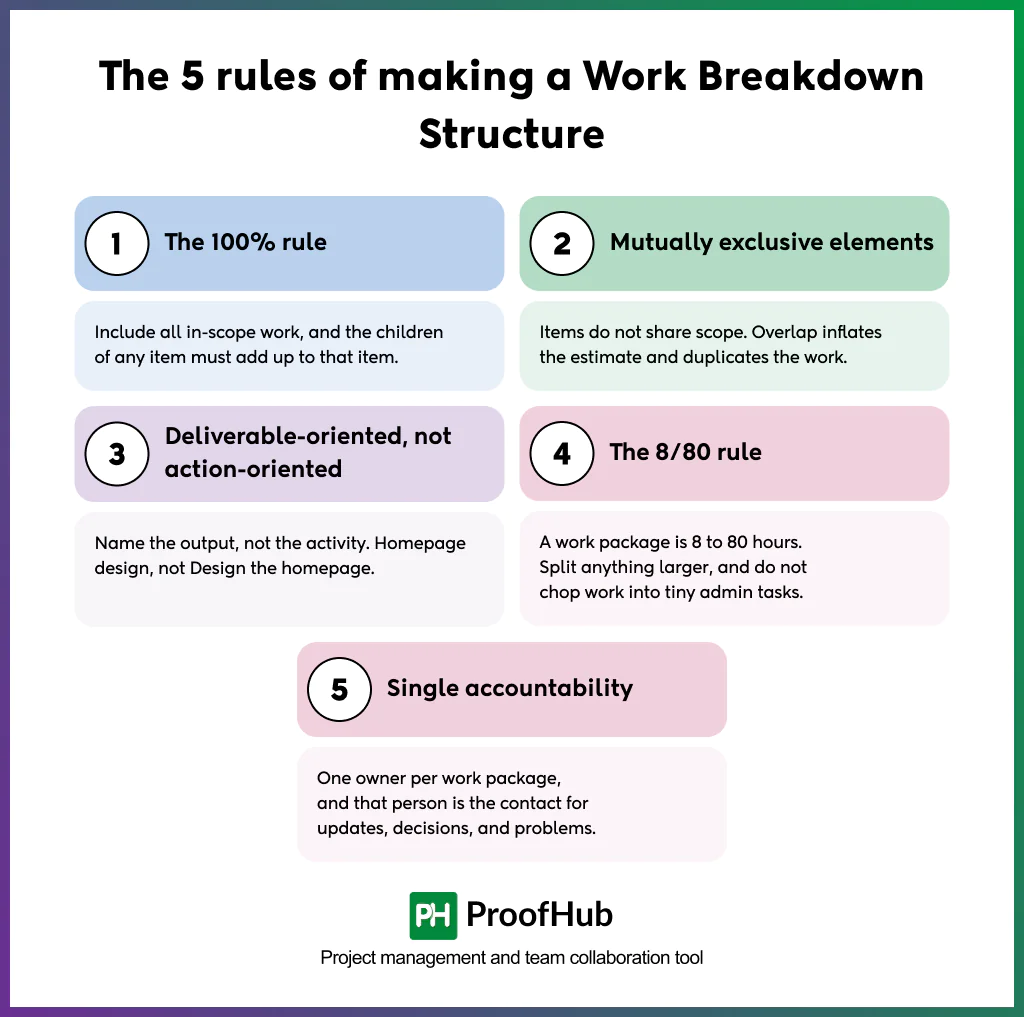
The five key rules for creating a work breakdown structure (WBS) are the 100% rule, mutually exclusive elements, deliverable-oriented decomposition, the 8/80 rule, and single-point accountability.
1. The 100% rule
A WBS should include 100% of the work required to complete the deliverables, excluding any work that is not particularly defined in the scope of the project (unrelated work).
The sum of all the child elements must equal the entire scope of their parent element. This helps teams identify missing deliverables, avoid scope gaps, and reduce the risk of uncontrolled scope changes.
2. Mutually exclusive elements
Each WBS element must represent a distinct component of work without overlapping with another element at the same level. Define clear scope boundaries that make every deliverable more reliable and earn a specific place in the structure.
Each one should not share scope with other elements, as overlapping leads to inflated estimates and duplicated efforts.
3. Deliverable-oriented, not action-oriented
Keep the WBS focused around deliverables, rather than a sequence of activities describing how the work will be performed. Name elements as Nouns rather than verbs of action.
For example, use “Homepage Design” rather than “Design the Homepage,” or “Test Report” rather than “Test the Website.” This keeps the WBS focused on what a project must produce while allowing teams to determine the activities needed to produce them.
4. The 8/80 rule
The work package should require at least 8 hours of effort but no more than 80 hours of effort. Break the work element into smaller packages that exceed 80 hours into smaller components.
Avoid splitting work into unnecessarily small packages, as they create unnecessary administrative overhead. The appropriate level of decomposition varies depending on reporting requirements, the nature of the work, and organizational practices.
5. Single accountability
Assign one clearly identified accountable owner or a team to each work package, regardless of how many people contribute to it.
Single point accountability gives project managers a clear point of contact for updates, decisions, escalations, and follow-ups.
How to create a work breakdown structure?
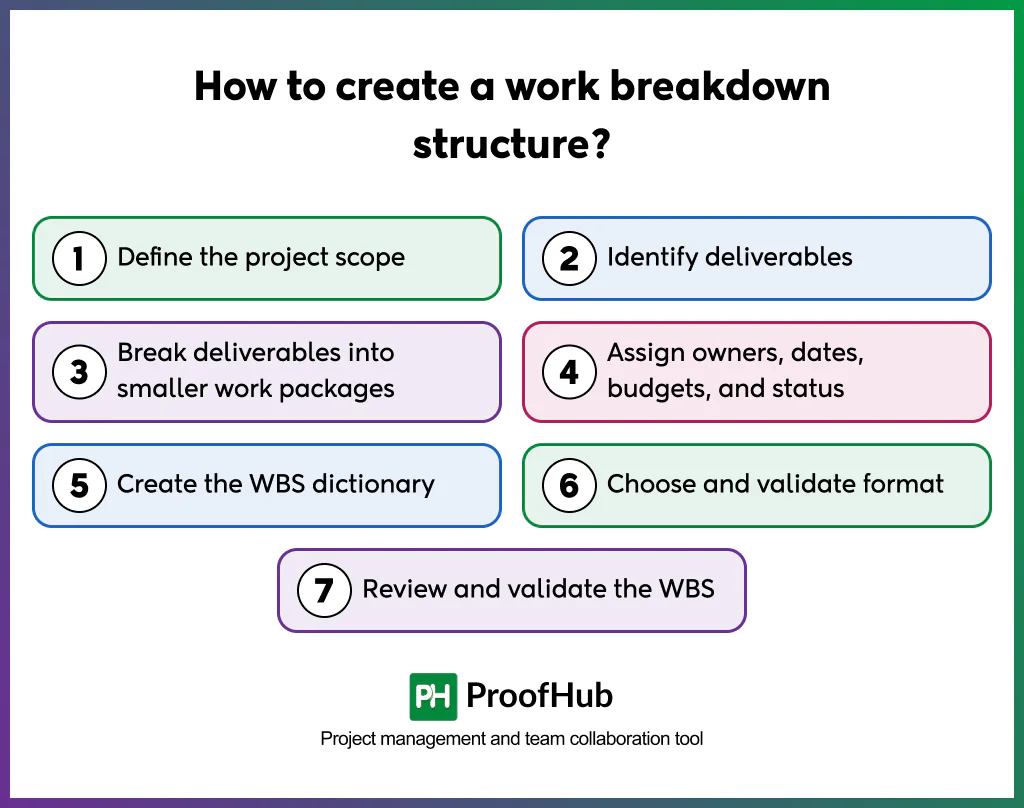
Creating a WBS involves defining the project scope, identifying deliverables, breaking them into smaller components, assigning responsibility, and validating the structure before execution.
1. Define the project scope
Define a clear project scope that outlines the project’s objectives, requirements, code of conduct, list of deliverables, constraints, expected outcomes, and the larger goals and milestones.
Use the following documents when establishing the project scope:
- Statement of work
- Requirements
- Stakeholder agreements
A clearly defined scope provides the foundation for the WBS.
2. Identify deliverables
List the major outputs the project is expected to produce to meet its objectives. Use the project requirements and, where appropriate, the objectives and key results (OKRs) to identify the outcomes the project needs to achieve.
- Products
- documents
- systems
- services
- approvals, or
- other verifiable results
Choose a decomposition approach that best represents the project, such as a deliverable-based, phase-based, or resource-based structure. A deliverable-based WBS is often a useful starting point because it organizes the project around the outputs it must produce.
For example, a website development project may include deliverables such as:
- Homepage design
- Landing page templates
- Navigation design
- Responsive layouts
- Content pages
- Website testing and validation
These deliverables establish the first level of decomposition below the overall project level.
3. Break deliverables into smaller work packages
Divide each major deliverable into smaller, clearly defined components until the work can be estimated, assigned, monitored, and controlled effectively.
Continue breaking down until you have actionable steps that an individual or a select group of people perform.
Each package needs atleast
- A clearly defined scope
- An identifiable output
- Measurable completion or acceptance criteria
Avoid unnecessary decomposition that creates excessive detail without improving planning or control. This process creates the hierarchical structure of the WBS.
4. Assign owners, dates, budgets, and status
Assign each package to an accountable owner or team with the appropriate skills. Estimate the effort, budget, and time required to complete the work.
For each work package, define relevant details, including:
- Accountable owner
- Effort and budget estimates
- Resource requirements
- Priority
- Planned start and finish dates, where applicable
- Dependencies and milestones
- Status, once execution begins
These details help translate the WBS into an actionable project plan.
5. Create the WBS dictionary
Prepare a WBS dictionary to explain the individual elements of the structure and provide a shared understanding of the work.
Each entry should include relevant details such as:
- Work package description
- Expected outputs
- Acceptance criteria
- Accountable owner
- Assumptions and constraints
- Dependencies
- Exclusions
- Budget or effort estimates
- Milestones, where applicable
The dictionary reduces interpretation differences between teams and provides a shared reference for execution.
6. Choose and validate format
Choose a format that makes the WBS easy to understand, review, and maintain.
- Gantt chart: Helps visualize tasks, schedule activities, and manage project dependencies.
- Kanban board: Tracks work through workflow stages and manages them by status.
- Calendar: Displays scheduled work, deadlines, and upcoming milestones by days, weeks, and months.
- List: Organizes work packages, owners, due dates, priorities, and other planning details.
7. Review and validate the WBS
Review the WBS against the 100% rule to confirm that the hierarchy reflects the approved scope of the work.
Check that:
- All work packages are manageable
- Each work package has a clear owner and completion criteria.
- Estimates and assumptions are clearly understood and reasonable.
- All the required deliverables and project work are represented.
- No missing, duplicated, or unrelated activities are included in the WBS.
- The WBS aligns with project requirements and constraints.
Obtain formal approval from the project team, sponsor, and key stakeholders. Establish the approved WBS as part of the project scope baseline and ensure suggested changes are implemented.
Examples of a work breakdown structure
The following examples give you an idea of how WBS structures are used in different projects. The level of detail varies depending on the project’s scope and complexity.
Example 1: Website redesign
1.0 Website redesign
1.1 Research and strategy
- 1.1.1 User research report
- 1.1.2 Competitor audit
- 1.1.3 Sitemap
1.2 Design
- 1.2.1 Wireframes
- 1.2.2 Visual design system
- 1.2.3 Homepage and template mockups
1.3 Development
- 1.3.1 Front-end build
- 1.3.2 CMS integration
- 1.3.3 Content migration
1.4 Launch
- 1.4.1 QA test report
- 1.4.2 Go-live deployment
- 1.4.3 Post-launch analytics setup
Example 2: Product launch project
1.0 Campaign strategy
- 1.1 Market research
- 1.2 Audience definition
- 1.3 Campaign brief
2.0 Creative production
- 2.1 Messaging and copy
- 2.2 Visual assets
- 2.3 Promotional video
3.0 Marketing execution
- 3.1 Email campaign
- 3.2 Social media campaign
- 3.3 Paid advertising
- 3.4 Landing page
4.0 Launch readiness
- 4.1 Stakeholder approvals
- 4.2 Campaign testing
- 4.3 Launch coordination
5.0 Performance evaluation
- 5.1 Campaign analytics
- 5.2 Results report
- 5.3 Recommendations
Work breakdown structure template
A WBS template is a pre-defined structure that turns project objectives into clearly defined deliverables and manageable work packages. It provides a reusable framework that saves time and effort and ensures consistency and alignment across the organization.
Hierarchical WBS template
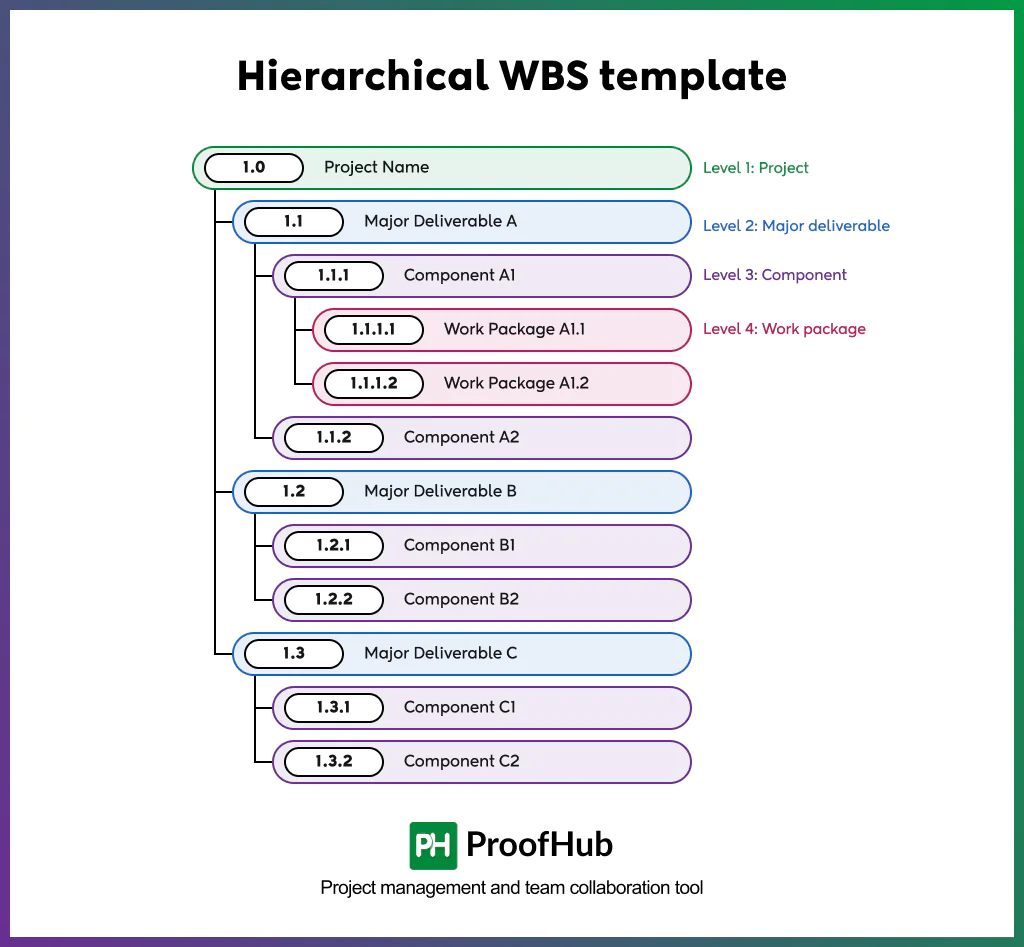
Copy and adapt this structure to your project.
- 1.0 Project Name
- 1.1 Major Deliverable A
- 1.1.1 Component A1
- 1.1.1.1 Work Package A1.1
- 1.1.1.2 Work Package A1.2
- 1.1.2 Component A2
- 1.1.1 Component A1
- 1.1 Major Deliverable A
- 1.2 Major Deliverable B
- 1.2.1 Component B1
- 1.2.2 Component B2
- 1.3 Major Deliverable C
- 1.3.1 Component C1
- 1.3.2 Component C2
WBS planning table template
Use the following table to record your project details and adapt to your different project information.
Create your work breakdown structure with ProofHub
ProofHub simplifies the implementation of a WBS through its task management and project planning capabilities, which teams can use to turn a work breakdown structure into an actionable project plan.
Here are five practical ways to create a WBS in ProofHub:
1. Gather and document project requirements: Define the project scope by documenting its objectives, requirements, constraints, stakeholder expectations, expected outcomes, and key milestones. Bring all the project-related discussions, documents, and requirements together in ProofHub to give the team a shared understanding of the work.
2. Identify and define project deliverables: List the major deliverables required to achieve the project objectives. In ProofHub, organize them into project task lists to create a clear structure for the work that needs to be completed. Ensure that each deliverable aligns with the agreed scope, stakeholder expectations, and desired outcomes.
3. Break deliverables into smaller components: Divide each major deliverable into smaller components until you reach manageable and actionable work packages. In ProofHub, use task lists, tasks, and subtasks to break down deliverables into a clear, structured hierarchy. Ensure that the breakdown covers all required work without unnecessary duplication or gaps.
4. Assign owners and allocate resources: Identify the skills, people, and resources required to complete each work package on time. Match responsibilities to team members’ expertise and assign a clear accountable owner to each package. Use ProofHub to assign tasks to team members and set due dates to clarify ownership. Define realistic timelines and effort estimates to support effective resource allocation and workload planning.
5. Map every task and dependencies with Gantt charts: Use ProofHub’s Gantt charts to visualize task schedules, plan activities, establish dependencies, and monitor progress. The visual timeline helps everyone understand which tasks depend on others, who is accountable for each activity, and when the work needs to happen. This makes it easier to identify scheduling conflicts and adjust the project plan when necessary.
What are common WBS mistakes to avoid?
Some common WBS mistakes include decomposing work too deeply or too shallowly, naming deliverables as activities, leaving ownership undefined, failing to update the baseline, creating overlapping components, and violating the 100% rule.
- Over or under decomposition of work: Too many work packages create unnecessary complexity, while too few leave tasks vague and difficult to estimate.
- Naming elements as activities: Creating an action-based task list, instead of defining deliverables and outcomes, makes the WBS focus on activities rather than the scope of work.
- Leaving ownership undefined: Work without an accountable owner, regardless if it is complete or not, weakens accountability and increases the risk of delays.
- Never updating the baseline: Failing to incorporate approved scope changes into the WBS leaves the scope baseline outdated. Updating it through the change control process keeps project plans aligned
- Overlapping components: Creating two work packages intended to achieve the same output causes unnecessary duplication, wasted resources, and inefficient use of time.
- Breaking the 100% rule: Including less than the full project scope leaves work unaccounted for, while including more introduces work outside the agreed scope.
Who is responsible for creating the work breakdown structure?
A project manager is typically responsible for creating the WBS often in coordination with project teams, subject matter experts, and stakeholders.
The project manager ensures that the WBS is aligned with the approved project scope and supports effective planning and execution. Team members and subject matter experts contribute their technical knowledge, task-level insights, and effort estimates to help define and decompose the work accurately. Stakeholders and sponsors review and validate the WBS to confirm that it covers the expected deliverables.
Who uses work breakdown structures?
A work breakdown structure is useful for teams that need to organize work and maintain complete visibility. Typical users include client-facing groups, creative groups, remote and internal project groups, commercial project planners, and event planners.
- Software development teams: Product and software teams use WBS to break down product features, user stories, testing activities, and other technical deliverables for easy estimation and tracking.
- Creative groups: Marketing, design, content, and production teams use a WBS to manage creative deliverables.
- Remote and internal project teams: Distributed and in-house teams use a shared WBS to clarify responsibilities and maintain visibility into work across locations and departments.
- Commercial project planners: Construction, engineering, and manufacturing planners use a WBS to estimate costs and schedules.
- Event planners: Conference, wedding, and festival planners use a WBS to coordinate venues, vendors, registrations, logistics, and event-day activities.
What is a WBS dictionary?
A WBS dictionary is a supporting document that describes every important topic related to each WBS element in detail.
A WBS dictionary typically includes:
- Description of work,
- Expected deliverables,
- Assumptions and constraints,
- Responsible owner,
- Resources required,
- Milestones and activities,
- Estimated efforts and resource requirements,
- Cost and budget estimates,
- Quality requirements,
- Acceptance criteria,
- Technical references,
- Reference documents
Can a project have multiple WBS structures?
Yes, a project can have multiple WBS views to plan, analyze, and report on work through different lenses. This helps teams understand the same project from multiple perspectives, depending on their coordination and reporting needs.
The key is to maintain one approved scope baseline and use consistent identifiers or interlinked structures to map the same work. Otherwise, teams risk scope inconsistencies, gaps, or duplicated work.
For example, a deliverable-based WBS may organize work by project outputs, while a responsibility-based view groups the same work by department or team. A phase-based view may support lifecycle planning and reporting.
What is the difference between a work breakdown structure and a product breakdown structure?
A work breakdown structure (WBS) decomposes the complete project scope into manageable deliverables and work packages, while a product breakdown structure (PBS) decomposes the product into its constituent components and parts.