

Disclaimer
Written by: Nandini Sharma, Marketing Manager at ProofHub
Author’s experience:13+ years in SaaS marketing and project operations. Nandini has personally evaluated 30+ project management tools since 2015 and manages a cross-functional team using PM software daily.
Publisher disclosure:This article is published by ProofHub. ProofHub is recommended at the end of this article as an alternative because it is our own product. You should weigh this accordingly.
Competitor coverage: Our review of Trello is based on our team’s hands-on evaluation of its 14-day free trial on the Advanced plan and publicly available information. We have no financial relationship with Trello.
Review integrity: No part of this review was influenced by Trello or any third party. All observations and conclusions in this article come from our internal team’s research and hands-on evaluation.
Last reviewed: June 2026
Trello is one of the easiest-to-use work management platforms in the market. There is no doubt about it, but the question is: how good is Trello for project management in 2026?
Why?
Because Trello is not a typical project management software and does not support traditional project management functions such as work breakdown structure, dependencies, resource management, time tracking, and reporting. It is essentially a work management app that helps you create, delegate, collaborate, and track work. That’s why I also refer to it as a work management platform. Although thousands of users use Trello for collaboration on project work and refer to it as project management software, we also use the term for the scope of this article.
Also, considering the recent change in Atlassian’s vision for Trello, “We shared our vision to pivot Trello from a project management app to a personal productivity companion. We have not removed any functionality from our original design but, going forward, we will not be taking new feature requests related to project management,” it is important to reconsider Trello for project management.
In this post, we will review the genuine strengths and limitations of Trello. We will find out how Trello performs on core project management functions: planning & organizing tasks, team collaboration, and tracking progress, what it excels at, and what it falls short of. Later, in the post, we will explore powerful alternatives to Trello that might make more sense for you.
We evaluated Trello by running real projects through a 14-day free trial on the premium plan and verifying every feature and pricing claim against Trello’s own documentation. Our team has been working with PM software since 2010, so we understand what exactly makes Trello a good choice and what could be the genuine deal-breaker.
Trello is indeed one of the easiest-to-use work management platforms. You can set up Trello within minutes, and your team can learn to use it within a day. But, it is good only for basic task & project management, team collaboration, and progress tracking. The moment you try to expand Trello for the management of complex projects, it becomes limited. Even for core PM functions such as a Gantt chart, time tracking, and reports, you need to rely on power-ups and integrations. (read more)
Task & project organization: Basic task creation, delegation, and collaboration. No Gantt chart, time tracking, or reports.
Team collaboration: Basic task comments and integration with Slack, Gmail, and Teams. No native chat, proofing, or video calling.
Reporting & dashboards: Basic insights such as cards per list, member, or board. No project or team performance reports.
Workflow & automation: Easy to set up Butler automation to automate common manual tasks, but limit on the number of commands per month.
Integrations: Seamless integrations with most of the third-party apps.
Pricing & value: Provide decent value for simple task management for small teams. For large teams or complex projects, Trello gets expensive due to power-ups and integrations.
- Marketing teams running simple campaigns and managing content calendars
- Small teams with simple workflows
- Teams that are already embedded in tools like Slack and Google Drive, and need integrations with third-party apps
- Organizations looking for core project management tools such as a Gantt chart, project report, project hierarchy, time tracking, and resource management
- Growing teams that want value for money
Bottom line: Trello is an easy-to-use project management tool with almost negligible learning curve, but it has limited core project management functionality which restricts its use to basic task management for simple teams with simple projects and workflows only.
What is Trello?
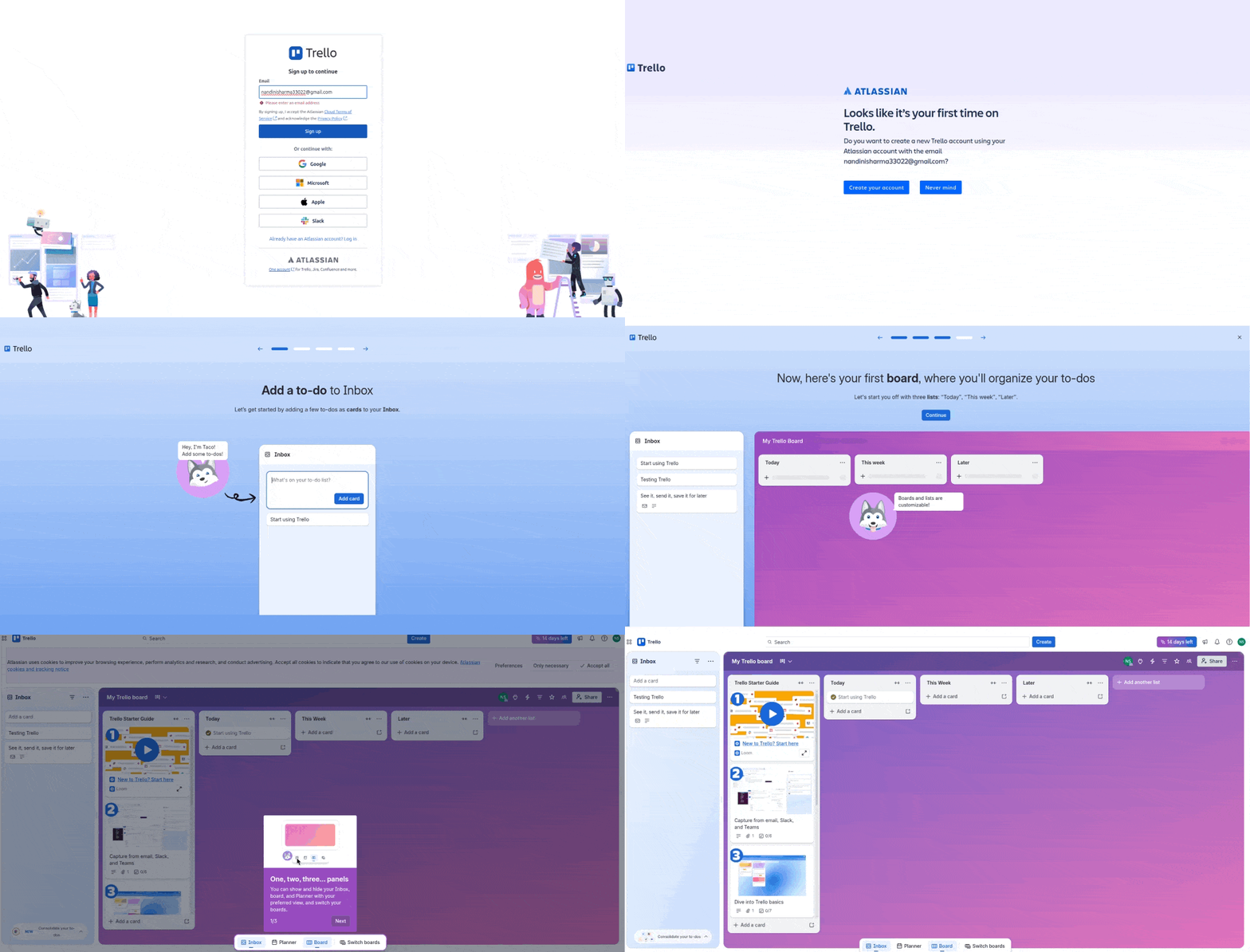
Trello is a work management platform founded in 2011 by Fog Creek Software and is currently owned by Atlassian. It is designed based on principles of Kanban philosophy and takes a visual approach to organize and manage work.
The platform uses the combination of Boards, Lists, and Cards to manage work.
Boards represent your entire project.
Lists are columns on that board representing stages of your workflow such as “To Do,” “In Progress,” and “Done.”
Cards are individual tasks that live inside lists with descriptions, attachments, due dates, and comments.
You can drag and drop cards between lists to track progress quickly. For example, when someone finishes a task, they simply drag the card from “In Progress” to “Done.”
To use Trello, create a board, build a workflow, add a few cards, and you are ready to use Trello within minutes.
Trello Review: How Trello handles core project management functions?
| PM function | What we evaluated | Verdict |
|---|---|---|
| Task & project organisation | Project hierarchy, task dependencies, views (list/board/Gantt) | Adequate |
| Team collaboration | Comments, file sharing, and real-time updates | Strong |
| Reporting & dashboards | Built-in reports, custom dashboards, and data export | Adequate |
| Automation | Recurring tasks, triggers, approval flows, and no-code automation | Strong |
| Integrations | Native integrations, API access, third-party connections | Strong |
| Pricing & value | Free plan quality and per-seat cost | Adequate |
1. Project and task organization

Getting started with Trello is super easy. Trello allows users to create a board for each project, client, or workflow.

A user can create a board from scratch, use templates, or export the project data from a CSV or JSON file. If you use a template or a CSV or JSON file, you get pre-defined workflow stages. The good thing is you can edit these stages. If you are creating the board from scratch, you need to create stages of the workflow.

To make the interface intuitive and personal, Trello allows you to set background photos. This might not be an important consideration, but it does make the user’s experience intuitive.
Most things are self-explanatory when you use the tool. You do not need onboarding assistance or a guide to use Trello. You create the stages of the workflow, which are represented as a column list. In each list, you add the tasks, which are cards. Cards let you capture all the details you need.
Trello has everything you need for basic task organization and team collaboration. But the challenge arises the moment you want to set dependencies. For example, task B cannot start before task A. This is where Trello gets limited.
Another big concern with Trello is managing the complex workflow. For simple projects with a simple workstream, it works fine. That’s why Trello is quite popular among marketing teams. But when it comes to multiple interdependent workstreams in a project, the Trello board gets clumsy and cluttered. You need to create multiple boards for different workstreams for a project.
Similarly, for a large number of projects, Trello requires significant effort to organize. For example, if you are working on a marketing campaign for a client, you need to create a separate board for the client, individual boards for the content team, digital marketing executive team, and PPC team, and a master board for tracking all the clients.
The upside: Ease of use, minimal learning curve, and no-brainer work management.
The downside: Good only for basic work management. Limited levels of project hierarchy. No dependencies. No native time tracking.
2. Team collaboration

Team collaboration in Trello happens in cards. You can add comments to the cards, keep a log of the activities, and get notifications of each update in the card. These are indigenous capabilities of Trello. If you are using Slack for collaboration, then Trello and Slack pair well with each other. You can integrate Trello with your Slack account, and you can turn your Slack messages into actionable to-dos effortlessly!
There are three easy ways to turn a Slack message into a Trello card:
- Use Slack’s “Save for later” feature
- React with the emoji
- Select “Create card from message” from the “More actions” menu
Additionally, AI can extract key information from your Slack message and automatically fill out the card on Trello with things like due dates, priorities, and action items. This feature is available starting with the Trello Standard and Premium plans.
However, the downside of Trello in collaboration is limited functionality. You do not get native chat, group discussions, file versioning, or digital proofing. You need to rely on third-party apps for the collaboration capabilities.
3. Reporting & dashboards
Trello is designed on the Kanban principle of visualization. Thus, Trello boards make everything clear and easy to track progress. You can simply see the progress of each task on the board.

To make tracking easy, Trello has multiple views, which make it easy to track progress. The due date reminder is quite visible.
Table view

Timeline view

For reporting, you only have a dashboard that provides you with basic insights.

The upside: Quick updates and switch to multiple views
The downside: Only the basic insights, which, too, require manual effort. No detailed reporting. No advanced KPIs and metrics.
4. Workflow automation
Trello’s Butler automation is quite useful for teams looking to repeat basic task management activities. It allows you to build a trigger and an action-based automation without the need for coding. Just simply select a trigger and select an action. Trello will run the automation smoothly.

I find Trello automation useful in saving manual effort on creating cards, notifying people, and archiving cards. If you need advanced intelligence and actions, Trello does not offer that.
5. Power-ups & integrations
Trello power-ups & integrations enhance its capabilities extensively. Trello power-ups can be added right within the platform and are available in the Trello marketplace.

When it comes to integrations, Trello integrates with most of the popular work management and communication tools, including Slack, Microsoft Teams, Zoom, and Gmail.
With some integrations, Trello provides true two-way synchronization. For example, Trello’s Slack integration allows users to create cards, view card details, and even update certain card attributes such as due dates directly from Slack. Changes made in Trello can also trigger notifications and updates in Slack.
6. Pricing and value
Trello pricing at first glance looks similar to other project management software or even cheaper, but when you carefully evaluate the price-to-feature ratio and each plan, you understand Trello offers low value for money. For example, table, timeline, calendar, workspace, and dashboard views are reserved for premium and enterprise plans. Standard plan has a limit on the number of automation commands you can run and single board guests.

Talking about the free plan, Trello starts for free, but it is good only for individual users, not for teams. You can create boards but add up to 10 boards per workspace; you get limited automations, and you do not get core views.
Users are forced to upgrade to the standard plan, which too is limited. The moment you upgrade to the premium plan and compare the price and features with other project management software, you find Trello does not offer high value for money.
Not just that, you need extra power-ups for basic things. For example, for chatting, you need Slack. Now, for every Trello user, you need to create a Slack account, which charges you a per-user-per-month fee. Thus, the effective cost of using Trello for one user turns out to be:
Trello: Standard Plan: $5 per user per month
Slack: Pro plan: $7.25 per user per month
The effective cost: $12.25 per user per month
Now, what if you need a Gantt chart, time tracking, and project reporting? Trello has a power-up for each function, but a paid power-up.
For example, the most commonly used power-up for Gantt chart is Gantt chart (by Placker), which costs $7.49 per user per month for the Basic plan.
Now, the effective cost of using Trello turns out to be:
Trello: Standard Plan: $5 per user per month
Slack: Pro plan: $7.25 per user per month
Gantt chart (by Placker): Basic plan: $7.49 per user per month
The effective cost: $19.74 per user per month.
Similarly, you need to add power-ups for almost every core feature.
Where Trello excels?
There are certain areas where Trello excels.
Ease of use and learning: The biggest upside of Trello is ease of use and learning. Trello takes minutes to set up. Just simply create a board for a project or client, add tasks, start collaborating, and drag and drop the cards from one stage to another to update the status. Any new user can learn it within minutes. In addition to that, Trello’s simple design and decluttered, intuitive user interface encourage tool adoption by teams. This is the biggest selling point of Trello and the biggest reason companies choose Trello.
Seamless integration with third-party work management software: Trello easily becomes a part of the existing tech ecosystem. Slack, Google Drive, Zoom, Microsoft Teams, and Gmail, Trello integrates seamlessly with almost every app. It syncs two-way. It means a user can make changes to Trello from the integrated app and to the integrated app from Trello. This makes Trello an easy part of the productivity suite.
Where does Trello fall short?
Trello does have many good things, but it has many areas where it falls short.
Limited project management capabilities: The biggest downside of Trello is its limited project management capabilities. It does not have a Gantt chart, native time tracking, reporting, chat, or collaborative notes. Users have to rely on Trello power-ups and integration with third-party apps for these core project management features. The moment users add power-ups and integrate third-party apps, two big concerns arise: First, the ease of use gets compromised, and second, the cost of power-ups and third party adds to the total effective cost. Thus, Trello is not able to deliver on the promise of ease of use and ends up offering poor value for money.
Poor value for money: Trello requires power-ups for basic project management functions, and its plans are designed in such a way that a user has to upgrade to the Premium plan to access its advanced capabilities. Thus, the effective cost of Trello turns out to be 3-5 times higher than the marketed pricing. Many other project management software in the market offer better value for money at the same price point.
Who should use Trello and who should not?
Trello is not the ideal solution for everyone. It caters only to a certain section of users.
| Who should use Trello | Who should not use Trello |
|---|---|
| Teams with simple projects with simple workflows who need task visibility and streamlined collaboration. | Teams who are managing projects with multiple interdependent workstreams and need dependencies, resource visualization, and portfolio-level reporting. |
What to look for in a Trello alternative?
We have clearly understood that Trello is not the value-for-money solution, but at the same time Trello has many goods which you need. The good news is there are better alternatives to Trello available. To make an informed decision, here are the key things one should look for in a Trello alternative:
- Ease of use & learning: Trello’s selling point is ease of use and learning. The alternative you should choose should be easy to use for users of all levels of experience. Most of the project management software in the market comes with a large and steep learning curve. Those do not qualify as an alternative to Trello.
- Project management capabilities: The biggest downside of Trello is that it lacks native core project management capabilities. A Trello alternative should provide with the native built in project management capabilities.
- Value for money: Most of the Trello features are locked behind the top-tier paid plans. Paired with the cost of power-ups and integrations, Trello costs skyrocketed. Trello alternative should offer decent value for money, as most people leave Trello for this reason
ProofHub: An alternative to Trello
ProofHub is an all-in-one project management and team collaboration software that makes the best alternative to Trello for project management. Why? There are three primary reasons for it.
- Ease of use
- Core project management capabilities
- Value for money
Ease of use
Trello is one of the easiest-to-use platforms, but it comes at the cost of core project management functionality. On the other hand, the other platforms that provide core project management features compromise on ease. ProofHub hits the sweet spot of core project management functionality with ease. I am not saying it out of bias, but real user reviews confirm the same. ProofHub has an extremely short and flat learning curve as compared to other popular project management platforms in the market. I agree it might be a little larger than Trello, but ProofHub is among the easiest-to-use project management platforms for first-time project management software users.
Core project management capabilities
ProofHub offers native core project management capabilities: Gantt chart, four-level project hierarchy to break a project into interconnected multiple workstreams, cost and time estimation, time tracking, built-in chat, multiple project views, and project reporting. These are simply absent in Trello. Other project management software offer these features, but they often compromise on ease of use and learning. For those software, the learning curve is exceptionally longer and steeper than ProofHub.
Value for money
The biggest advantage of ProofHub, not just over Trello but other project management software, is the pricing. ProofHub charges one flat fee for the entire organization. The company can add as many users as they want for one flat fee. There is no need to pay per user per month. Whether you have 15 users or 50 or 500, you pay the same flat fee. Considering all the out-of-the-box project management and team collaboration capabilities, ProofHub offers the best value for money.
These three reasons make ProofHub the best alternative to Trello.
ProofHub vs Trello: Price comparison
| Team Size | Trello Standard | Trello Premium | Trello Enterprise | ProofHub Ultimate Control |
|---|---|---|---|---|
| 10 users | $600 | $1200 | $2100 | $1482 |
| 25 users | $1500 | $3000 | $5250 | $1482 |
| 50 users | $3000 | $6000 | $10,500 | $1482 |
ProofHub vs. Trello: Feature comparison
| Feature | Trello | ProofHub |
|---|---|---|
| Pricing model | Per seat | Flat fee — unlimited users |
| Native team chat | No | Yes — chat and Discussions |
| Built-in time tracking | No | All paid plans |
| Gantt chart | No | Yes |
| Native document editor | No | Yes — Notes |
| Cross-project visibility | Advanced plan only | All paid plans |
| Guest access | Yes, but view-only guest roles (Observers) require a Trello Standard or Premium plan. | Available with complete permissions on both plans |
| Flat-fee pricing | No | Yes |
| Free plan | Yes | 14-day trial, full access |
| Starting price (annual) | $5 per user per month | $89 per month for unlimited users |
Last verified June 2026
Where ProofHub falls short
Having said that, it does not mean that ProofHub is the ideal choice of project management software for every Trello user. Here are the areas where ProofHub might not be the solution for you:
- You are using Trello in integration with apps like Slack, Teams, and Zoom. ProofHub’s native integration list is significantly shorter. And in the case of Slack, ProofHub integration does not offer two-way sync. It rather offers built-in chat.
- Your workflow depends heavily on Trello Butler automation. ProofHub does not offer trigger and action-based automation. It offers simple recurring task automation, which does not offer the same depth of conditional automation or AI-powered rule generation. Teams that have built Trello automation rules should test whether ProofHub’s workflow capabilities cover what they actually use day to day.
- You are using the Trello free plan, which lets individuals use the product indefinitely. ProofHub does not. It offers a 14-day trial with full feature access, but once that window closes, there is no free tier to fall back on. Teams that want an extended evaluation period before committing, or individuals who need a zero-cost personal tool, will need to factor this into their decision.
How to move from Trello to ProofHub?
ProofHub does not support a direct, 1-click migration from Trello. However, you can seamlessly migrate your data by following a manual workaround using CSV files.
To migrate from Trello to ProofHub:
- Export from Trello: Export your Trello boards and cards as CSV or JSON. You may need to use a Trello Power-Up or Chrome extension (such as Export for Trello) to export your data to a clean CSV file.
- Format the CSV: Organize your spreadsheet’s columns so they align with ProofHub’s fields (e.g., Task Name, Assignee, Due Date, and Priority).
- Import to ProofHub: Go to your specific project in ProofHub, use the task import tool, and upload your prepared CSV file to map the data correctly.
The bottom line
Trello is undoubtedly one of the easiest-to-use project management software in the market, but it is not the right fit for everyone. Teams who are using project management software for the first time and need a simple and easy-to-use and learn project management software for simple and independent workflows should opt for Trello. On the other hand, teams looking for project management software with native capabilities like Gantt chart, time tracking, and project reporting, and the ability to create multiple interconnected workstreams for a project and cross-collaboration can explore Trello alternatives like ProofHub. ProofHub forms the best alternative to Trello due to ease of use, native core project management capabilities, and better value for money.
Frequently asked questions
What is Trello mainly used for?
Trello is mainly used for personal task management and team task management. Its recent development of features such as planner and inbox clarifies Trello’s vision to pivot to personal productivity apps.
Is Trello good for project management in 2026?
Trello is good for project management in 2026 only for a certain section of users. For those who need simple task management and team collaboration capabilities to work together on tasks in a project, Trello is a good choice for them. For teams looking for advanced project management capabilities such as dependency planning, time tracking, project reporting, and interconnected workstreams, Trello is not the right choice of project management software in 2026.
Can Trello handle large or complex projects?
It is hard to manage large or complex projects in Trello. For projects with multiple interconnected workstreams, a user needs to create a Trello board for each project stream. There is no native way to set dependencies. In addition to that, there is no native reporting system. Thus, it is often advised not to use Trello for large or complex projects.
What is the learning curve for Trello?
Trello has almost zero learning curve. One can learn to use Trello within minutes, even if one has no prior experience using project management software. It is one of the easiest-to-use project management software in the market.
