

A creative approval process is a structured sequence of steps that teams follow to review creative assets for quality and accuracy, revise them based on feedback, and ultimately secure final approval before they go live.
The process is critical for businesses to ensure their output aligns with business objectives from the start. It eliminates communication gaps that often create confusion and lead to rework when expectations aren’t clearly defined.
It also brings structure to how feedback is given—defining when, how, and by whom while ensuring accountability and maintaining a clear record of every decision from creation to approval.
An effective process is built by establishing reference standards, defining review stages, assigning clear ownership, setting timelines, maintaining version control, and bringing all assets and feedback into one centralized system for clarity and consistency.
Tools like ProofHub, Filestage, and others help eliminate these challenges when paired with intentional workflows and practices to keep approvals structured and reduce manual coordination across teams.
What is a creative approval process?
A creative approval process is a defined workflow that teams use to review, annotate (if feedback is required), make revisions, and approve creative assets before they are finalized and shared or published.
The process typically involves multiple review rounds, with each stage assigned specific stakeholders – such as the internal creative team, brand managers, legal teams, clients, or executives.
At every stage, stakeholders, whether individually or collaboratively, evaluate the asset against specific parameters like brand consistency, quality, accuracy, and stakeholder requirements.
Based on the feedback, the asset is either approved and moves to the next stage or sent back for revisions. This cycle continues until collective sign-off is reached, ensuring the final output aligns with the established standards and is cleared for release.
Why is it important to have a creative approval process?
A creative approval process is crucial for ensuring alignment with business objectives, clear accountability, reduced rework, timely feedback, and complete visibility into decision-making.
- Aligns creative output with business goals: The creative approval process introduces multiple structured checkpoints to evaluate the assets before release. This ensures every asset aligns with the campaign objectives, target audience expectations, and overall brand direction from the start.
- Ensures accountability at every stage: Each stage of the approval process has a clearly defined reviewer responsible for evaluating the asset against specific parameters, such as brand consistency, legal accuracy, and business alignment. If any error or issue surfaces during the process, it becomes easier to trace the stage where it occurred and the person responsible for reviewing it.
- Reduces time spent on avoidable rework: The process helps identify gaps caused by misaligned briefs, delayed stakeholder input, missed parameters, or version inconsistencies early in the process. This prevents unnecessary rework that typically arises when issues are discovered in later stages.
- Controls the timing of feedback: A well-defined approval process specifies which stakeholders to involve and at which stage while reviewing the asset. This prevents feedback from being introduced too early or too late, or even at the wrong stage by the wrong people, reducing confusion and disruption to the workflow.
- Creates a traceable record of every decision: Every approval, rejection, piece of feedback, and revision is documented, time-stamped, and attributed. This creates a reliable system of record that teams can refer to during the process and even after completion for clarity, audits, or learning.
How to create an effective creative approval process?
An effective creative approval process is built in six steps: establish the basics, create workflow, assign reviewers, set timelines, establish version control, and centralize assets in a tool.
Step 1: Establish the basics before building the workflow
Start by defining clear reference standards so reviewers don’t rely on personal judgment when evaluating creative assets. These give your team a consistent framework to work from.
When expectations are clear from the beginning, teams develop on the standards that define what good work looks like. This increases the likelihood that assets will be approved with minimal revisions.
What to include:
- Brand guidelines (tone, visuals, voice)
- Quality benchmarks (what “good” looks like)
- Campaign objectives and audience context
- Approval criteria (what must be checked before sign-off)
Step 2: Define your review stages
Depending on the type of creative assets your team produces – ad copy, social graphics, email templates, video scripts, product images- define clear review stages with a specific purpose for each. This ensures the asset progresses only when it meets the criteria of the current stage, instead of moving with unresolved gaps.
A standard workflow looks like this:
Draft: The creative team develops the initial version based on the brief and defined standards.
Internal review: The internal team (typically designers, copywriters, or peers) reviews the asset for quality and accuracy.
Brand review: A brand manager evaluates an asset’s tone, visual, and messaging to ensure consistency with brand guidelines.
Legal/compliance review (if needed): The legal team checks whether the asset complies with regulatory requirements, reducing potential risks before release.
Client/stakeholder review: Key stakeholders or clients review the asset to ensure it aligns with their expectations before approval.
Approval: The project manager (or designated owner) confirms the approval from stakeholders and marks the asset as ready.
Final sign off: The final authorization to publish or release the asset.
A structured flow like this ensures everyone understands their role, reviews happen at the right stage, and teams avoid unnecessary back and forth or conflicting feedback.
Step 3: Assign owners to each stage
Every stage should have designated owners responsible for reviewing and confirming the asset against the criteria of that particular stage. Clear ownership enhances accountability and ensures reviewers are aware of when to approve, request changes, or escalate when needed without ambiguity.
What this looks like:
- One primary reviewer per stage
- Optional contributors for input (not final decision-makers)
Any gaps or missed issues, if not corrected at one stage, lead to mistakes being carried forward and compounded in the next stage, leading to rework or misalignment later in the process.
Step 4: Set response deadlines per stage
Define clear, realistic deadlines for each stage to set expectations for both reviewers and creators. This gives everyone a defined window to get their part done, ensuring the overall workflow doesn’t stall due to delays from a single person or stage.
Best practices:
- Set realistic but firm deadlines
- Prioritize reviews regardless of urgency
- Define what happens if deadlines are missed (auto-approval or escalation)
Any bottlenecks or delays should be flagged immediately and escalated to the project owner to keep the process moving.
Step 5: Establish version control
Every revision creates a new version of the asset. If not named and tracked properly, it leaves the asset vulnerable to confusion, outdated feedback, duplicate work, or even publishing the wrong version.
Set clear rules for:
- Naming conventions (e.g., v1, v2, final_v3)
- Tracking changes and revisions
When everyone knows which version is current, everyone doesn’t waste time second-guessing and acts with confidence.
Step 6: Centralize assets and feedback in one tool
Bring all assets, versions, comments, and approvals into a single system to create one source of truth for your entire creative process.
Instead of relying on emails or scattered tools that fragment communication and disconnect feedback from the actual work, use a centralized project management or proofing tool like ProofHub to manage everything in one place.
What this solves:
- Feedback is visible and contextual
- Approvals are tracked in one place
- Teams don’t waste time chasing updates
What are the common challenges in creative approvals?
The most common challenges in creative approvals include unclear feedback, involvement of multiple stakeholders, delayed responses, version confusion, and scattered communication across tools.
- Unclear feedback: When reviewers provide vague or context-lacking feedback, creators spend more time interpreting the context than improving the work. This often leads to revisions that are subject to their interpretation, resulting in output that doesn’t align with expectations and requires additional rounds of revision. Define clear feedback guidelines so that every feedback is specific, actionable, and according to the predefined standards.
- Multiple stakeholders: Having multiple reviewers at a single stage can lead to conflicting or overlapping feedback, pulling the asset in different directions. Also, when approval depends on consensus from too many people, the entire process slows down. Assign one primary decision-maker per stage; if additional expertise is required, involve them as contributors.
- Delayed responses: Despite defined timelines, if reviewers fail to respond on time or don’t prioritize their reviews, creators are left waiting, unable to complete their work on time. This disrupts the workflow and extends overall project timelines. Set strict response deadlines with escalation rules to ensure work moves forward without bottlenecks.
- Version confusion: Relying on emails or shared drives for approvals creates confusion around file versions. Reviewers may confuse the recent version of creatives and provide feedback on outdated files, while creators implement changes on different files. This leads to duplicated efforts, missed changes, and time spent manually reconciling feedback across versions. Establish structured version control to ensure everyone works on the latest file.
- Scattered communication: When feedback, assets, and approvals are spread across multiple tools, there’s no single record for a company to trace its activities. As a result, context gets lost, updates are missed, and the entire process becomes harder to manage. Maintain a single source of truth for all assets, feedback, and approvals to keep context intact and accessible.
What are the best creative approval tools and software?
ProofHub, Filestage, Ziflow, PageProof, and GoVisually are some of the best creative approval tools – suited to teams with different workflow needs and levels of complexity.
1. ProofHub: ProofHub combines project management with a built-in proofing tool, where teams can upload creative assets, annotate files, leave feedback, collaborate directly on designs, and approve files – all within the same interface. Teams can also manage tasks, share files, track progress, and keep all communication and approvals centralized in one project view.
2. Filestage: It is built for structured creative review, enables teams to share, review, and collect precise, time-stamped feedback from clients on creative assets in a centralized review environment.
3. Ziflow: Ziflow provides centralized review & markup tools to help streamline creative reviews. It allows setting up customizable checklists to ensure reviewers deliver feedback that aligns with established standards to maintain creative integrity.
4. PageProof: PageProof is a creative approval workflow software that supports a wide range of file types, including PDFs, videos, designs, and more. It offers enterprise-grade security and encryption, making it ideal for teams that require secure, compliant review environments.
5. GoVisually: GoVisually is a collaborative platform designed for reviewing designs, annotating PDFs and videos in one place. It allows teams to invite external clients and stakeholders to review and comment, without requiring complex setup or logins.
Who is responsible for creating a creative approval process?
Typically, project managers and creative operations managers are responsible for designing the creative approval process.
However, in most teams, they collaborate with creative leads, marketing heads, or department leaders to design a process that is both realistic and aligned with how the team actually works.
Their responsibilities often include:
- Identifying all relevant stakeholders early in the process
- Establishing the workflow and defining clear review stages
- Defining roles and responsibilities for each stakeholder
- Setting timelines and turnaround expectations for every stage
- Creating quality checklists and review criteria
- Deciding on the tools and platforms used for feedback, proofing, and approvals.
How long does a creative approval process take?
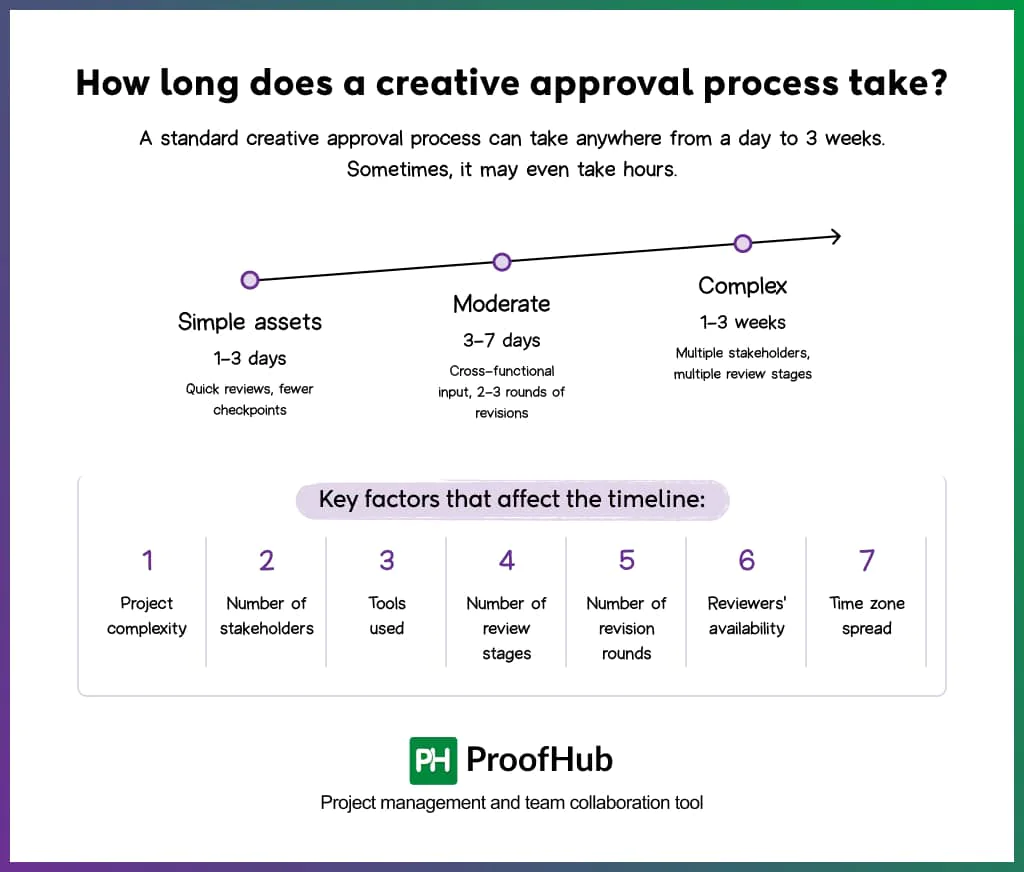
A standard creative approval process can take anywhere from a day to 3 weeks. Sometimes, it may even take hours.
The timeline varies based on the seven key factors: project complexity, number of stakeholders, tools used, number of review stages, number of revision rounds, reviewers’ availability, and time zone.
1. Project complexity & review criteria: The depth of review required for an asset influences the timeline and the number of iterations involved.
- Simple assets (social post, a banner ad, or internal visuals)
- Typically takes 1–3 days
- Have fewer review checkpoints
- Move through the process faster with 1–2 rounds of feedback
- Moderately complex assets (like blog graphics, landing pages, email campaigns)
- Typically takes 3–7 days
- Require cross-functional input (content, design, marketing)
- Go through 2–3 rounds of revisions
- Complex assets (product launch campaigns, brand films, regulated content)
- Typically takes 1–3 weeks
- Involve multiple stakeholders, detailed validation, and compliance checks
- Require multiple review stages and structured approvals
2. Number of stakeholders: Every additional decision-maker directly extends the timeline.
- Sequential review
- Feedback happens one after another
- Delay at one point pushes the entire timeline forward
- Parallel review
- Multiple stakeholders review at the same time
- Speeds up timelines initially, but can lead to conflicting feedback, which may require additional alignment rounds
3. Tools used: The platforms used in the creative approval process directly impact speed, clarity, and control across every stage.
- Teams using emails or shared drives
- Constant back-and-forth coordination costs more time
- Feedback gets fragmented across threads, files, and versions
- Creates confusion about the feedback and the latest version
- Teams using dedicated proofing and approval tools
- Move faster with structured workflows and defined review stages
- Centralize feedback in one place, tied directly to the asset
- Maintain clear version control and feedback history
4. Number of review stages: Each review stage has a minimum turnaround time, which directly decides the overall approval timeline.
- Routine assets
- Typically require 2–3 review stages (creative → marketing → final check)
- Move faster due to fewer dependencies
- Regulated or high-stakes deliverables
- Require 4–5 review stages (creative → marketing → legal → compliance → final approval)
- Takes longer due to multiple dependencies or layered validation
5. Number of revision rounds: Each rejection moves the asset through another revision cycle, extending the total turnaround time.
- Teams that align on the brief before production
- Produce creatives that meet expectations earlier
- Get approvals faster with fewer revision cycles
6. Reviewers’ availability: The absence of reviewers, whether due to genuine absence, unavailability, or oversight, is one of the most common causes of unplanned delays.
- Genuine absence (leave, time constraints)
- Creates approval bottlenecks
- Delays entire stages in sequential workflows
- Unavailability (occupied in meetings, conflicting priorities, workload)
- Leads to fragmented or rushed feedback
- Extends turnaround time due to inconsistent engagement
- Lack of responsiveness (missed notifications, low ownership, partial attention)
- Slows down feedback cycles even when reviewers are technically available
- Creates uncertainty around timelines and next steps
7. Time zone spread: When reviewers are distributed across different time zones, approvals naturally slow down regardless of how responsive they are.
- Overlapping working hours
- Reduce waiting time
- Enables same-day responses if not same time
- Help resolve queries and conflicts in real time
- Non-overlapping working hours
- Each review stage may add a full-day lag
- Feedback loops become asynchronous and slower
- Delays compound when reviews are sequential
Who are the key stakeholders in the creative approval process?
The key stakeholders in the creative approval process are creators, creative leads, brand or marketing managers, project managers, legal or compliance teams, and the clients or business executives.
| Stakeholder | Role in the Process |
|---|---|
| Creative team (Designers, Copywriters, Content creators) |
|
| Creative leads |
|
| Brand/Marketing managers |
|
| Project managers |
|
| Legal/Compliance team |
|
| Final approver (Clients or executives) |
|
Note
In smaller teams or businesses, all these roles often overlap, with individuals handling multiple responsibilities
across the process.
Can creative approval processes lead to project delays?
Yes, a poorly designed creative approval process with unclear workflows, excessive reviewers, or undefined turnaround time can significantly delay projects.
But even a well-designed process can slow things down if execution within the process breaks down.
- Slow responses
- Conflicting or unstructured feedback
- Lack of clear ownership or a final decision-maker
These issues can derail project momentum and turn a structured process into an unproductive cycle of rework and delays.