
Online Proofing is the process of reviewing, annotating, revising, and approving digital assets within a structured system. The purpose is to leave contextual feedback, implement changes accurately, and approve assets without confusion, duplication, or version-related errors.
Proofing emerged because, without a structured review mechanism, collaborative workflows break down due to ambiguity and fragmentation. Feedback shared over calls, texts, emails, or informal conversations is often missed, misunderstood, or forgotten, leading to repeated clarification cycles, delayed approvals, and frustration among stakeholders.
It eliminates these inefficiencies by providing a central space to perform reviews without leaving the asset context. Teams upload and manage work; reviewers review and annotate assets directly; and all feedback, decisions, versions, and approvals remain documented and traceable.
Proofing applies across documents, files, PDFs, videos, images, and websites, enabling consistent review and approval workflows.
What is online Proofing?
Online Proofing is the structured, collaborative process in which teams review, markup, annotate, approve, and share feedback on digital assets (such as designs, PDFs, documents, videos, or marketing creatives) on a cloud-based platform.
Also referred to as online and digital proofing, the process confirms the readiness, correctness, and alignment of artifacts by enabling teams to share and upload work for review, collaborate directly on those assets, and maintain a complete record of changes, versions, and feedback, establishing accountability and decision traceability.
By replacing verbal instructions, physical markups in in-person meetings, and fragmented email exchanges, proofing establishes a single source of truth for asset-centric review and approval.
Why Proofing Exists?
Proofing exists because it eliminates fragmentation gaps by consolidating feedback, maintaining context, standardizing review flows, enabling stakeholder collaboration, preserving version control, and establishing accountability.
1. Eliminates feedback scattered across emails and chats
Online proofing allows stakeholders to leave feedback directly on assets and consolidates all comments into a single, shared review space.
When comments are centralized, creators easily piece together what needs to change and in what order of priority. Reviewers clearly track changes and follow up to ensure full visibility into what has already been addressed and what still needs attention.
2. Reduces subjective interpretation of comments
Proofing enforces contextual annotation and element-level commenting, ensuring feedback is implemented to the right element.
Specific and element-level feedback provides clarity and direction for execution, ensuring alignment between the reviewer’s intent and the creator’s interpretation.
3. Standardizes approval workflows
Proofing offers explicit approval states and records that make the feedback process more transparent and visible to everyone involved.
Teams know exactly who approved the asset, which version was finalized, and the asset’s current status at every stage. Stakeholders can verify whether feedback has been addressed before decisions are finalized.
4. Enables structured collaboration between stakeholders
Proofing brings order to stakeholder collaboration by centralizing input and ensuring everyone works with the same context.
When stakeholders are aware of each other’s feedback and explicit roles, they can align their perspectives and priorities to achieve consensus. This reduces conflicting feedback and enables teams to craft a version that meets shared objectives.
5. Prevents version confusion and redundant work
Proofing applies version control and locks approvals to specific versions to prevent feedback and rework on outdated or superseded files.
Stakeholders review the current asset while creators build the latest version. This ensures teams maintain consistency across iterations and reduce unnecessary revision cycles.
6. Establishes clear ownership and accountability
Proofing maintains a time-stamped record of feedback, decisions, changes, and approvals to establish clear ownership at every stage.
This makes it clear who requested changes, who implemented them, and who approved the final output. These documented trails ensure review cycles stay structured and time-bound, and everyone remains accountable for their inputs and decisions.
How does the proofing process work?
The proofing process allows design teams to review creative assets, markup and annotate, make revisions based on collected feedback, manage asset versions, and finalize approvals without leaving the workflow.
- Review & evaluation: Relevant stakeholders evaluate the asset against defined criteria such as accuracy, brand guidelines, and completeness, ensuring feedback is intentional and aligns with requirements and objectives.
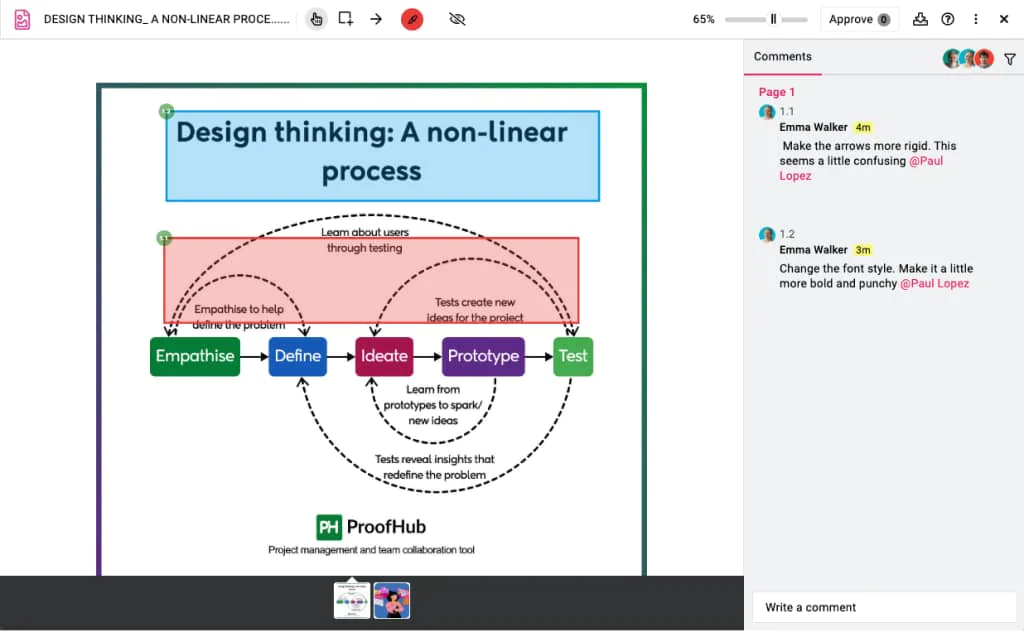
- Markup & annotation: Reviewers add precise markups, highlights, and comments directly on the assets, so that every instruction is understood and applied to a specific element, frame, timestamp, or section. The annotation software reduces back-and-forth, preserves context, and brings clarity about what needs to be changed, why, and where it applies.
- Feedback & discussions: Stakeholders leave feedback and engage in discussions directly within the context of each comment or annotation. All responses, clarifications, and resolutions are captured alongside the feedback, ensuring related conversations, decisions, and intent remain preserved within the system to provide a complete review history in one place.
- Revisions & version control: Creators implement changes on the asset strictly based on stakeholder feedback and upload a revised version for further review. Each revision creates a new version that is stored and tracked in proofing tools, allowing stakeholders to track edits, compare changes across multiple versions, and ensure feedback and approvals apply only to the correct iteration.
- Final approval: After revisions are completed, authorized stakeholders review the updated asset to confirm its accuracy and compliance with defined standards and formally approve the final version. The platform records approval status, approver identity, and timestamp to maintain a clear audit trail. It prevents accidental approval of outdated files or unreviewed changes, finally closing the review cycle.
What types of assets are proofed?
Assets that require review, feedback, and approval, whether visual, written, or multimedia, can be proofed. These assets include visual designs, documents, digital content, video and audio, and specialized content across different industries.
Visual design assets include static and interactive creative files that require detailed visual review. These commonly include brand creatives, marketing designs, UI and UX designs, illustrations, packaging designs, presentations, and advertising creatives.
Proofing allows reviewers to comment directly on visual elements such as layout, typography, color, spacing, and imagery.
1. Visual design assets
These assets include visual materials that require consistency and accuracy before finalization.
- Graphics & illustrations – Custom illustrations, photos, icons, and infographics
- Marketing designs – Banners, brochures, flyers, posters, ads
- Brand creatives – Logos and symbols, style guides, brand kits, templates
- Print designs – Business cards, packaging, labels, other print-ready assets
- UI and UX designs – Website and application interfaces, wireframes, prototypes, and design systems
- Social media content – Posts, stories, graphics, and images
2. Documents
These assets include written and structured content that requires approval before distribution or publication.
- Word documents – Reports, proposals, policy documents, contracts, and internal documentation
- Presentations – Slide decks, PDFs, pitch materials, and training presentations
- PDFs – Forms, technical documentation, manuals, and downloadable resources
- Spreadsheets – Data reports, financial statements, forecasts, and project plans
- eBooks & publications – Digital magazines, newsletters, catalogs, and long-form publications
3. Web & digital content
These assets include websites, emails, and application interfaces that require functional consistency across devices and platforms.
- Website designs – Mockups, wireframes, landing pages, UI designs
- Web pages – Live URLs or staged websites for review
- Email templates – Marketing emails, newsletters, transactional emails
- App interfaces – Mobile and web app screens, flows, prototypes
- Interactive prototypes – Clickable designs, simulated user journeys
4. Video & audio content
These assets include videos, voiceovers, and animations that require frame-accurate and time-stamped feedback.
- Marketing videos – Commercials, training videos, product demos
- Social media videos – Short-form content, reels, stories
- Animation – Motion graphics, animated logos, character animations
- Video ads – Pre-roll, mid-roll, display ads
- Voice-overs – Narration, commercials, explainer scripts
- Music & sound design – Background tracks, jingles, sound effects
5. Specialized content
These assets include regulated, technical, or domain-specific materials that require precise review and compliance validation.
- Packaging designs – Box designs, label, product packaging
- Manuscripts – Books, articles, editorial content
- Technical drawings – Architectural drawings, engineering diagrams, schematics
- Legal documents – Contracts, policy documents
Proofing vs Traditional Methods
Traditional and proofing methods differ in how feedback is collected, understood, and acted upon during review workflows.
| Aspect | Traditional Methods | Proofing |
| Feedback Location | Emails, messages, meetings, and sticky notes | Directly on asset; centralized on one platform |
| Contextual Clarity | Text-based and ambiguous | Precise annotations on specific elements |
| Version Control | Multiple copies with manual file naming | Single version control and tracking |
| Collaboration | Fragmented communication; reviewers unaware of others’ feedback | Structured; all stakeholders see each other’s comments in real-time |
| Approval Tracking | Informal (email confirmations, verbal sign-offs); manual | Formal approval with documented timestamps and approver identity |
| Accountability | Unclear who requested changes or approved decisions | Complete audit trail showing who did what and when |
| Audit Trail | Incomplete or nonexistent; difficult to trace decision history | Permanent record of all feedback, changes, and approvals |
| Stakeholder Visibility | Limited; unclear who has reviewed or what’s pending | Real-time visibility to asset states, changes, and pending reviews |
Traditional methods rely heavily on scattered efforts to share assets, collaborate, and track approval. This fragmentation creates confusion, conflicting inputs, and slows down the review cycle. Lost context and misinterpretations lead to errors, repeated revisions, and delayed approvals.
On the other hand, proofing formalizes the process through a dedicated proofing tool that centralizes discussions, feedback, annotations, versions, and approvals. It enables seamless collaboration through clear markup, in-context comments, and version-specific approvals, reducing ambiguity and speeding up the review process.
How is proofing implemented using tools?
Proofing is implemented through dedicated proofing and annotation tools that provide a centralized space to manage structured review cycles. These tools replace scattered, unstructured communication channels with a unified system to manage feedback, discussions, versions, and approvals at scale.
- Asset upload & storage: Teams upload assets to the platform and centralize them so authorized reviewers can access all versions, feedback, and approvals easily, without searching across emails, chat threads, or shared drives.
- Structured review and approval workflows: Proofing tools formalize the review process by allowing teams to define reviewers, roles, and approval stages, where each participant knows when and how to contribute. External stakeholders and clients can also be invited with controlled permissions, without exposing internal discussions or sensitive information.
- Annotation and markup capabilities: Reviewers add precise markups, highlights, and comments directly on the exact location within the asset. This contextual feedback brings clarity and preserves intent by clearly indicating which section needs modification, what changes are required, and why those changes matter.
- Version control and comparison: Proofing tools create a new version for each revised upload, ensuring reviewers and creators do not confuse outdated copies with the current ones. Teams can compare versions, track changes over time, and restore previous versions when needed to maintain continuity and accuracy.
- Approval tracking and history: Proofing and annotation software maintain a complete record of every comment, decision, iteration, time stamps, and user identity. The audit trail ensures accountability, compliance, and decision traceability throughout the review lifecycle.
- Scalable collaboration across teams: Proofing tools allow teams to easily manage multiple assets, parallel review cycles, and high reviewer volumes without losing control. They support real-time visibility and collaboration across multiple teams, stakeholders, and locations, while preserving structure, context, and accountability as scale increases.