PDF Proofing is a quality-check process that involves reviewing PDF documents for errors, inconsistencies, and formatting issues before final approval.
It ensures that the final PDF document meets quality standards, is free from errors and inconsistencies that may impact organizational credibility
PDF proofing works through a controlled workflow where documents are first exported into PDF and sent for review. Reviewers identify issues using annotations, creators implement corrections in the source file, and the updated version is verified and validated before formal sign-off.
An effective PDF proofing process involves reviewing the exported PDF, standardizing annotations, defining roles and responsibilities, maintaining version control, and resolving changes in the source file. This approach ensures consistency and traceability across every review cycle.
PDF proofing is used across creative, marketing, business, and compliance workflows. Collaboration and proofing platforms, annotation and markup tools, and design feedback tools make the proofing process efficient and scalable across teams.
What is PDF proofing?
PDF proofing is a systematic review and validation workflow of ensuring quality, accuracy, and approval of a digital PDF document before they get published, printed, or distributed.
Unlike a basic review that focuses on surface-level checks or informal feedback, the PDF proofing process involves examining every element of the document, including text, fonts, visuals, colors, hyperlinks, logos, and formatting against defined standards.
Reviewers mark and document each identified issue within the document using comments, highlights, and annotations to provide page-specific feedback, enabling creators to resolve them through controlled revisions. Reviewers track all feedback and issue statuses to ensure no errors remain unaddressed before final PDF approval and sign-off.
A proofed PDF becomes a credible and reliable resource for stakeholders, clients, or publication, ensuring it meets the required quality standards and intended purpose.
Why is proofing PDF files important?
PDF proofing acts as a single control point between a draft and an approved document.
A PDF is a fixed-format file type that, once distributed or published, represents the final, validated version of your work.
Proofing it establishes a clear audit trail, confirming every element was checked and validated against requirements for complete accuracy and compliance within a structured workflow.
Everyone from designers, brand teams, and regulatory reviewers works on a single version with centralized, traceable feedback, ensuring faster approvals and error-free document release.
A proofed PDF document ensures every recipient receives a document that is brand-consistent and ready for final distribution.
How to proof PDF files?
Proofing PDF files includes five steps: preparing the document, reviewing and annotating, making revisions, verifying changes, and getting approvals on the final version.
1. Prepare the document
Export the final draft from the source file (Google Docs, Word, etc.) into a PDF and share it for review through a controlled system.
The files are shared via a centralized platform or controlled link to ensure only relevant stakeholders can access and review the document.
2. Review and annotate:
Check the PDF document against defined requirements to confirm its completeness and accuracy. Identify errors and inconsistencies across:
- Content accuracy (text, data, terminology)
- Layout and formatting (fonts, spacing, alignment)
- Image and graphic quality (resolution, placement, brand accuracy)
- Links and interactivity (hyperlinks, bookmarks, form fields)
- Accessibility (alt text, heading tags, reading order, metadata)
There are two outcomes: either the document meets requirements and moves forward without changes, or issues are identified that need correction.
In the second case, reviewers highlight text, add annotations, and include contextual comments or visual references to clearly communicate required changes.
3. Make revisions and corrections:
Use the feedback to make required changes in the source file (not the PDF document) to resolve reviewers’ comments.
The corrected file is re-exported as a new PDF version (Each revision creates a new version in the proofing cycle.)
4. Verify and validate documents:
Check the revised PDF document against the previous feedback to confirm whether all the issues have been correctly resolved.
Flag any newly introduced inconsistencies, something that is missed, implemented incorrectly, or still unresolved.
The document either moves forward for approval or returns for another revision round.
5. Get approvals and control versions:
Get formal sign-off from stakeholders on the fully validated document.
- Document approvals with the name, date, and status.
- Lock the approved version with a clear version number.
- Distribute or publish only the approved version.
What are the common uses of PDF proofing?
The PDF file proofing is commonly used in creative, marketing, business, and compliance workflows. It ensures consistency and validates documents before distribution or publication.
- In creative workflows, it is used to review design files, layouts, and visual assets to ensure visual accuracy and brand consistency.
- In marketing workflows, it helps validate campaign materials, presentations, and digital content for correct messaging and consistency.
- In business workflows, it ensures the structured review of reports, proposals, and internal documents for accuracy and clarity before stakeholder sharing.
- In legal and compliance workflows, it validates contracts and regulated documents with traceable approvals to ensure adherence and reduce legal risks.
What are the best tools for PDF proofing?
The best tools for PDF proofing are collaboration and proofing platforms, PDF annotation and markup tools, design-integrated tools, and editing and review tools.
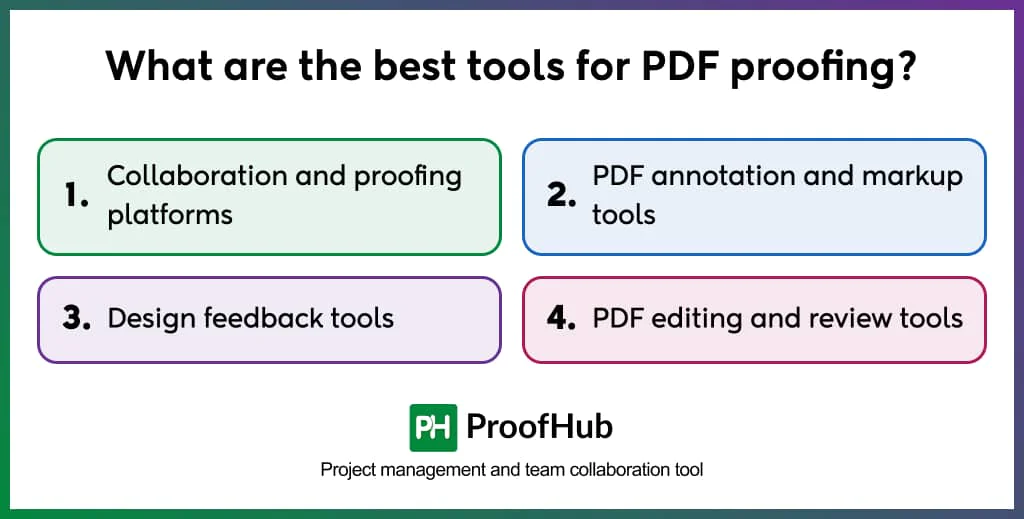
- Collaboration and proofing platforms: Example: ProofHub, Filestage.
These platforms provide a centralized system where teams and stakeholders can review PDFs, share feedback, track issues, and collaborate in one shared space, leading to clearer communication and faster turnaround times.
Best for: Teams managing multi-stakeholder reviews and approval cycles
- PDF annotation and markup tools: Example: Adobe Acrobat Reader
These tools facilitate straightforward review by enabling users to highlight text, add comments, and annotations directly on the PDF. These are great for teams that do not require a structured approval workflow.
Best for: Individual reviewers or simple feedback collection
- Design feedback tools: Example: Nitro PDF Pro
These tools combine design workflows with annotation to review visual layouts and creative assets, helping teams flag issues and ensure accuracy.
Best for: Design and creative teams handling visual documents
- PDF editing and review tools: Example: Adobe Acrobat Pro
These tools allow teams and stakeholders to both review and edit the documents in one place. They help teams who want to manage corrections and validation within a single controlled environment.
Best for: Teams needing both editing and proofing capabilities
Best practices to follow for PDF proofing
Effective PDF proofing involves proofing the exported PDF, using standardized markup and commenting rules, defining reviewer ownership, maintaining document version control, resolving feedback in the source file, and avoiding any changes after final sign-off.
- Proof the exported PDF, not the source file: Review the PDF version to catch not only content and formatting issues, but also export-related errors to ensure the source file translates correctly and is free of functional issues that may disrupt the final output later.
- Use standardized markup and commenting formats: Establish a standard directory of annotation styles to ensure clarity and reduce misinterpretation amongst creators and reviewers. The standardized format makes feedback immediately actionable and unambiguous.
- Define reviewers’ roles and responsibilities: Decide regulated reviewers, their scope (design, content, legal, or accessibility), and their entry points to avoid overlapping responsibilities and conflicting feedback.
- Maintain PDF version control: Ensure every revision round is assigned a specific version number (V1, V2, V3) to the PDF document. This ensures reviewers always access the current version, and creators implement changes on the same document.
- Resolve feedback in the source file: Implement all corrections in the original document, not directly in the PDF. This creates a master document where all updates are applied, ensuring consistency across future exports and preventing a mismatch between the source and final version.
- No modifications to the PDF after sign-off: Lock the approved PDF after receiving formal sign-off. Any required change must go through a new proofing cycle, ensuring all updates are correctly reviewed, validated, and approved in controlled revisions.
How is PDF proofing different from PDF annotations?
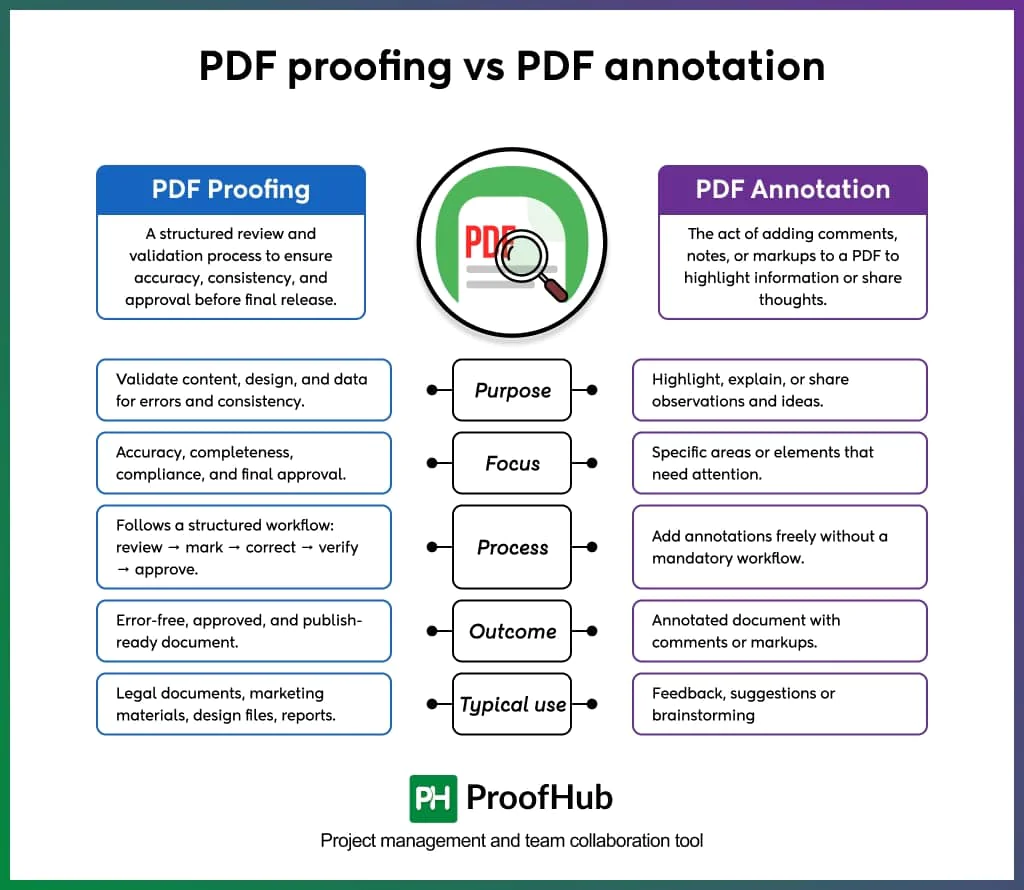
PDF proofing is a structured validation process, and PDF annotation is a feedback mechanism used within it.
PDF proofing follows a defined workflow and approval stages to ensure accuracy and consistency before release. Annotation is an independent activity of adding comments, highlighting specific elements, and sharing observations on a PDF without any required resolution, approval, or workflow structure.
Proofing produces an approved, publish-ready document, while annotation creates a marked-up document with captured feedback.
Note: An annotated PDF is not a proofed PDF unless the annotations are produced through a defined document review process and formal sign-off.
How is PDF proofing different from traditional PDF review?
PDF proofing is an outcome-driven process with structured workflows and markups, while traditional PDF review is an unstructured process that relies on scattered feedback and subjective input.
In PDF proofing, stakeholders review the document against defined specifications – identifying errors, formatting deviations, and technical failures using comments, highlights, stamps, and annotations within a centralized system.
If the document fails to meet standards, corrections are made to the source file and verified through controlled review cycles before formal approval.
The process includes audit trails, version tracking, and comparison mechanisms to ensure every change is validated and results in approved, publish-ready documents.
In traditional PDF review, documents circulate via email or messaging tools to collect stakeholder input and feedback. Reviewers share observations through disconnected comments or handwritten marks without centralized visibility.
The process has no standardized resolution requirement, making it difficult to ensure whether all changes are implemented. Whether feedback gets actioned depends on the document owner, not the process itself.
A traditional review tells you whether the content is right. Proofing confirms if the document is ready.
What are the inconsistencies to look for when proofing a PDF document?
The inconsistencies to look for in digital PDF proofing include textual errors, formatting deviations, technical output failures, and structural integrity issues.
1. Textual inconsistencies
- Misspellings and grammatical errors
- Incorrect data or outdated information
- Inconsistent terminology
- Missing, duplicated, or mismatched information
- Version mismatch (incorrect or outdated file being reviewed)
2. Formatting inconsistencies
- Inconsistent fonts, sizes, or styles
- Uneven spacing
- Header and footer inconsistency
- Misaligned columns, tables, or image captions
- Layout concerns (Position & placement)
- Borders (inconsistent or incorrect styling)
- Pagination and numbering errors
3. Technical output inconsistencies
- Low image resolution (affects screen clarity and zoom quality)
- Incorrect color profile (display inconsistency across devices)
- Fonts embedding issues (text rendering problems across systems)
- Broken hyperlinks or deleted anchored bookmarks
- Interactive element failures (buttons, forms, navigation not working)
4. Structural inconsistencies
- Missing alt text on images
- Form fields without labels or with incorrect tab order
- Document language metadata missing
- Insufficient color contrast between text and background
What are the implications of distributing unproofed PDF documents with errors?
Distributing an unproofed PDF with errors costs businesses on the financial, reputational, and operational fronts.
Incorrect data pushes wrong decisions, reporting discrepancies, and process breakdowns; design errors increase scrutiny, delay approvals, and cause rejections or reprints; unclear content creates confusion, duplicated work, and repeated coordination cycles across teams and stakeholders.
When businesses release documents without proofing and validation, not only does this question their process discipline, but also undermines stakeholder confidence in their quality standards. It creates compounding consequences, including damage to business credibility, disrupted workflows, operational errors and revisions, increased costs, strained relationships, loss of trust and reliability, and legal risks.