

Project artifacts are the documents that record, guide, and manage a project across its lifecycle. These artifacts serve as formal references that support decision-making, performance tracking, governance, and communication throughout the project.
Projects without artifacts lack the documentation needed to make decisions, track progress, and maintain accountability. This ultimately leads to miscommunication, misalignment, and an increased risk of project failure.
This article covers what project artifacts are, why they matter, the key types produced across each phase of the project lifecycle, best practices for maintaining them, and real-world examples to put it all in context.
- 1.Project artifacts are documents created throughout a project to guide decisions, track progress, control project activities, and maintain accountability from initiation to closure.
- 2.Each project phase: initiation, planning, execution, monitoring, and closing, creates its own set of artifacts, each serving a specific purpose at that stage.
- 3.Artifacts are updated as the project evolves to remain accurate and useful at every stage.
- 4.The project manager owns the artifacts, but updating and reviewing them are shared team responsibilities.
- 5.Project artifacts are not the same as deliverables. Artifacts support how a project is managed internally, while deliverables are the outputs produced for the client.
What are project artifacts?
Project artifacts are tangible or intangible documents/outputs produced throughout a project’s lifecycle to guide, document, and manage project work. Artifacts vary across different phases, with each serving a specific purpose at that stage.
Common examples include the project charter, project management plan, work breakdown structure (WBS), risk register, stakeholder register, communication plan, and change management plan.
Why are project artifacts important?
Project artifacts ensure transparency and accountability, keep communication clear and stakeholders aligned, enable accurate tracking, support risk management, drive informed decisions, and preserve knowledge for future use.

- Transparency and accountability: formally documents project processes, decisions, and activities. Creating a project activities record and ensuring everyone understands their responsibilities.
- Communication & stakeholder alignment: establishes a common reference point for expectations, priorities, and decisions. Reducing misunderstandings and aligning stakeholders ensures all stakeholders remain focused on shared goals.
- Supports project tracking: provides a documented baseline to monitor project progress. Makes it easier to refer back to project records to assess track projects and make informed decisions when adjustments are required.
- Risk management: ensures documenting potential risks and mitigation strategies in advance. Providing a clear direction, minimizing disruptions, and keeping the project on track.
- Knowledge retention: Supports documenting decisions, lessons learned, and processes followed throughout the project. Helping apply proven practices and avoid repeating the same mistakes in future projects.
What are the types of project artifacts?
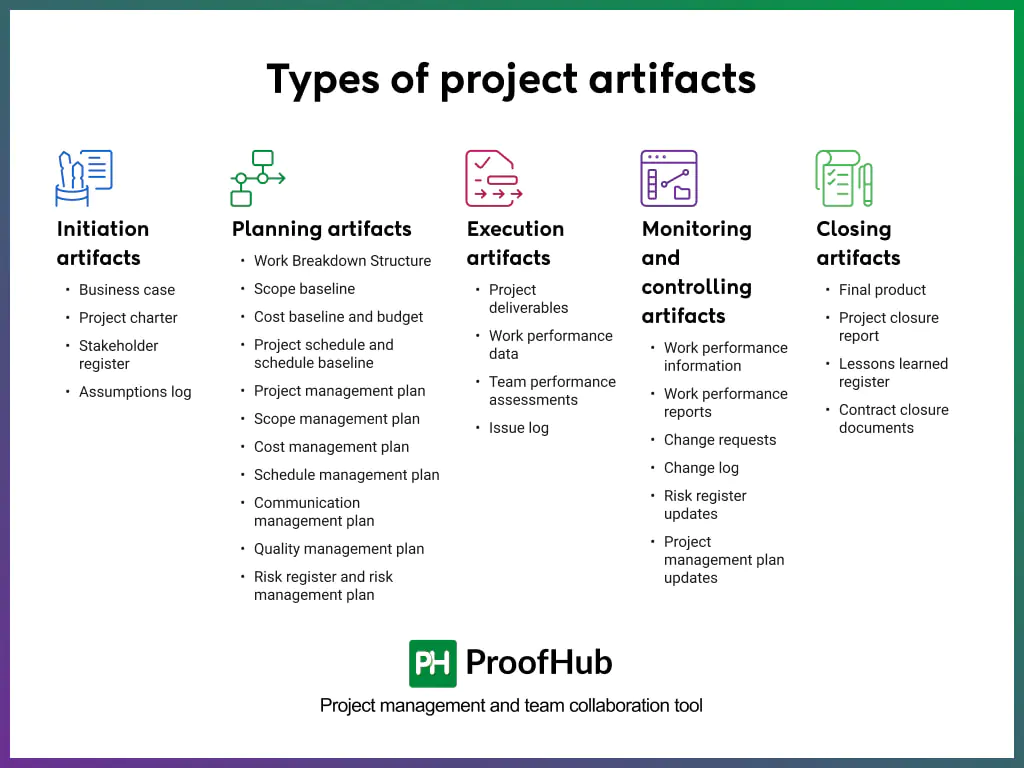
There are five types of project artifacts: initiation artifacts, planning artifacts, execution artifacts, monitoring and controlling artifacts, and closing artifacts.
Initiation artifacts
Initiation artifacts are the foundational documents that are created during the initial phase of a project to define its purpose, scope, and feasibility. The 4 key artifacts of the phase are:
1. Business case
The business case explains why the project should be done. It outlines the problem the project solves, the value it delivers, and justifies the time, budget, and resources required.
The document helps project stakeholders determine whether a project is viable, aligned with organizational strategy, and worth the investments.
2. Project charter
The project charter document officially authorizes the project and assigns a project manager to it. It outlines the business need and the project’s justification, identifies high-level risks, and establishes success criteria.
It also grants the project manager the authority to allocate organizational resources to project activities.
3. Stakeholder register
A stakeholder register identifies everyone involved in or affected by the project, including the client, the team, and senior management.
It records who they are, their role, and their level of involvement. It gives the project manager a clear map of who receives updates, how often, and through which channel.
4. Assumptions log
The assumption log records all assumptions and constraints that affect a project. A project manager documents factors that are generally considered true and tracks their impact.
It allows project managers to identify risks, their impacts, and associated uncertainties during project execution.
Planning artifacts
Planning artifacts are the documents that act as a structural roadmap for a project. They carry the details on how the project will be executed, monitored, and closed.
The 11 key project artifacts of this phase are:
5. WBS (Work Breakdown Structure)
A Work Breakdown Structure (WBS) captures the entire project scope into smaller, manageable components.
It breaks the project down into deliverables and further into work packages that can be planned, assigned, and tracked. It provides project managers with a structured framework for assigning, sequencing, and tracking work.
6. Scope baseline
A scope baseline is the approved version of the project scope used for comparison and control. It establishes a reference point for measuring scope performance and managing changes.
The key components of scope baselines include the scope statement (defines deliverables and boundaries), the Work Breakdown Structure (decomposes deliverables), and the WBS dictionary (provides detailed task descriptions).
7. Cost baseline and budget
A cost baseline is the approved, time-phased estimate of project costs, while the budget is the total approved funding. It is used as a reference point to track actual spending against the original plan.
The cost baseline enables project managers to control spending, track financial performance, and make informed decisions to keep the project within budget.
The project budget includes the cost baseline and management reserves set aside for unexpected costs.
8. Project schedule and schedule baseline
A project schedule document outlines the sequence of tasks, timelines, and dependencies required to complete the project.
A schedule baseline is the approved version of the project schedule, used as a reference to track actual progress. It includes planned start and finish dates for tasks and milestones.
It is commonly represented as a Gantt chart, which displays tasks, timelines, and dependencies, making it easy to visualize the project’s overall schedule.
Together, the project schedule and baseline ensure the project stays on track, and any delays are identified and addressed early.
9. Project management plan
A project management plan defines how a project will be executed, monitored, and closed.
It brings together all the key aspects of the project, such as scope, schedule, budget, quality, resources, risks, and communication into a single, comprehensive reference.
It serves as the definitive guide for project execution, clearly establishing what will be done, by whom, when, at what cost, and to what standard.
10. Scope management plan
A scope management plan is a component of the project management plan that describes how the project scope will be defined, developed, monitored, controlled, and validated.
The artifact serves as a critical reference for project managers, preventing scope creep, ensuring deliverables remain aligned with project objectives, and providing a clear framework for handling scope-related changes.
11. Cost management plan
A cost management plan describes how project costs will be planned, structured, and controlled.
It provides the financial framework needed to keep the project within budget, enabling informed spending decisions and early identification of cost overruns.
It helps project managers control costs, track spending, and identify budget issues early.
12. Schedule management plan
A schedule management plan establishes the criteria and activities for developing, monitoring, and controlling the project schedule.
It guides the management of scheduling processes and procedures to ensure positive outcomes.
The plan ensures scheduling remains consistent and controlled, supporting timely delivery and proactive management of delays.
13. Communication management plan
A communication management plan outlines the project’s communication needs and expectations.
It outlines who needs what information, when they need it, and how it will be delivered (e.g., meetings, reports, emails) and who is responsible for providing each type of information.
It helps project managers ensure the right information reaches the right people, on time, improving alignment, decision-making, and project efficiency.
14. Quality management plan
A quality management plan is a document that describes how the project will ensure that its deliverables meet the required quality standards.
It outlines the roles, responsibilities, and quality standards to ensure the project work meets stakeholder expectations.
It ensures consistent standards, reduces defects, and delivers high-quality outcomes that meet stakeholder expectations.
15. Risk register and risk management plan
The risk register lists identified risks, and the risk management plan defines how risks are managed.
The risk register includes all identified risks, their probabilities and impacts, risk owners, and responses.
The risk management plan includes risk identification, analysis, and response methods.
They help identify, track, and proactively manage risks, improving decision-making and reducing uncertainty.
Execution artifacts
Execution artifacts are used during the execution phase of a project, where the actual work is performed. They capture performance, track issues, and document any changes that arise along the way.
The 4 key execution artifacts are:
16. Project deliverables
Project deliverables are the tangible or intangible outputs produced during the project execution phase to meet project objectives. They represent the completed work that stakeholders review and approve against the project agreement.
A well-defined project deliverable document is measurable, verifiable, aligns with the scope baseline and is formally approved by the stakeholders.
Its main purpose is to demonstrate project progress and completion and to ensure the outcome meets stakeholders’ expectations.
17. Work performance data
A work performance data artifact captures real-time observations and factual data recorded during project execution.
It includes actual costs incurred, percentage of work completed, and number of defects identified. Its value lies in how it is interpreted and compared with the project baselines.
18. Team performance assessments
Team performance assessments evaluate how effectively the project team meets objectives and works effectively.
The project manager analyzes team output, measures productivity and collaboration, and identifies training needs.
It improves team efficiency, capability, performance and support resource planning.
19. Issue log
An issue log is a project document used to record and track issues that have already occurred and require resolution.
It captures details such as the issue description, impact, priority, assigned owner, status, and target resolution date.
This document ensures that issues are actively monitored and resolved.
Monitoring and controlling artifacts
Monitoring and controlling artifacts are the documents created and used to track, review, and regulate a project’s progress and performance.
The artifacts ensure the project stays aligned with the approved scope, schedule, and budget, and, if it does not, they support corrective action.
The 6 key monitoring and controlling artifacts are:
20. Work performance information
Work performance information (WPI) is processed data that shows project status and performance against baselines. The project manager converts the team’s raw performance data into meaningful metrics.
The key elements of WPI include comparing actual vs. planned scope, project schedule, and cost; analyzing trends; and summarizing KPI metrics. It supports managers in decision-making, reporting, monitoring, and controlling projects.
21. Work performance reports
Work performance reports compile work performance information and present reports to stakeholders.
The report supports communicating project performance, supporting stakeholder decision-making and corrective actions.
The key elements of WPR include summarizing project scope, schedule, and cost performance; providing status updates and forecasts; and documenting project performance.
22. Change requests
Change requests are formal proposals to modify project scope, schedule, cost, or processes.
They are used to control project changes through a streamlined process and maintain alignment with the approved baseline.
The key elements of a change request include justifying the proposed change, assessing its impact on scope, time, and cost, and tracking approved decisions.
23. Change log
A change log records and tracks all change requests in a project.
It captures details such as the requested change, its impact, approval status, and implementation progress.
It ensures that all changes are controlled, evaluated, and properly documented.
24. Project management plan updates
Project management plan updates are revisions made to the project management plan when approved changes affect how the project will be executed, monitored, or controlled.
They reflect changes to key components such as scope, schedule, cost, or quality baselines.
The updates ensure the plan remains an accurate and reliable reference throughout the project lifecycle, keeping the entire team aligned with the current project direction.
Closing artifacts
Closing artifacts are the documents produced at the final phase of a project to formally confirm that all work has been completed, accepted, and handed over.
It serves to formally close the project, record lessons learned, and archive documentation for future reference. The 4 key closing artifacts are:
25. Final product
A final product is the tangible, intangible, or deployable output resulting from a development lifecycle (e.g., software code, a physical prototype, or a report).
It is produced by consolidating all completed work packages and verifying them against the scope baseline to confirm that everything agreed upon has been delivered.
It serves as proof that the project met its objectives and enables seamless handover to the client for future maintenance, upgrades, or audits.
26. Project closure report
Project closure report documents final performance, outcomes, and delivery acceptance. The project manager summarizes the project report against the scope, schedule, and cost baselines.
The key components of the report include comparing planned vs. actual performance, recording acceptance status, and documenting issues, risks, and resolutions.
The report confirms the formal closure of the project and documents reference data for future projects.
27. Lessons learned register
A lessons learned register is a project document used to record knowledge gained during a project.
It documents and analyzes project successes, failures, and insights in a structured log throughout the project lifecycle.
The register improves future performance by giving teams a verified record of what worked, what failed, and why.
28. Contract closure documents
Contract closure documents are records to confirm that all contractual obligations have been completed and formally closed.
It ensures all deliverables are formally accepted, payments are settled, and no outstanding obligations remain on record, protecting both the project team and client from future disputes or claims.
How to maintain project artifacts?
To maintain project artifacts, standardize templates, keep artifacts updated, ensure accessibility through centralized storage, review regularly, maintain clear ownership, and engage stakeholders.
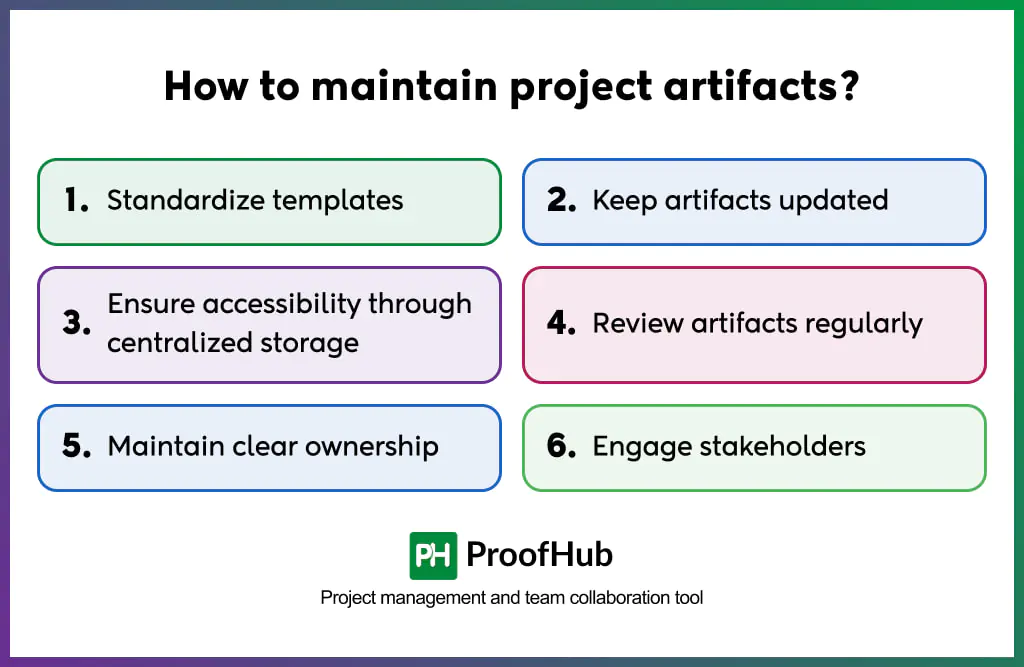
- Standardize templates: Use a single template for each artifact to ensure consistency across the project. This makes it easier for team members to understand, complete, and reference documents without ambiguity.
- Keep artifacts up to date: Regularly revise artifacts as the project evolves to reflect its current state. This ensures they remain reliable sources of truth and prevents teams from acting on outdated information.
- Ensure accessibility: Storing all artifacts in a centralized location ensures team members and stakeholders can access the documents when needed. Utilize a project management tool or a cloud storage platform.
- Review artifacts regularly: Periodically review artifacts to confirm they remain aligned with the project’s objectives. This helps catch discrepancies early before they impact project performance.
- Maintain clear ownership: Assign a designated owner to each artifact who is responsible for keeping it accurate and up to date. This ensures accountability and prevents documents from becoming outdated or neglected.
- Engage stakeholders: Involving relevant stakeholders ensures documents accurately reflect project goals, requirements, and expectations, reducing misalignment and rework.
These practices are most effective when applied in context. The following real-world examples show how specific artifacts function on active projects.
Real-world examples of project artifacts
Some real-world examples of project artifacts are:
Example 1
Consider a project to build a commercial office complex. The project manager creates a cost baseline and an issue log.
The cost baseline sets the approved budget across all construction phases: foundation, structure, and interiors, while the issue log records problems that arise on site, such as material shortages or weather delays, and tracks their resolution.
Because these documents support financial control and day-to-day decision-making, they are considered project artifacts.
Example 2
Consider launching a new product campaign across digital platforms. The project manager creates a communication management plan and a risk register.
The communication management plan defines who receives campaign updates, how frequently, and through which channels, while the risk register flags potential risks such as missed deadlines or underperforming ad spend.
Because these documents manage how the project runs, they are considered project artifacts.
Who is responsible for creating and maintaining project artifacts?
The project manager is responsible for creating and maintaining project artifacts. Team members contribute to creating artifacts, and stakeholders review and approve them.
For example, a risk register is created by the project manager and updated & maintained by team leads, who are closest to the work and best positioned to identify potential issues
What is the difference between project artifacts and deliverables?
Project artifacts are documents that support project management, such as risk registers, schedules, and change logs, while deliverables are the actual outputs the project produces for the client.
Are project artifacts and documents different?
Yes, all project artifacts are documents, but not all documents are project artifacts. A project artifact is created to guide, track, and record project management activities, whereas the project documents, such as reference materials or internal emails, are not artifacts unless they formally support project planning, execution, monitoring, or closure.
Can AI be used for creating project artifacts?
Yes, AI can assist in creating project artifacts by generating templates, drafting risk registers, summarizing meeting notes, and producing status reports.
However, AI-generated artifacts must always be reviewed and validated by the project manager. AI supports the process, but it does not replace the judgment, context, and accountability that human oversight provides.
Can artifacts be reused in future projects?
Yes, project artifacts can be reused in future projects. The risk registers, lessons learned registers, and communication plans from past projects serve as practical starting points that save time and reduce errors. Reusing artifacts ensures that past experiences are utilized in future projects.
Can project artifacts change during a project?
Yes, project artifacts can evolve as the project progresses. Changes in scope, budget, schedule, or stakeholder requirements require updates to relevant artifacts.